My Dear Friends:

We moved to

www.SoftStreet.net


Please come to visit us
Thanks for your patient, Best wishes for you

Showing posts with label After Effects. Show all posts

Monday, April 7, 2008

Presets Collection For After Effects


Presets Collection For After Effects
Size: 1.02 MB


Fast Film Grain
Auto bright lens flare
Quick 3d reflections
Day for night
After Shake

And more...

Enjoy!

Download From Rapidshare
or
Download From Easy-Share


Click Here to Read More

Sunday, April 6, 2008

Creating Motion Graphics with After Effects, Fourth Edition: Essential and Advanced Techniques


Creating Motion Graphics with After Effects, Fourth Edition:
Essential and Advanced Techniques
2008 - 705 Pages - PDF - 22.15 MB


Our goal in this book is to give you insight into how After Effects thinks, as well as to let you know how we think while using it to solve realworld design and production challenges. We’ve also crammed in numerous Tips, Gotchas, and Factoids to give you additional ideas for how to use a feature, as well as warn you about situations where they will not work.


Click Here to Read More

Friday, April 4, 2008

Knoll Light Factory v2.5.2 Pro Win for After Effects


Knoll Light Factory v2.5.2 Pro Win for After Effects
Size: 5.47 MB


Created by Photoshop co-creater and Star Wars effects guru John Knoll, Knoll Light Factory is one of the worlds most used motion graphics tools, used by 1,000 to digitally simulate light effects called flares. Flares simulate reflections from a very bright light source as seen in a camera lens. You see them most often used in nature to simulate the sun, on text or logos to enhance their appearance or in special effects explosions.
Supports: After Effects, Motion, Final Cut Pro, Avid & Premiere Pro.


Features
:: Choose from a list of 70 preset flares effects
:: Use the custom lens editor to create and save your own unique effects.
:: 19 lens elements to create custom light effects.
:: Auto Track: track multiple points and add multiple, identical lighting points to a scene.
:: Auto Obscuration: automatically hide and reveal a light effect as the light source moves behind another object.

Uses
:: Simulate a bright spotlight behind text or logos.
:: Create mood by emulating a fabulous sunset in seconds.
:: Enhance the dramatic impact of explosions.
:: Add sparkle and glows to any 2D or 3D object like text and logos as seen news and sport show openers.
:: Replicate sun flares around a planet, above water or any landscape scene.


Click Here to Read More

Wednesday, April 2, 2008

3D Invigorator Pro 4.5.0 Win for After Effects


3D Invigorator Pro 4.5.0 Win for After Effects
Size: 9.08 MB


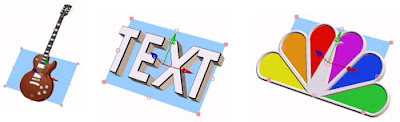
The 3D Invigorator PRO for After Effects plug-in has once again proven to be the must-have software of the year. Already known as the industry standard 3D graphics power house, version 4 adds many new capabilities which appeal to the artistic side of graphics design, as well as adding new tools that appeal to the motion graphic artist who must create large numbers of graphics on impossible deadlines.

These new features unlock a whole different way of using 3D as a design tool and will be sure to inspire an evolution in animated motion graphics.


3D Text Creation
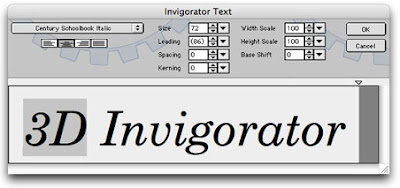
Rather than starting in Adobe Illustrator, you can now jump into the 3D process with a full-featured text editor. The 3D text engine can use Post Script Type 1 and True Type fonts resident on your computer system to directly create 3D models using any of the 100 edge bevels included with the program.

Each letter can have its own font, size, kerning, tracking, baseline shift, horizontal and vertical scale, color, bevel, position and depth. But the most astounding hallmark to this feature is the ability to change the text at any phase of the production process and retain the color, modeling and animation.


This means that after the first version of a promo is created, 50 other versions can be created by simply changing the text. The new 3D text will retain the same coloring, text attributes, 3D beveling, texture map placement and even the animation data. This makes for an unbelievably fast production process when many changes or extra versions are needed.

Tracking AE's 3D Objects
Another great new feature is the ability for Invigorator objects to track, or mimic, what an AE 3D plane is doing. On the surface this feature might not seem that significant, however for the advanced After Effects user this feature opens the doors to incredible new abilities.


By tracking AE's 3D planes an AE user is now able to use the standard 3D manipulation tools within AE to create motion paths and keyframes for the Invigorator's objects. This means that everything you can do to an AE 3D plane can now be done to Invigorator objects. You get visible 3D paths, function curve control, animation assistants and even expression-based control over your 3D animations! And all you have to do to make it work is to pick a simple menu option. Incredible.


Cartoon Coloring
This one is really fun. It renders the 3D objects as though they were drawn by a poster artist or an animator painting animation cells. Standard 3D rendering paints the objects in continuous tones creating a photo-real look, but Cartoon Color rendering paints the objects in bands of color . The bands block in the color of the highlights, shadows and base, giving you a big bold look with lots of punch!


Click Here to Read More

ProAnimator 4.5.0 Win


ProAnimator 4.5.0 Win
Size: 11.49 MB


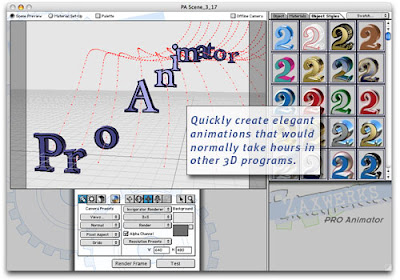
ProAnimator comes in two forms: as a standalone application and as an After Effects plug-in. Both products act exactly the same, but the plug-in is integrated into Adobe After Effects, so you can do all of your authoring with After Effects. The standalone application doesn't require a host product, so you may generate your animated movies independent of any particular target. You may even import a standalone ProAnimator scene into the ProAnimator plug-in (or vice versa) for added flexibility.


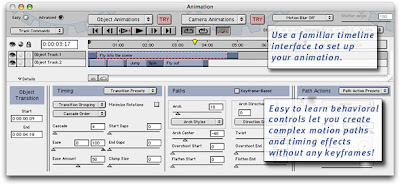
ProAnimator includes all of the powerful 3D content creation tools as the 3D Invigorator PRO product. It also contains a next generation animation system that can be used to quickly generate complex animations that would take hours to create in other 3D applications.

Integration With After Effects
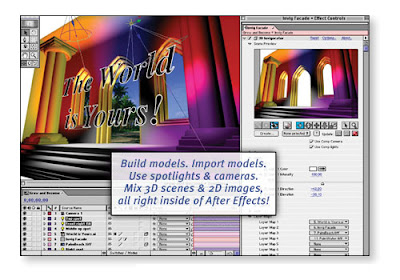
The ProAnimator plug-in works well with After Effects. You can apply ProAnimator as an Effect and then bring up the ProAnimator interface with a click of a button.
You can either use After Effects 3D cameras and lights or you can use the ProAnimator camera and light controls, offering unprecedented flexibility when integrating Invigorator-style text and objects into your After Effects project.


3D Text Creation
Rather than starting in Adobe Illustrator, you can now jump into the 3D process with a full-featured text editor. The 3D text engine can use Post Script Type 1 and True Type fonts resident on your computer system to directly create 3D models using any of the 100 edge bevels included with the program.

Each letter can have its own font, size, kerning, tracking, baseline shift, horizontal and vertical scale, color, bevel, position and depth. But the most astounding hallmark to this feature is the ability to change the text at any phase of the production process and retain the color, modeling and animation.


This means that after the first version of a promo is created, 50 other versions can be created by simply changing the text. The new 3D text will retain the same coloring, text attributes, 3D beveling, texture map placement and even the animation data. This makes for an unbelievably fast production process when many changes or extra versions are needed.


Click Here to Read More

Thursday, March 6, 2008

Zaxwerks ProAnimator v4.3.1 Portable


Zaxwerks ProAnimator v4.3.1 Portable
Size: 10.21 MB


ProAnimator comes in two forms: as a standalone application and as an After Effects plug-in. Both products act exactly the same, but the plug-in is integrated into Adobe After Effects, so you can do all of your authoring with After Effects. The standalone application doesn't require a host product, so you may generate your animated movies independent of any particular target. You may even import a standalone ProAnimator scene into the ProAnimator plug-in (or vice versa) for added flexibility.
ProAnimator includes all of the powerful 3D content creation tools as the 3D Invigorator PRO product. It also contains a next generation animation system that can be used to quickly generate complex animations that would take hours to create in other 3D applications.


Click Here to Read More

Sapphire Plug-ins version 2.03 for After Effects


Sapphire Plug-ins version 2.03 for After Effects
Size: 9.12 MB


:: Over 30 new effects and many enhancements in version 2.
:: Includes support for Adobe CS3 and Smart FX.
:: Support for Mac OS 10.5 Leopard and Mac Intel hardware.
:: Support for Windows Vista
:: More than 200 total plug-ins for image processing and synthesis.
:: All plug-ins have multiple options and parameters that can be adjusted and animated for creating an unlimited range of effects.
:: Resolution independent, antialiased, high quality images.
:: Online hyper-linked documentation for all plug-ins.
:: Dual, Quad, and 8-core support for faster rendering.
:: On-screen user interface for visual control of parameters in After Effects and Premiere Pro.
:: Only one license is needed to use the plug-ins with all AE compatible applications on the same computer.
:: Free network rendering on After Effects, Combustion, and Digital Fusion.


Click Here to Read More

Thursday, February 28, 2008

Flash + After Effects


Flash + After Effects
2008 - 297 Pages - PDF - 12.36 MB


What Is This Book About?
This book will help Flash animators and designers understand how After Effects integrates with Flash. Now that Adobe owns both Flash and After Effects, the two programs are becoming tightly interwoven together with every product update. Flash provides a creative web tool for animation and interactivity.
After Effects provides an easy-to-use application for creating visual effects and motion graphics. With the ever increasing presence of video on the Web, Flash animators and designers are jumping on the bandwagon and integrating After Effects into their projects.

Why would someone who uses Flash care about After Effects? After Effects provides many features and effects that not only can enhance Flash projects but save on development time because of how these two applications are integrated. After Effects implements a variety of ways to create video with alpha, animate graphics in 2D or 3D space, and then export the animation with a transparent background, as well as apply a variety of effects and presets that
help differentiate a Flash designer’s work.
For Flash animators, After Effects takes their project to the next level in 2D animation. It provides Flash animators with an assortment of visual effects that are rather difficult or next to impossible to achieve in Flash. Within After Effects, these complex effects can be applied through a simple drag-and-drop interaction. After Effects incorporates character animation tools (parenting and puppets) that easily hinge and animate multilayered artwork. After Effects also
incorporates a 3D engine, allowing animators to add depth to their backgrounds. After Effects is an excellent tool to prepare your Flash animation for broadcast.

This book covers the technical requirements you need to be aware of in video production. You will explore the world of broadcast design and learn the basics in setting proper frame size and frame rates, pixel aspect ratios, title and action safe areas, and color management.

Rapidshare Link - Easy-Share Link


Click Here to Read More

Thursday, February 21, 2008

Film Magic Pro

Film Magic Pro
Plugin for Adobe After Effects - PC & Mac - 1.24 MB

Features:

* 50 Unique Cinema Style Presets for After Effects 6.5 Pro
* 8 Cinematic Transitions
* Fast Rendering Times
* Works with HD, NTSC & PAL Footage
* Use on Any Frame Rate: 60i, 50i, 30P, 25P, 24P, 24Pa, etc.
* Easy to use. Really!
* Installation and Useful Techniques Video Tutorial
* Film Magic Pro For Video Editors Video Tutorial
* Take Advantage of True 16 Bit Color, Unlike Most NLE's
* Maximize Your Videos Dynamic Range
* Affordable Price (Especially compared to others)

Uses:
* Create Dramatic Color Grading During Video Finishing
* Achieve the Look of Popular Movies and Commercials
* Great for Enhancing the Look of Digital Video

Requirements:
* Both PC & Mac Compatible
* Host Application: Adobe After Effects 6.5 Pro & 7.0 Pro


Click Here to Read More