My Dear Friends:

We moved to

www.SoftStreet.net


Please come to visit us
Thanks for your patient, Best wishes for you

Showing posts with label Artist Utility. Show all posts

Tuesday, April 15, 2008

FaceFilter Studio 2.0.1206.1


FaceFilter Studio 2.0.1206.1
Size: 16.06 MB


Revitalize the beauty of your photos
The latest release from Reallusion, FaceFilter Studio, includes many powerfully smart features making FaceFilter Studio an indispensable must have photo editor for both novice & advanced users.

Utilizing Reallusion's fully automated 3D facial mapping technology, FaceFilter Studio now not only has the ability to change and enhance facial expressions, but also offers new features including: muscle based morphing; editable facial mask; skin filtration; smart color correction; 1-click red eye removal and instant photo-sticker printing. FaceFilter Studio has the ability to truly deliver perfect photos by enabling anyone to enhance expressions, remove common skin blemishes, smooth wrinkles, sharpen and improve facial structure, correct color balance and more.


:: The powerful image color correction function, Smart Portrait, auto-detects human face and skin color to create vibrant colorful photos from imperfectly lit images such as over/under exposed, taken with a low quality camera or washed due to backlighting.

:: Red-eye often seen in flash photography due to reflection of the retina can quickly and easily be removed with a single click with the new function of automatic red-eye reduction. This new function can simultaneously find red eyes on multiple faces of your photos. Also it is easy to change eye color to any color you desire.

:: Print instant photo-stickers with various mood expressions.

:: Supports high resolution image rendering up to 12 Mega pixels for professional camera users and prints fine quality.


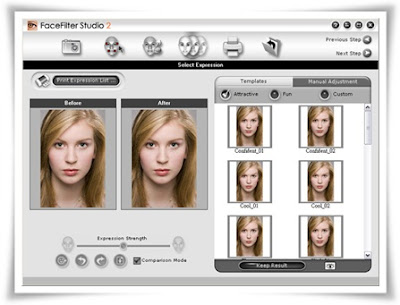
:: In addition to a library of facial expression templates, FaceFilter Studio provides free-form muscle level tuning tools that allow you to tweak 16 different muscle areas on the face to produce natural/subtle expression changes, such as raising inner brow to look sympathetic, or raising mouth edge to increase the curve of a smile.

:: Fine tune existing expression templates and save in your own custom template folder. Build your own tool box without the need to tune from scratch.

High resolution facial mesh; keeps the smooth facial contours of your images without causing any distortion when adjusting facial features.

:: Skin enhancement; now you can erase wrinkles, whiten teeth, smooth skin, change skin tone easily with the extensive skin filtration tools.

:: Lighting; reduce washed-out/overexposure, brighten shadowed areas, and remove shine or gloss on the face. Make every face a glamorous image with vibrant, clean and healthy skin.

Natural Expression Enhancement
FaceFilter Studio's proprietary 3D muscle-based photo morphing technology lets you fine-tune facial expressions naturally such as adding a smile, widening eyes or raising an eyebrow.

:: Remove bad expressions
:: Change facial expression
:: Open and widen eyes
:: Adjust head proportion & width
:: Slim/Fatten face
:: Revamp & Beautify faces
:: Improve balance


Skin Enriching Technology
Enhance the skins appearance with subtle color adjustment to improve skin color, add a suntan or whiten. Improve skin's complexion and smooth the texture by reducing wrinkles, lines or rough skin.

:: Adjust skin color
:: Hide skin flaws such as spots, freckles, moles, birthmarks and acne
:: Eliminate wrinkles, lines or rough skin
:: Remove oily skin & glossy reflections
:: Reduce dark lines around the eyes

Powerfully Smart Photo Color Correction
Automatically improve the color, contrast, and dynamic range of any image.

:: Auto-detect human face and skin color to create vibrant colorful photos
:: Improve color balance
:: Global color adjustment
:: Automatic Red-eye reduction
:: Fix over/under exposure
:: Enhance backlit/washed-out

Simple, yet powerful 5 step automated process
Get superior results faster than any other photo editor! Automatic facial feature mapping automates and greatly simplifies the demanding editing process.

:: 5-step process
:: Import high-resolution photos up to 12 Mega pixels in size for editing
:: Print instant photo-stickers with various mood expressions
:: Automatic facial feature recognition
:: Blended layers for easy editing
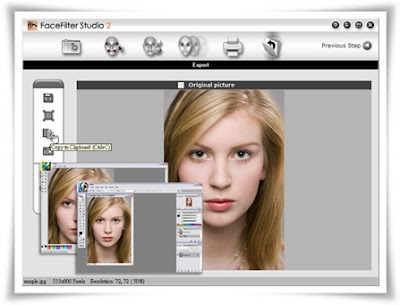
:: Copy/Paste to support external applications
:: Wide range of export formats: .JPG, .GIF, .BMP


Click Here to Read More

BusinessCards MX v3.91


BusinessCards MX v3.91
Size: 61.74 MB


This program will help to design and print a professional business card . The interface of the program has been designed in such a way that even a beginning user will not have problems with using the program.
The process of designing is based on inserting ready for use elements accessible in the program such as figures, images and the background, and freely shifting them on the prepared project. Another advantage of the program is the possibility of saving data about a company or people so that it can be used later while designing a business card.

The program uses templates which you can prepare on your own, or you can use ready models , templates of business cards accessible in it.


There are 400 examples of business card templates in the program.

The attributes of the program:
:: operating jpg, bmp, wmf , png ,tiff and more graphic formats
:: a dozen or so effects which can be used while working on all objects (text , image , backgrounds) for example: shadows, textures, sepia, gradients and others
:: export to high resolution (300 DPI , 600 DPI) pdf,jpg,tiff,bmp graphics file
:: the size of designed business cards: min 70x40 max 105x65
:: the appearance of the interface can be changed
:: convert and export to CMYK ( with ICC profiles )
:: support right to left languages (like arabic,hebrew)
:: support unicode
:: print on both sides of the paper (duplex printing)

Multilanguage support:
English, German, Portuguese, Spanish, Italian, French, Norwegian, Swedish, Polish, Czech, Hungarian, Russian ,Bulgarian ,Farsi(Persian) ,Serbian ,Chinese(simplified) ,Romanian, Croatian
400 supported business card paper for ink jet and laser printers, from Avery, APLI, Hisago, Sigel, A-One ,Printec and other manufacturers.


System Requirements:
:: Operating System: Windows 2000 / XP and Windows Vista
:: CPU: Pentium processor minimum
:: Memory: 256M or more
:: Free hard drive space: 200 MB


Click Here to Read More

Monday, April 14, 2008

Vertus Fluid Mask 3 v3.0.8.5486


Vertus Fluid Mask 3 v3.0.8.5486
Size: 12.54 MB


Fluid Mask 3 is designed for photographers, image editors, graphic designers and all those who take digital image editing seriously.


In a streamlined interface and workflow, Fluid Mask 3 instantly shows key edges in the image and provides comprehensive easy to use tools that work with difficult-to-see edges and tricky areas like trees & lattices.

Fluid Mask promises:
:: Fastest masking available today - from loading to final cut-out. Turn hours of tedious work into something that's short to complete and fun to do...


:: The best edge cutting technology available.
:: Quick and easy to pick up, Fluid Mask 3 offers an intuitive workflow. Check out the edge guides that makes selecting the cut-out as easy as coloring by numbers and the always visible interactive help.


:: Amazing edge quality. Always thought the pen tool makes cut-outs look a bit too artificial and clean? Now Fluid Mask 3 takes blending to a new level by preserving the edge data. In the final result, natural edge blur and contour is preserved for the best, most authentic cut-outs ever.


Click Here to Read More

Sunday, April 13, 2008

Wild Photo Effects


Wild Photo Effects
Size: 2.69 MB


WILD PHOTO EFFECTS
ON HAND SOFTWARE (WIN 95,98,ME,XP)


Product Features

:: Over 40 creative photo tools are collected here, to turn a typical photo into a funny, wacky picture
:: Use Catastrophe Tools to add explosions, pinches and punches to your photos
:: Shrink and deflate people and object, or grow & magnify them until they fill the entire photo
:: Include Hook, Hammer & Drill effects, or Storm tools like tornado, wind, ripples, waves and blots -- the possibilities are endless
:: You can even create a brief animation and morph your family & friends into monsters and aliens!


Click Here to Read More

Saturday, April 12, 2008

AutoMatting v1.0


AutoMatting v1.0
Size: 8.48 MB


AutoMatting automatically creates a unique mat for each image which is designed to make the photographer's work more attractive and appealing to the customer in a slideshow or viewing mode. AutoMatting customizes the output to a user specified display or TV screen format. Each computer generated mat is unique and is generated with color and image content from the image that it surrounds.


Colors and texture from the source image are extended into the mat for a pleasing effect, including a border and colored core extracted from the image by finding a strong color to match.


Click Here to Read More

DustKleen v1.02


DustKleen v1.02
Size: 2.92 MB


The DustKleen application automatically removes dust and dirt from any scanned image. This DustKleen application now has operational enhancements.


Click Here to Read More

SensorKleen Pro v2.05


SensorKleen Pro v2.05
Size: 3.81 MB


The SensorKleen Pro product allows the user to automatically erase the dust and debris in a set of Digital SLR (DSLR) camera images. These image defects are caused by artifacts on the camera sensor cover. SensorKleen Pro processes a folder or set of images, calculates the dust locations and corrects the entire set. The SensorKleen SmartBrush product (included with SensorKleen Pro) allows you to correct the dust and defects in individual images. The SensorKleen technology separates the image content from the shadow created by the dust or debris on the sensor and reveals the image content that is under the dust artifact.


Click Here to Read More

Wednesday, April 9, 2008

Photoshop Actions Set - Photographers Toolkit Vol 1, 2, 3


Photographers Toolkit Vol 1, 2, 3
(Photoshop Actions Set)
Size: 1.06 MB


Download From Rapidshare
or
Download From Easy-Share


Click Here to Read More

Tuesday, April 8, 2008

Photomatix Pro v3.0


Photomatix Pro v3.0
Size: 3.04 MB


If you have ever photographed a high contrast scene, you know that even the best exposure will typically have blown out highlights and flat shadows. Photomatix offers two ways to solve this problem: Exposure Blending: Merge differently exposed photographs into one image with increased dynamic range. Tone Mapping: Reveal highlight and shadow details in an HDR image created from multiple exposures. The tone mapped image is ready for printing while showing the complete dynamic range captured.


Saving on lighting equipment
Given that most digital cameras can auto-bracket at different exposures, you do not need to acquire expensive lighting equipment -and carry it- when shooting high contrast scenes. Just enable Auto Exposure Bracketing, and let Photomatix merge your photos into an image with extended dynamic range.

Saving time in post-processing
Photomatix Pro is designed for productivity -- automatic blending, unlimited stacking, easy comparison of results and batch processing save hours of masking and layers work in image editing programs.

Taking advantage of your 32-bit images
Have you created a 32-bit HDR image in Photoshop CS2 and could not get a good HDR conversion? The Photomatix Tone Mapping tool may help. See how it compares to Photoshop CS2 HDR conversion.


Great pictures on cloudy days
Shadowless hazy sunlight or an overcast sky usually results in dull-looking photographs. The tone mapping tool of Photomatix Pro can turn them into great-looking images. Check this image as example.

Noise reduction
The Exposure Blending functions of Photomatix Pro merge any number of bracketed photos -- this process is equivalent to image stacking, which tends to reduce noise in the resulting image.

Well exposed panoramas
A panoramic scene is almost always a high contrast scene -- you can't limit your view to areas with the same brightness when shooting a 360° panorama. By taking views under several exposures and processing them in Photomatix Pro, you can create a panorama that will show details in both the dark and bright areas of the scene.


Click Here to Read More

DemoCreator v2.0.0.8


DemoCreator v2.0.0.8
Size: 7.02 MB


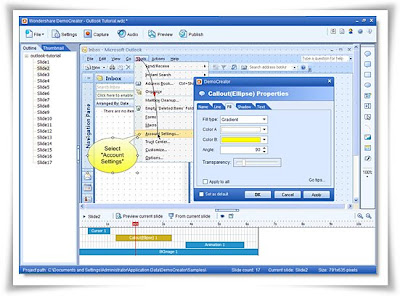
Wondershare DemoCreator - straightforward screen recording software to create flash-based screen movies used for software trainings, presentations, demonstrations, and screen activity logs instead of boring reading material. It not only records mouse movements, keystrokes along with the screenshots, but also provides sound recording and comprehensive editing capability to enhance the final output.


Feature List:
Recording:
• Record actions take on an application, custom region or full screen.
• Record mouse movements and clicks, keystrokes. (New!)
• Auto-annotations and highlights while recording. (New!)

Edit and Enhance:
• Enrich with Interactivities:
• Add callout, shape, text, button and edit entry to make notes and instructions
• Add images (BMP, JPG, PNG, ICO, EMF, WMF, GIF)
• Add a master image as logo or signature (New!)
• Provide 16 kinds of animations(New!)


Enrich with Media:
• Record narration from microphone View the tutorial>>
• Add sound clips (WAV, MP3)
• Preview your edits and transitions in real-time

Powerful Editor:
• Fill elements in different ways (solid fill, gradient fill, fill with picture)
• Add text to elements (font, color, style, size, alignments editable)
• Set actions when click button and clickable areas (do nothing, continue, go to slide, go to URL, close movie, E-mail)
• Organize audio clips’ time sequence with audio timeline editor

Settings:
• Resize the dimension of movie by setting width and height in pixels, and also keep the aspect ratio (4:3, 16:9, 16:10 or custom) automatically
• Set author info (name, email, website, description)
• Set frame rate, quality of output movie
• Set action (stop, loop, close, go to URL) at the end of demo

Flexible Publishing Options:
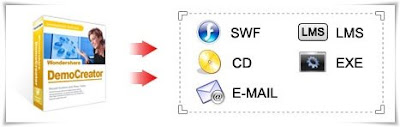
• Publish as Flash movie for sharing on web
• Publish as LMS (AICC/SCORM) compatible courses
• Export as Standalone EXE file or Autorun CD
• Export as email attachment
• Export a certain frame as an image (New!)

OS: Windows 2000/XP/2003/Vista with Microsoft DirectX 9 or later version


Click Here to Read More
Likno Web Button Maker v2.0 Build 136


Likno Web Button Maker v2.0 Build 136
Size: 9.52 MB


Likno Web Button Maker is a user-friendly software for creating unique and professional custom 2D and 3D buttons for your web site pages and projects fast and easy.


Design and create an endless variety of eye-catching web buttons by defining/applying different features and effects such as background, text options, symbols, dimensions, text, size, shadow, lighting, texture, shapes, colours, links, and more.

You can choose from various shapes and pre-defined styles ranging from plastic to metallic, or simply customize your own buttons.


Impress your web site visitors by displaying unique navigation buttons on your html pages, or simply transform your projects by applying stylish web buttons to them.

Guide your users to the desired “click” by creating attractive buttons with our web button generator.


Click Here to Read More
Monday, April 7, 2008

Watermarking v1.01a


Watermarking v1.01a
Size: 1.28 MB


Protect images and photo (JPG, PNG, TIFF, GIF) with elegant watermarks using this effective utility for Windows 2000/XP/Vista.

Benefits:
:: Easy-to-use interface designed for digital images watermarking and eBay item photo protection
:: Built-in set of ready-to-use watermark types including text, annotations, logo images and vertical text watermarks;
:: live preview for watermarks so you can preview watermark on every step;
:: Support for special symbols like ©, ® and other to help protect copyrights;
:: Ability to preserve original images file format or convert to another (JPG, TIFF, PNG, TIFF);
:: Batch watermarking support;
:: And more!


Click Here to Read More
Sunday, April 6, 2008

The LightMachine v1.02


The LightMachine v1.02
Size: 2.07 MB


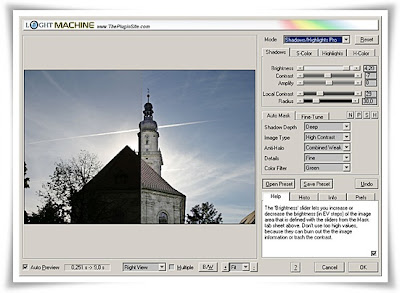
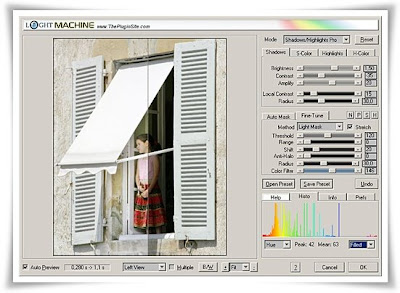
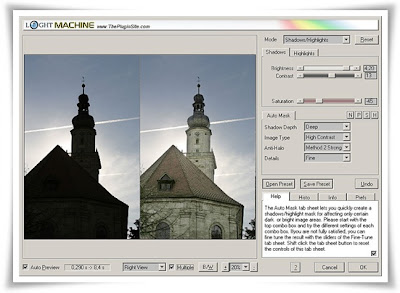
LightMachine is a plugin for performing all kinds of light adjustments in photos. It combines shadow/highlight, virtual lighting and color-based correction tools for performing sophisticated corrections without the need for time-consuming selections and layer stacks. It lets you selectively correct photos taken under bad light conditions or with inadequate camera settings and achieve results that rival photos taken under the best circumstances. Additionally LightMachine can achieve special effects like glows, sunsets, high key and selective b/w effects, replace one color with another and simulate polarizing filters.

LightMachine works in dozens of graphics applications including Photoshop, Paint Shop Pro, IrfanView, Photoshop Elements, PhotoImpact, Photo-Paint and Fireworks under Windows as well as MacOS X. It also runs natively in Photoshop CS3 on Intel-Macs. LightMachine can be applied to 8bit and 16bit RGB images.


LightMachine corrects brightness, contrast, color and saturation in specific image areas independently from each other. It basically consists of four different filters each split up into a simple mode suitable for beginners and a Pro mode with more features for more flexibility. The Brightness/Contrast modes adjust brightness and contrast throughout the image which is nice as a starting point. The Shadows/Highlights modes give you complete control over dark and bright image areas and let you correct them completely independently from each other with the help of sophisticated masking options. The Virtual Studio modes allow you to place an unlimited number of shadow and light spots as if you were placing studio lights in a real photo studio. The intensity, size, ovality, angle, hardness and reflection properties of each spot can be adjusted precisely. Finally, the Colors modes let you selectively correct image objects of a specific color by clicking on them.


Why LightMachine is Different
LightMachine offers plenty of features for improving a much wider range of photos with better results. Other available software often only give acceptable results for the common cases, but can't cope with more difficult cases. These shadow/highlight tools usually produce contrast-burned or over-saturated results which cause an unnatural look. Unlike LightMachine, they don't let you adjust shadows and highlights really independently, add artifacts along the shadow/highlight borders or don't brighten shadows or darken highlights enough to make details clearly visible.


Other lighting tools usually produce only artistic effects and are not suitable for correcting photos. They don't give you precise control over the lighting effects and offer no contrast options. They also affect the surrounding areas instead of just focusing on the target area. They do not support a Reflection feature therefore you often can't avoid blown highlights without decreasing the overall effect. LightMachine's Virtual Studio tool avoids these problems, because it was developed for producing realistic light effects for correcting photos.

Other color-based correction tools don't allow to replace the color of a specific image area with any other imaginable color. They are limited to a range of colors depending on the color that needs to be replaced. Most of these tools also don't let you selectively adjust brightness and contrast and have no features for adjusting the border smoothness. LightMachine on the other hand gives you complete control for color-based corrections.


Click Here to Read More

Saturday, April 5, 2008

Comic Life Deluxe Edition v1.3.5


Comic Life Deluxe Edition v1.3.5
Size: 10.21 MB


Comic Life lets you create astounding comics, beautiful picture albums, how-tos... and more! The easy-to-use interface integrates seamlessly with your photo collection. Drag in your pictures, captions, Lettering text (‘ka-blam!') and speech balloons and your work is done! You can even use your webcam within Comic Life to make a comic on the spot!

Fast..ZZooooommmm
Comic Life gives you fun and professional templates for instant, impressive, photo layouts. Tweak your creations to your hearts desire!


Super-Shine
Looking for something special? Enhance the look of your photos with the many included filters like hand-drawn, painted and night vision.


Share your Life Stories
Comic Life makes it easy to share your creations with friends and family via the web and email.

Keepin' it Real
Print your creations to share with Grandma (when her 'net is down). Laughter ensues.


System Requirements
• Windows XP SP1+ / Vista
• 1.5GHz processor; 2.0+GHz recommended
• 512MB RAM; 1GB RAM recommended
• 40 MB available disk space
• Minimum 1024x768 display


Click Here to Read More

Photo Card Maker v1.0.1


Photo Card Maker v1.0.1 + Templates
Size: 6.62 MB


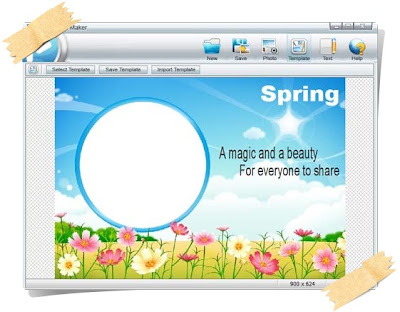
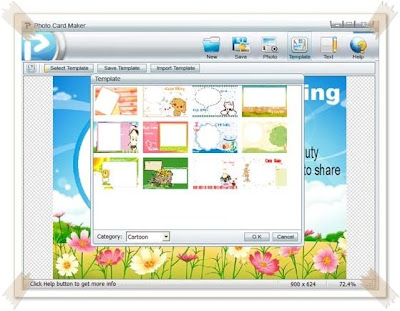
Kigo Photo Card Maker is an easy to use software to create your photo cards in a minute. Choose from a variety of professional templates, and add your own pictures and words.

With it, you could easily create Photo Cards, Photo Holiday Card, Photo Christmas Card, Photo Greeting Cards. And we'll supply more & more templates for all occassions.

Add & Edit a digital photo
Click button "Photo", a file selection dialog will popup. After the photo is loaded, you will see the photo show on the top-left corner of the template.

The photo will be zoomed in if it's larger than the template size. Also you can adjust the position and size of the photo by just clicking and dragging it.
Click buttons on the bar to modify the photo. The effects of buttons involved are list below in order:

:: Zoom out
:: Zoom in
:: Mirror
:: Flip
:: Rotate left
:: Rotate right


Add & Edit text
Click button "Text" to input text on the template,or double_click the text to edit it.

Adjust the size and postion
You can adjust the position every photo, clip picture or text comment in the current image by just clicking and dragging them.
And you can adjust the size of those items in the current image by drag the corner points of the frame of the selected photo.

Save photo card image file
Click button "Save" to save current image as JPEG, BMP or PNG file.


Click Here to Read More

Friday, April 4, 2008

GenoPal Pro v1.0.0.1


GenoPal Pro v1.0.0.1
Size: 3.66 MB


Genopal Pro allows you to create, save an share sophisticated color palettes using a patent pending technology. Therefore you now can get more Harmonious Color Palettes For Your Designs.

Here are some key features of "Genopal Pro":

:: Easy To Use: Just pick, click and drag.
:: Drag And Drop Swatches: You can now just drag a swatch out of the palette, and place it on top of your designs.
:: Park Palettes On Screen: Place as many palettes as you like, inactive ones will auto-hide controls.
:: Many Ways To Select Color: Select colors by RGB, HSB, CMYK and HEX Values and 147 Widely Used Color Names.
:: Get Colors From Pictures: Pictures have great colors.
:: Customize Own Palettes: Create your own layouts.
:: Switch mode for more aggressive saturated colors for highlights (to be used sparingly).
:: Colors In Between: Create color schemes to match 2 existing colors.
:: Keep What You Like: Lock colors you like while you continue to explore the rest.
:: Suit your Style: Black or Gray.
:: Finetune Your Colors: Swatches allow you to tweak colors in HSB.
:: Save for Adobe & GIMP: Ensures integration with Adobe Suite color swatches and Gimp.
:: Undo/Redo allows you to go back up to 20 steps. Never lose a nice color again.

system requirements
:: Windows XP Professional/Home 32-bit platform
:: Windows Vista 32-bit/64-bit platform
:: Microsoft .NET Framework 2.0 (Free download here)
:: System Memory (RAM): 256Mb
:: Hard Disk: 20Mb free space
:: Display supporting at least 16-bit colors.


Click Here to Read More

ALLCapture Enterprise v3.0


ALLCapture Enterprise v3.0
Size: 10.63 MB


Record screen activities in real-time to quickly and easily create your own screencasts, demos, tutorials, software simulations and videos for the Internet without any programming language necessary.

The steps are as easy as: record, edit, export, play.


Click Here to Read More
Topaz Vivacity - Advanced Photoshop image enhancement suite


Topaz Vivacity
Advanced Photoshop image enhancement suite
Size: 3.86 MB


Topaz Vivacity is an advanced Photoshop plug-in suite that uses the latest in wavelet-based image enhancement technology. It is jam-packed with the best image enhancement tools on the market and is an integral part of any image enhancement workflow.

The best noise removal solution, period.
Don't lose the detail when you lose the noise. Recent developments allow for superior detail preservation in Topaz Vivacity's proprietary noise removal algorithms.


Many noise removal techniques remove image information as well as noise. One thing that differentiates Topaz Vivacity from many of our competitors is that we strongly emphasize detail preservation in our noise removal techniques. Topaz Vivacity specializes in killing noise while protecting important details. So, sure, you can get rid of noise with any solution... but you can only get the best results with one.

Accomplish high-quality enlargement.
Image resizing without loss of quality or detail. Use Topaz Vivacity to blow up the size of any image without destroying details along the way.

Whether you want to enlarge a photo for printing or increase the resolution of a low-quality stock, Topaz Vivacity's enlarge filter will exceed your expectations. The resulting quality is much better than standard bicubic interpolation used in leading pixel-wrangling applications like Photoshop; edges stay intact and details stay sharp.

Repair JPEG artifact damage.
Removing JPEG compression artifacts has never been easier. A new and improved technique gets rid of JPEG noise while preserving image clarity.

JPEG compression artifacts can severely damage the quality and detail of the original image. Topaz Vivacity includes a proprietary JPEG artifact removal tool that quickly and effectively recovers edges, takes out checkerboarding, and removes mosquito noise.


Intelligently sharpen and reconstruct edges.
Bring out every little detail in your image. Topaz Vivacity cleanly sharpens edges without aliasing, edge ringing, or noise amplification.

Native sharpening solutions such as Photoshop SS or USM often affect undesired parts of the image like noise and unwanted artifacts that get through the threshold, and may also create horizontal and vertical aliasing and edge ringing (or halos). Get rid of all of that by using high-quality Topaz Vivacity sharpening techniques.

Create interesting effects
Many people purchase Topaz Vivacity just for the effects. Take a glimpse at what's possible with the innovative algorithms used in this plug-in suite.

These effects are unique to Topaz Vivacity, and simply cannot be created using native Photoshop.


Many people buy into the myth that plug-ins only do things that, given enough time and energy, can be manually done using native Photoshop. Admittedly, this is true for some plug-ins. Topaz Vivacity filters, however, do not operate using Photoshop functions at all. Topaz filters use a unique lib file containing proprietary algorithms, which is why the results you get are many times better than what you could ever get by using native Photoshop filters.


Click Here to Read More