My Dear Friends:

We moved to

www.SoftStreet.net


Please come to visit us
Thanks for your patient, Best wishes for you

Showing posts with label Network Utility. Show all posts

Monday, April 14, 2008

Network Magic 4.2.723


Network Magic 4.2.723
Size: 8.99 MB


Whether you are a small business owner or someone who wants to do more with your home network, Network Magic Pro is the networking tool for you.


:: Set up your network in minutes
:: Print from any computer and share files
:: Securely connect to your wireless network and prevent intruders from using it
:: Automate networking functions included in Microsoft products
:: Monitor network and web site activity
:: Test your Internet speed to optimize performance
:: Connect NAS devices to your network
:: Access files and folders remotely


Click Here to Read More

Thursday, April 10, 2008

Automize 8.01 Enterprise


Automize 8.01 Enterprise
Size: 24.94 MB


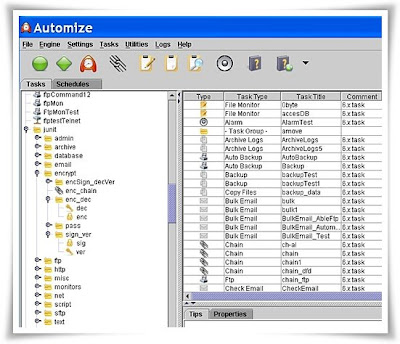
Automize is the leader in cross platform Automation software.Automize is a task scheduler and automation software that can automate a variety of tasks, including ftp transfers, ftp monitoring, web downloads, web site monitoring, email checking and sending, telnet, ping, directory monitoring and more.

You can choose the task from one of the many categories and then customize it to your needs. Automize contains several pre-configured tasks, not commonly found in other applications, this includes automated SQL database queries, support for MS Office tasks, CGI testing and more. All of them offer a simple template that you can customize. In addition, the chaining feature can run tasks in sequence or conditionally depending on exit codes.


Click Here to Read More

Sunday, April 6, 2008

SemSim 2.2.1: Cisco CCNA Exam Router Simulator


SemSim 2.2.1: Cisco CCNA Exam Router Simulator
Size: 1.96 MB


SemSim is internationally acclaimed Cisco CCNA exam router simulation software that helps aspiring candidates prepare for the Cisco Certified Network Associate certification exam. Not only does it provide an understanding of networking concepts – through router simulation based virtual labs and practice tests, but also recreates an environment for real-life network configuration practice. It opens new vistas in personal flexibility and time management.

SemSim provides you with a classroom quality-learning environment at an affordable price. Start a successful career as a Cisco certified network professional with SemSim now ! We even offer an online free CCNA Study center to provide some helpful articles on basic exam information.


Save Time, Save Money, Prepare Better
:: with SemSim Router Simulator, your choice to make for success in the exam
Save Time

SemSim offers you valuable time savings in your preparation for Cisco certification exam, without compromising on the quality of preparation.

With Sem-Sim you will get the following time management advantages:

:: Do your practicals at your convenience.
:: Practice as often as you want.
:: No need to enroll at a training lab and wait your turn.
:: Save time on the certification exam:
:: Simulation questions typically consume the most time on the exam. However with SemSim simulator, exhaustive practice with mock exam simulation questions will ensure that you save time on the exam. This will provide you with better time management to ensure that you have sufficient time to answer the multiple choice/theory questions.


Click Here to Read More

Friday, March 28, 2008

Radmin 3.1 Full Pack


Radmin 3.1 Full Pack
Size: 7.18 MB


Radmin (Remote Administrator) is fast and secure remote control and remote access software that enables you to work on a remote computer as if you were sitting right in front of it and access it from multiple places. Radmin includes full support for Windows Vista (32-bit and 64-bit), file transfer, multi-user text and voice chats, Windows security, Kerberos authentication, 256-bit AES encryption for all data streams, telnet access, multiple monitors support and unique DirectScreenTransfer? technology. Radmin utilizes the ever-present TCP/IP protocol - the most widespread protocol used in LANs, WANs and the Internet. This means you can access your remote computer from anywhere in the world. Radmin is deployed on thousands of corporate PCs worldwide. Among our clients are companies where Radmin is the standard application for network management.


You view the remote computer screen on your own monitor either in a window or full screen. All your mouse movements and keyboard signals are transferred directly to the remote computer. Radmin enables you to work on a remote computer in real time as if you were using its own keyboard and mouse. According to our tests and user feedback, Radmin outperforms all other remote control software in speed, usability and features.


Features:
:: Full compatibility with Windows Vista 32-bit and 64-bit
:: Highest Speed of Work
:: Highest Security Level
:: Multi-user Text and Voice Chat
:: Multiple monitors support
:: User-friendly interface
:: File Transfer with "Delta Copy" feature
:: Low System Requirements
:: Multiple Connections Support


Click Here to Read More

Wednesday, March 26, 2008

Remote Anything v5.38.14


Remote Anything v5.38.14
Size: 1.19 MB


Remote Anything (RA) is equally useful for the consumer and the 20,000+ PC WAN network administrator to:
:: remote-control PCs, assist end-users, transfer files, share applications, Chat, etc.
:: from a centralized place: administrate PCs, deploy applications, audit records, etc.

The closer to perfection a computer program is, the fewer bytes it requires for its operation

RA allows to completely control the keyboard, mouse, and screen of a remote PC via a modem, a LAN or the Internet: explorer-like file transfer, ability to install and use programs, to power up/down PCs, and to record sessions that you can play back.

RA consist of two application :
:: Master: (300 KB) Used to take the control of a remote PC where Slave is installed.
:: Slave: (90 KB) Installed on all the PCs that you want to access remotely.

RA allows to monitor and to administer PCs, instant training, interactive chat, user assistance and remote application sharing on more than 100 remote computers at the same time.

:: Fast enough to watch real-time video remotely
:: Automatically detects available PCs on your network
:: Ultra-Fast File Transfer using intelligent compression
:: The ultimate small footprint: the Slave is only 90 KB
:: The first remote-control tool with a Directory Server
:: Easy to deploy - just copy and run the Slave.exe file
:: Amazingly low cost of only $23 by remote PC
:: Free program updates and support the first year!
:: Integrated Gateway to reach private IP addresses

Works with Windows 95, 98, ME, NT, 2000, XP and 2003!


Click Here to Read More

Sunday, March 23, 2008

Outlook LAN Messenger v4.1.0


Outlook LAN Messenger v4.1.0
Size: 3.69 MB

LAN Messenger for Small, Medium and Corporate Enterprises
Outlook LAN Messenger is a Cross Platform instant messaging software designed for use within Small, Medium and Corporate Office's Local Area Network.This Intranet Messenger is an ideal replacement for Internet messengers in companies, having private and secure messaging and improves internal communications, business productivity and relationships with colleagues inside office.

Easy to Install & Use "ZERO" Settings
Compatible with LAN, Terminal Services, Sub-Network, VPN, WAN. Outlook Messenger adopts peer-to-peer server-less technology, that requires No Server & No Internet connection. This application works across Windows / MAC / Linux Ethernet port using TCP/IP protocol. Installation can be easily done without seeking system administrator help - Just install the software in all the computers, and the program is ready to use. Users need not add friends' list manually, its automatically done.

WHAT'S EXCLUSIVE in Outlook Messenger?
:: Terminal Service offers Multiple Instance running in Single Computer - read more
:: Broadcast IP Tool to reduce Network Traffic in Subnetwork - read more
:: Server based Offline Messaging (option)
:: Outlook Plug-in to exchange Outlook data like emails, contacts, appointments - read more
:: Remote Desktop Sharing - access and edit colleague's desktop application sitting from your PC
:: Admin Tool allows administrator to configure Outlook Messenger in all the computers - from his computer - read more
:: MAC LAN Messenger Outlook Messenger MAC OS X version to communicate with Windows / Linux Version.
:: Linux LAN Messenger Outlook Messenger Linux version to communicate with Windows / MAC Version.


Instant Messaging
Rich text chatting with Interactive features includes emoticons, pre-set messages, Sealed message delivery.

Group Chat
Group discussions can be arranged among a particular group or among the selective users.

Preset Messages
For quick chatting, you can assign your own Pre-set messages with hot keys.

Message History
A detailed log file is maintained in your Computer showing the list of interactions you have made with other users.


Reminders
Outlook Messenger provides an exclusive 'Reminder' Function which can do the functions such as Reminder yourself, Remind other users, Run application, Open Website, Logoff Computer, Shut down computer, Reboot computer at the scheduled time.

Notes
You can maintain small notes for your future reference or for the reference of your colleague/ steno / personal assistant. The advanced function of the notes is, it can popup-up during next computer/Outlook Messenger login.


Outlook Messenger Plugin Toolbar
Outlook Messenger can be plugged into Microsoft Outlook to share your Outlook Emails, Contacts, Appointments, Journals, Notes, Tasks between other MS Outlook Single or Multiple users within Office network.


Click Here to Read More

Network Event Viewer 7.0.0.53


Network Event Viewer 7.0.0.53
Size: 2.59 MB


Network Event Viewer (NEV) is a powerful tool that enables systems administrators to centrally manage, consolidate, view, sort, search, and monitor Windows Event Logs.

Features:
NEV automatically enumerates available networks and allows you to select the machines that you want to download the event logs from (admin access required). The downloaded logs are saved locally for later review. System administrators can manually download files, or configure the service to download and optionally clear the logs at a specific time or interval enabling you to have the latest logs at your disposal.


Filters can be created enabling the service to automatically email important entries to the system administrator. The service can send a PDA friendly message or a detailed message that includes the entries of interest. The service can also append the filtered results to a file.

The viewer enables you to view the logs individually or in a merged report view. You can filter, search and sort multiple logs simultaneously.


Click Here to Read More

Friday, March 21, 2008

NetInfo 6.4


NetInfo 6.4
Size: 2.25 MB


NetInfo is a network toolkit that includes 15 standard networking tools to help diagnose network problems and gather information about users, hosts and networks on the Internet or on your Intranet. They include Local Info, NetStat, Ping, Traceroute, Whois, Finger, Whois, Daytime, Time, Quote, HTML, Port Scanner and E-mail verification. The registered version of NetInfo also provides access to a WebCenter, which allows you to perform many of the functions from an online server that is outside your local network.

Main Features
:: Local Info - Displays system IP addresses and MAC addresses.
:: Connections - Displays all local TCP/IP connections and their foreign connection IP address.
:: Ping - Allows you to quickly verify network connectivity to another IP address on the network.
:: Trace - Displays a list of routers between your system and the destination system.
:: Lookup - Allows you to perform DNS forward and reverse lookup queries.
:: Finger - Displays information about users currently logged on to a specified server.
:: Whois - Allows you to query contact information for domains registered with a Whois server.
:: Daytime - Displays the local time of day for any remote host specified.
:: Time - Allows you to query the time value from a remote time server and synchronize the time value with your local system clock.
:: Quote - Allows you to view quotations from a remote Quote server.
:: HTML - Displays the HTML header code and the page data for any Web page address specified.
:: Scanner - Scans for host names for a particular range of IP addresses and displays the state of each IP address in the range.
:: Services - Lists the available network services (HTTP, Telnet, DNS, SMTP, and so on) for a particular host.
:: E-mail - Allows you to verify any e-mail address by simply entering a full user principal name (user@domain.com).
:: Web Center - Displays available online tools, how-tos, tips, and news.


Click Here to Read More

Thursday, March 20, 2008

NetGong 6.4.205


NetGong 6.4.205
Size: 1.81 MB


NetGong is a sophisticated network monitoring solution that allows network administrators, webmasters, and Internet service providers to monitor any networked device on the Internet, corporate intranet, or TCP/IP LAN and receive alerts immediately via audible alarm, message, e-mail, or third-party software when a connection fails. It is a powerful personal monitoring product delivering low cost, simplicity of operation, and round-the-clock coverage.


Main Features
:: Agentless architecture - Allows you to monitor network devices or services without installing an agent on each machine.
:: Comprehensive monitoring - Monitors up to 500 network resources simultaneously.
:: Global settings - Allows quick network resource configuration.
:: Independent parameters - Allows all parameters to be set independently for each network resource.
:: Maintenance mode - Permits you to temporarily disable monitoring of certain resources.
:: Robust alerting - Alerts you to failures using a variety of techniques ranging from audible alarms to third-party software.
:: Alert schedule - Allows you "fine tune" the alerting functions to avoid unnecessary alerting during an extended failure.
:: Failure and recovery alerts - Alerts can be enabled for any combination of failure and recovery notices.
:: Custom alerts - Allows custom alerts to be created for each monitored resource.
:: Test alert configuration - Each alert type can be tested in order to verify that the alert is configured correctly prior to going live.
:: E-mail notification - Allows e-mail notification via SMTP with the server of your choice.
:: Custom messages - Supports keyword values and customized message information.
:: Integrated reporting - Offers real-time and historical reporting capabilities to assist you in tracking network resources availability.
:: HTML report output - Provides reports in HTML format to help keep track of network resources availability in an easy to view list.
:: Remote access - Provides remote access to the monitoring results using a Web browser.


Click Here to Read More

Search Engine Builder Professional 2.50


Search Engine Builder Professional 2.50
Size: 1.59 MB


Create a search engine for your website to enable the visitors to search your website. Search Engine Builder Professional is a superset of Search Engine Builder Standard, the basic functions and features please see Search Engine Builder Standard above. This professional version is specifically designed to deal with large website, it includes all functions and features of standard version and additional features for large sites.

::Enables your site visitors to find what they want easily and rapidly.
:: A site search tool makes your websites more professional.
:: Page templates help you build a search engine with various attractive & functional styles.
:: Visually config the output of search results with various styles, font and color etc.
:: Indexes and searches PDF, DOC, XLS, PPT, RTF, TXT and many other files.
:: Enables you to build a search engine for searching local files, CD-ROM etc.
:: Easy to work with multiple websites and search engines.
:: Schedules automatically index, build and upload the search engines.
:: Search Engine Builder Pro includes all functions and features of standard version.
:: Search Engine Builder Pro enables you to index and search large site with thousands and millions pages.
:: Pro version generates site search script as ASP, PHP, Java Script etc.
:: Easy to install to website needn't to config web server.


Click Here to Read More

Monday, March 17, 2008

NetShareWatcher V1.4.4


NetShareWatcher V1.4.4
Size: 1.71 MB


NetShareWatcher is network security improvement software. It allows network administrators to monitor network shares and identify shares which are violating data access policy of their organization.
NetShareWatcher is very handy. Once you configure it a first time, you can forget about network sharing problems. You only need to select restricted groups or users and every time NetShareWatcher will automatically detect network shares with an access list containing those restricted groups and perform a configured action. It allows you to easily monitor network shared folders and permissions. It allows you to easily monitor network shared folders and permissions.

NetShareWatcher alerts anytime a user sets a share ACL to "Everyone" or some other global group that violates your data access policy as well as disables this shared folders automatically if you have selected the appropriate feature in the settings. NetShareWatcher has user friendly interface and is easy to use. Being configured once, it will regularly notify you on network sharing detection with restricted permissions assigned.

Last Changes:
• Added administrative shares creation functionality.
• Added access permissions type monitoring.

System Requirements:
• Windows 2000/XP/2003 or Vista.
• Internet Explorer 5.1 or higher.
• Installation of Microsoft Network Client on the local computer.
• Administrator privileges on local computer.
• 128 MB memory.


Click Here to Read More

Friday, March 14, 2008

MetaProducts Net Activity Diagram 2.4.339


MetaProducts Net Activity Diagram 2.4.339
Size: 1.54 MB


Net Activity Diagram. See Your Network Traffic.
Net Activity Diagram is a Windows 95/98/2000/ME/XP/2003/Vista application that monitors your computer network and Internet activity.

The program lets you monitor and control your network traffic. Visualizing your Internet activity is simple the program is easy, even for inexperienced users. You can view all established connections, monitor network traffic over a certain period, setup various notifications, etc. Use tray icons and floating diagrams to see the network bytes flow.

Net Activity Diagram can display your network activity in floating windows and tray icons. You can adjust colors, font sizes and transparency according to your favorite desktop theme.

Control and monitor your traffic.
The new version introduces a unique and reliable Smart Filtering feature to monitor network traffic by Internet protocol. Unlike other network monitors, Net Activity Diagram analyzes Internet connections independently by port number, allowing you to see Web, FTP, streaming media and other activity separately.

The program has rich statistical capabilities to monitor traffic for a specified time period. You can filter traffic by connection type, IP address, port and other parameters.

The Active Connections dialog shows all connections established with other computers and the amount of information passed through each one.
Be notified when your traffic exceeds your predefined limits.

The flexible notification system helps you to set limits on various traffic parameters. If you exceed these limits, you will be notified via E-mail, net send, message box, sound or an application launch, whichever you choose.
Get instant information about Wi-Fi signal strength.

Wi-Fi users will like the signal strength indicator in the system tray. This feature helps find the place where your wireless connection is fastest and most reliable.


Click Here to Read More

Thursday, March 13, 2008

VirtGuard 2.02.13


VirtGuard 2.02.13
Size: 1.17 MB


VirtGuard is a digital video surveillance system. With the help of digital camera or any webcam and a PC, you can create an office or home security system. You can secure your business, watch over you family or even over your pets. Virtual Guard detects all motion, saves images and logs events. VirtGuard has convenient interface and is easy in use.

Features:
:: Differential sensitivity adjustment and the visual motion monitor allow you to adjust the area and sensitivity of the motion detector flexibly and precisely.
:: The false alarm filter eliminates false alarms. The filter analyzes the motion detector output and generates an alarm signal in case of danger.
:: The images of alarm source can be saved to the local disk or to a remote FTP server.
:: Automatic activation allows you to activate the system for a certain period of time.
:: It is possible to connect an external alarm system.


Click Here to Read More

Wednesday, March 5, 2008

USB CopyNotify v1.3.3


USB CopyNotify v1.3.3
Size: 1.28 MB

USB CopyNotify!. Plug that Data Leak !
Security Software to monitor USB Drive Activity on all PCs on the network.
USB CopyNotify! is a simple to use security software that notifies you when a removable USB Removable Storage Device is used on any computer on the network.


USB CopyNotify! (Ver. 1.3) is a software that notifies a user when a USB Drive, Memory Stick, Pen Drive etc. is used on any computer on the network. As soon as there is any USB activity, the software detects this activity and notifies the user of the same immediately.

The notifications include:
:: Insertion & Removal of USB/Pen/Thumb Drives
:: Data Copy Operations on the USB/Pen/Thumb Drives
:: Name of Files being copied on the USB/ Pen/Thumb Drives
:: Shutdown / Startup of USB CopyNotify! Client Component
:: Uninstall of USB CopyNotify! Client Component

With the advancement of technology, USB devices can store gigabytes of data and have become very small in size. This makes it very easy for a person to walk into office, copy confidential data onto the USB Drive and walk away without anyone even knowing about. In addition to USB
Flash Drives, iPODS are also being used to steal important company data.

Today, USB removal storage devices come in various forms & devices such as USB Zip Drives, USB Thumb Drives, USB Memory Sticks, USB Flash
Drives, iPODs, mp3 players, external HDDs/CDs & Mobile Phones having the USB interface. All these devices connect via the USB slot of the computer and allows you to copy data onto them from the PC as well as your network extremely easily.

Hence monitoring the usage of these devices on the PCs on your network becomes crucial as it has several data security implications.

As soon as someone in your office uses removable media such as a USB removable drive on any computer on the office network, the sophisticated
detection system of USB CopyNotify! alerts you of the same immediately. A log of the activity is also maintained automatically so that it can be audited at a later stage.

USB CopyNotify! now also alerts you when any computer in office has been ON yet INACTIVE for a specified period of time hence indicating the possible wastage of power/energy. This alert hence helps you conserve energy in office by reminding you that there are idle computers which need to be switched off or set to energy saving mode.

Alerts include
:: Insert of USB Device
:: Removal of USB Device
:: Mounting of USB Device
:: Friendly Device Description
:: Files Copied onto USB Device
:: Shutdown of USB CopyNotify!
:: Startup of USB CopyNotify!
:: 'Save Energy'

USB CopyNotify! now also alerts you when any computer in office has been ON but not in use hence indicating possible wastage of power/energy.

USB Devices monitored
:: USB Flash/Pen Drives
:: USB Memory Sticks
:: USB Card Readers
:: Mobile Phones
:: Digital Cameras
:: iPODs via USB
:: External USB Hard Disks
:: External USB CD Drives


Click Here to Read More

Monday, March 3, 2008

OfficePopup 2.43


OfficePopup 2.43
Size: 1.60 MB


OfficePopup allows the management team to inform employees about any important events or incidents by sending messages to entire departments or individual users on your network.
By default, OfficePopup allows your employees to send and receive messages. However, in case you would like to use OfficePopup to broadcast messages only, you can specify that during the install procedure. This way, you can be absolutely sure that particular employees won't spend most of their day sending messages to their coworkers.

Advanced users will find that OfficePopup is a great replacement for WinPopup utility that was supplied with Win9x/NT and is unfortunately missing in the recent versions of Windows such as Windows 2000 and XP.


Click Here to Read More

Saturday, March 1, 2008

ipMonitor v9.0.1236


SolarWinds ipMonitor v9.0.1236
Size: 16.30 MB


SolarWinds ipMonitor delivers out-of-the-box network monitoring that is perfect for the small- and medium-sized business (SMB). With ipMonitor, you always know exactly what’s happening with your applications, servers, and network devices. Plus, ipMonitor includes a built-in database and Web server, so you don’t need to install anything but ipMonitor -- making it fast, affordable, and easy, even if you don’t have a PhD in network monitoring.

ipMonitor's network monitoring highlights include:
• Quickly discovers IP-based network devices and automatically recommends SmartMonitor settings for each device -- a huge time savings as no manual configuration is required
• Performs out-of-the-box monitoring of Active Directory®, DNS, Microsoft® Exchange, FTP, Web, IMAP, MS SQL Server™, SMTP, and more
• Monitors end-user experience with synthetic transactions
• Creates customizable network maps that enable you to visually monitor network data and to drill down to take immediate corrective actions
• Automates recovery and remediation actions to reduce downtime
• Provides a cutting-edge user interface and dashboard that enable you to quickly get a clear view of the health of your network and application infrastructure
• Leverages SNMP, WMI, and RPC for agent-less network monitoring of critical applications and systems


Click Here to Read More

Monday, February 25, 2008

Net Control 2 v7.0.2.173


Net Control 2 v7.0.2.173
Size: 3.31 MB


Net Control 2 is a PC network remote control software for classrooms, libraries, Internet Cafe, other public access computers.

Benefits:
Net Control 2 was specially designed for easy management of several computers simultaneously. Due to scalable structure, it is suitable for both small home networks and large networks, containing thousands of user computers.
Remote Desktop, Broadcast Desktop, files and programs management, messaging, monitoring and many other features are combined in user friendly and intuitive interface.
Currently, Net Control 2 runs under all versions of Windows, and includes support of new Windows Vista in Net Control 2 version 7.

Features:
Remote Desktop features (view and control user computers, using keyboard and mouse; control several computers simultaneously).
Broadcast Desktop features - share Teacher's or any User's desktop with other users, the performance practically not depends on amount of computers in the network.
Use Desktop Recorder for preparing electronic tutorials and share them with users.
File management - deploy documents and programs, manage files remotely, support of "virtual" folders.
Remote power management: restart, turn computers on and off, wake-up computers via LAN, switch computers to stand-by and hibernation modes.
Speak with Users, send messages (text, graphics, sound).
Manage programs remotely: run, terminate and disable applications, programs and services.
Control access to Internet of Users: track visited web-sites, dynamically block and enable access to web-sites on a base of domain name or web-page's content.
Automation: macro-commands, batch execution, scheduled tasks.

System Requirements
Operating system: Version 7.0: Microsoft(R) Windows 2000/XP/2003/Vista;
version 6.0: Windows 95/98/ME/2000/XP/2003.

What's new in the last version
full change log list, see in the what's new file, installed with Net Control 2 software)

:: Support of Windows Vista.
:: New User Interface.
:: "Virtual" groups - with this tool, you can divide your Net Control 2 connections in a workgroups, assign individual passwords to each workgroup, and control workgroups separately
:: .Net Control 2 Client supports unlimited amount of connections (depends on purchased license)
:: Remote Desktop, Broadcast Desktop and Desktop Recorder tools works faster due to new generation of Video Hook Driver, included in the product.
:: Internet Control Engine may be installed as Internet Explorer plug-in (which provides better compatibility and customization of a web-page, displayed in "blocked" state). The old mode is also supported.
:: Virtual NC2: drive for file operations. For security reasons and by default, Net Control 2 allows file operations on a virtual folder only. This feature is controlled by "File Operations -> On the specified folder only" permission of Net Control 2 Server
:: Special Configurator program for configuring setting of Net Control 2 Server on both Client and Server computers.
:: Panning mode in Remote Desktop Viewer


Click Here to Read More

Kiwi CatTools Enterprise v3.3.4


Kiwi CatTools Enterprise v3.3.4
Size: 11.45 MB


Backup and manage your network devices with ease
Kiwi CatTools automates configuration backups and management on routers, switches and firewalls. It provides e-mail notification and compare reports highlighting config changes. Supports Telnet, SSH, TFTP and SNMP.

What is Kiwi CatTools? CatTools is a software application used by network administrators to automate many of the tasks they perform on a daily basis.

Why do I need it? CatTools is designed by network engineers, for network engineers. We understand the tasks you need to perform and how you work. CatTools is here to make your life easier. It does this by scheduling batch jobs,automating changes, and reporting on the things that matter to you as a network administrator.

How does it work? At the heart of CatTools is a batch processing machine. Once you have setup your network devices (routers, switches and firewalls) you then tell CatTools to perform any one of the many predefined Activities against those devices.

How can it help me?
Some of the many tasks CatTools can perform to make your life easier include :
:: Device configuration backups. Scheduled or Run Now. Any differences can be instantly e-mailed to you.
:: Send CLI commands via Telnet or SSH to many devices at once.
:: Change device configuration at scheduled times.
:: Change all of your network device passwords in one go.
:: Generate various reports such as Port, MAC, ARP and Version.
:: Compare the startup and running configuration of a device.


Click Here to Read More

Sunday, February 24, 2008

CCProxy ver. 6.6


CCProxy ver. 6.6
Size: 1.18 MB


Proxy Server CCProxy lets all computers on the LAN access Internet through one single Internet connection. Just need to install Proxy Server CCProxy on the server which can access Internet directly and the other PC clients can connect to the Internet through the proxy software. It will provide you a cost-effective Internet connection sharing solution without losing ease of use and peace of mind.

Proxy server CCProxy is easy-to-use and powerful. This enables you set up your own proxy server and realize Internet connection sharing within 10 minutes. CCProxy includes innovative features like Internet access control, web filter, bandwidth control, web cache, parent, remote dial-up, auto dialup and time schedule puts you in a complete control of the Internet access. It also provides some advanced and interesting functions. Proxy software CCProxy can well accommodate your Internet sharing whether for business or home network.

CCProxy Main features:
:: Modem, Cable Modem, ISDN, ADSL, Satellite, DDN and so on are supported(more).
:: HTTP, FTP, Gopher, SOCKS4/5, Telnet, Secure (HTTPS), News (NNTP), RTSP and MMS proxy are supported.
:: Port Mapping is supported.
:: Web cache can enhance browsing speed. The size and refresh time of cache can be freely changed.
:: Bandwidth control flexibly manages the traffic condition of clients.
:: Time schedule can freely control the clients' on-line time(access time control).
:: Web filter can ban the specified web sites or contents. Also can name specific web sites for browsing.
:: URL filtering prevents users from downloading files with designated extended name via IE.
:: Seven types of account authentication: IP address, IP range, MAC address, User Name/Password, IP + User Name/Password, MAC + User Name/Password and IP + MAC.
:: Parent proxy function enables CCProxy to access the Internet via another proxy.
:: Dial-On-Demand, remote dial up and auto disconnect are supported.
:: Access Logging can keep a full set of the Internet access log.
:: Enable IE, Netscape to access the Internet through HTTP/Secure/FTP (Web)/Gopher.
:: SOCKS5 proxy support allows use of ICQ, MSN Messenger, Yahoo Messenger, CuteFTP, CuteFTP Pro and WS-FTP.
:: Mail proxy supports Outlook, Eudora etc.
:: Supports NetTerm accessing the Internet via Telnet proxy.
:: Supports Outlook connecting to the News server via News proxy.
:: Support SOCKS5 and web authentication.
:: Support for Real Player RTSP proxy and Media Player MMS proxy.
:: Built-in DNS can resolve domain names.
:: Win98/WinMe/WinNT/Win2000/WinXP/2003 compatible.
:: Flow Stats.


Click Here to Read More

Magic Utilities 2007 v5.41


Magic Utilities 2007 v5.41
Size: 1.78 MB

Magic Utilities is a cute program designed to make your computer clean and more stable. These utilities include Uninstaller Plus, StartUp Organizer,Process Killer,Disk Cleaner,File Shredder and File Protector. Magic Utilities enables you to easily and safely uninstall programs, inspect and manage the programs that automatically start when your turn on or logon to your computer,lists and controls all currently running processes (system and hidden processes are also shown),quickly clean up temp files and unnecessary files on your computer,and enables you to encrypt any type of file.With a cool and user-friendly interface, Magic Utilities makes it easy for anyone.

Feature highlights include:
:: More user-friendly interface to list and uninstall programs that have been installed on your computer.
:: Support drag and drop.Automatically analyse your operation when you drop a file on Magic Utilities icon on the desktop.
:: Automatically detect the bad entries left behind in registry by misbehaved uninstallers.
:: Automatically detect the files lefted after a program has been uninstalled.
:: Automatically detect the new programs have been installed on your computer or added to your startup congiguration.
:: Full control all program's uninstall info.
:: View,Edit,Delete and Add entries to your startup configuration .
:: Rate all your startup programs to list potential harmful program .
:: Display a list of all running programs and allows you to force-quit frozen applications.
:: Display details of an certain running program so you can find harmful background processes like spyware, viruses and worms infect 90% of computers with an internet connection.
:: Export uninstall programs,startup programs and current running programs list to file.
:: Clean up temp files and unnecessary files on your computer.
:: Delete your files in a secure way.
:: Offers an easy way to encrypt any of your files.
:: Includes multi-language support.
:: Windows Vista/2003/XP/2000/Me/98 compatible.

Rapidshare Link - Easy-Share Link


Click Here to Read More