My Dear Friends:

We moved to

www.SoftStreet.net


Please come to visit us
Thanks for your patient, Best wishes for you

Showing posts with label Mac Software. Show all posts

Tuesday, April 15, 2008

BetterZip v1.6.1 (Mac OS X)


BetterZip v1.6.1 (Mac OS X)
Size: 3.51 MB


If you only need a few files or folders from a larger archive, you don't have to extract the whole thing and remove all the unneeded files. Simply drag the files you need from the BetterZip window to any Finder window or the desktop.

Open Archives Without Extracting
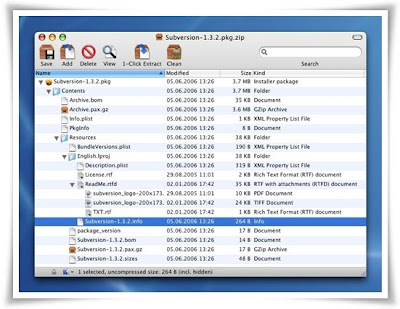
BetterZip can open archives without first extracting them which is fast, really fast. Then search for a file with the search box like in iTunes. BetterZip can open and extract archives with the most common formats: ZIP, SIT, TAR, GZip, BZip2, RAR, 7-Zip, CPIO, ARJ, LZH/LHA, JAR, WAR, CAB, ISO, CHM, RPM, DEB, NSIS, BIN, HQX, DD.

Create Archives
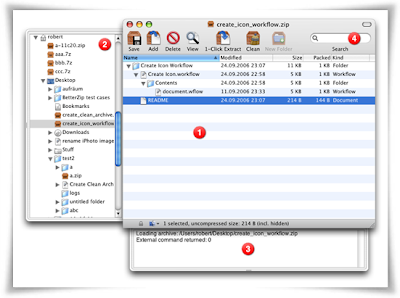
Simply drag files and folders from your hard drives, disks, or network places into your new zip file. You no longer have to copy all the files into a temporary folder first. When you are ready save the archive and everything is packed together. The supported formats are ZIP, TAR, GZip and BZip2 compressed TAR, 7-ZIP, and RAR (using the external RAR commandline tool). Large archives can be split.

Protect Your Data
BetterZip can protect your data with a password and create WinZip® compatible AES-256 encrypted archives. 7-zip and rar archives can also be protected with strong data encryption.

Update Archives
Add new or updated files to existing archives. Remove any file or folder from the archive, or even move files around inside the archive as if it were a normal folder.

Make Archives Compatible
Strip Mac specific files and resource forks from archives for best compatibility with systems like Windows or Linux.

BetterZip Speaks Five Languages
Besides the English version BetterZip includes German, French, Italian, and Japanese localizations, each with a complete translation of the documentation.

BetterZip is universal and runs on your shiny, new
Intel-based Mac just as well as on your trusty G4/G5 Mac.
Mac OS X 10.4 (Tiger) or later required.


Download From Rapidshare
or
Download From Easy-Share


Click Here to Read More

Monday, April 14, 2008

SofaControl v2.5.1 (Mac OS X)


SofaControl v2.5.1 (Mac OS X)
Size: 3.01 MB


Control your Mac from your Sofa
Use your apple remote to control applications, watch videos, listen to music, open documents, browse the web, look up the weather forecast, adjust the volume, move the mouse, play games and more, all while resting on your sofa.


Access all your media
We have the best support for all popular Video Players like Quicktime, VLC and MPlayer. By controlling the Democracy Player you can download and watch new movies from YouTube and other sites right from your sofa.

Surf using only your remote control
We provide extensive support to offer the best web browsing experience on your TV. Use tabbed browsing, increase the font size or just tab through the links of a web-page.

Virtual Mouse and Zoom
You have an application that is not supported yet? Thanks to the Virtual Mouse you can control that application too. And if the text is just too small to read, the zoom feature comes to the rescue.

Sleep Timer
Set your Mac to go to sleep after a certain period of time. Conserve energy, and have a good nights sleep.

File Chooser
Navigate the file system with ease. Easily choose which media file you want open.

More Remotes
Sofa Control supports the Keyspan RF Remote as well as the Apple Remote. Users that own Macs, which did not come with an Apple Remote, can purchase a remote from Keyspan

Global Menu
Sofa Control provides a number of actions that are just a button press away in the Global Menu. Change the Sound Volume, eject disks or set a sleep timer with ease.

Available Global Actions:
▪ Change Sound Volume / Mute Sound
▪ Control standard Dialogs (Alerts and Confirmation dialogs)
▪ Set a sleep timer
▪ Zoom in and out
▪ Restart, Shutdown or Sleep your Mac
▪ Eject disks, CDs or iPods
▪ Multi Display support
▪ Toggle the mirror mode
▪ Change the primary display and align it left or right
▪ Open the Dashboard
▪ Use Exposé to flip through your applications
▪ and many more


Give Presentations like a Pro
Using a remote for your presentations allows you to move around and give more natural and captivating presentations. Walk around, keep eye contact with your audience, and use your arms and legs to convey your message.

Presentations Applications
There are many applications for giving presentations using a Mac. Most people use Keynote or PowerPoint. Many use Preview, Acrobat or Adobe Reader to give presentations with PDF. Others use VoodooPad or NeoOffice.

Sofa Control supports them all. Flip through your presentation regardless of the application you prefer. All applications share the same behavior when controlled via Sofa Control. Clicking to the next slide in Powerpoint works the same way as switching to the next page in your PDF presentation with Acrobat Professional.

Mouse Light
Want to highlight something in your presentation? Forget your laser pointer. With Sofa Control your remote control becomes a light beam. Highlight the mouse pointer and steer it with Sofa Control.
Boinx Mouseposé is supported as well if you need a professional light.

Keynote Recorder
Have you ever wanted to record your presentation or the comments and questions from your audience for future reference? It's easy to adopt Sofa Control scripts for these kind of things. Check out the Keynote Recorder script which triggers an audio recording using Quicktime when you hold the play button - without leaving your presentation.


Click Here to Read More

World Clock Deluxe v4.5.2 (MacOSX)


World Clock Deluxe v4.5.2 (MacOSX)
Size: 1.96 MB


Regularly work with people across the world? Have family or friends living in other countries or time zones? Often travel abroad? World Clock Deluxe will make your life much easier.


With World Clock Deluxe you can:

:: display multiple digital or analog clocks in a horizontal or vertical palette, in the menu bar and in the Dock;
:: show the time in over 800 cities and 200 time zones and world times (Coordinated Universal Time, Internet Time);
:: show seconds, weekday, date, date change, time zone and the offset from local time or UTC;
:: customize date and time formats and assign labels and colors to clocks;
:: keep clocks arranged alphabetically, by time, longitude, longitude offset and label;
:: edit cities and time zones and add new cities and time zones;
:: calculate date and time conversions between different cities and time zones;
:: show the current weather all over the world.

Showing clocks in the Clocks palette
The Clocks palette lets you display any number of digital or analog clocks and show the time in different cities and time zones with or without seconds, weekday, date, date change, time zone, offset from UTC and offset from your local time.

World Clock Deluxe lets you freely customize the way the palette looks and behaves: you can hide controls, choose font and type size, adjust opacity and dial size, arrange it horizontally or vertically and decide whether it should float over all open windows, behave as normal window or lie on your desktop.


World Clock Deluxe lets you minimize the Clocks palette's size by rotating clocks, that is by displaying them alternately. You can adjust the rotation speed as desired and add a transition effect if you like.

To gain a quick overview on clocks while they rotate, simply click the clock in the palette: the displayed pop-up menu will list your clocks.

Showing clocks in the menu bar
Displaying clocks in the menu bar can be a good way of having them always to hand without taking up precious space on the desktop.

You can simply add the World Clock Deluxe icon to the menu bar and use it to quickly display your clocks.

Alternatively, you can show a single clock (your local clock for instance) or rotate multiple clocks in the menu bar. Either digital or analog clocks can be shown: clicking the clock in the menu bar will give you an immediate overview on your clocks.

Showing clocks in the Dock
With World Clock Deluxe you can also display clocks in the Dock.


You can show either digital or analog clocks in the Dock. If you display multiple clocks, they will rotate in the Dock icon.

No matter whether you show clocks in the Dock or not, the Dock icon lets you also quickly gain an overview on clocks: press it and your clocks will appear in the displayed menu.

If you aren't entangled by the many possibilities offered you by the World Clock Deluxe Dock icon and always crave for more space in the Dock, there's no problem: World Clock Deluxe lets you hide its icon in the Dock if you wish.

Displaying world times and time zones
With World Clock Deluxe you can easily display world times (including Internet Time) and time zones (e.g. EST, CET, ACST) in the Clocks palette, in the Dock and in the menu bar.

World Clock Deluxe lists over 200 time zones and world times from International Date Line West (IDLW) to Line Islands Time (LINT), from UTC-12 to UTC+14.

Organizing clocks
World Clock Deluxe lets you easily organize your clocks so that you can always have a good overview on them.


You can associate colors and labels to clocks to quickly single out your local clock or different groups of clocks.

You can sort or keep clocks arranged by name, by time, by longitude, by longitude offset or by label.

You can finally show different clocks in the Clocks palette, in the menu bar and in the Dock and hide seldom used clocks.

Calculating date and time conversions
Often make phone calls to another country at a pre-set time in the other country or join conference calls set up by people in another country? Calculating the corresponding local time is simple arithmetic, but it nevertheless generally causes a lot of head scratching and always the inmost doubt: after all, have I got it right?

World Clock Deluxe helps you with its Time Converter that calculates corresponding dates and times in two different locations and the time offset between them.

World Clock Deluxe's Time Converter lets you also calculate date and time conversions involving a city and a time zone (e.g. EST, CET, ACST) or world time (UTC, Internet Time) or involving two different times zones or world times.

Showing the weather
With World Clock Deluxe you can quickly show the weather all over the world.


Click Here to Read More

Sunday, April 13, 2008

Physics 101 SE 7.0 (Mac OS X)


Physics 101 SE 7.0 (Mac OS X)
Size: 17.50 MB


Physics 101 SE - Your favorite tool for surviving Physics!
Introducing the new Physics 101 SE 7.0 - the Physics calculator of choice for students, teachers, and professionals worldwide is now better than ever!

Version 7.0 Introduces:
• Thermodynamics Simulation - Simulate heat exchange between two bodies
• Orbital Motion - Simulate up to a three-stage rocket obtaining orbit
• Spectrum - View the electromagnetic spectrum with ease
• New Look - slick new interface

The perfect solution for physics students and teachers everywhere, Physics 101 SE is the premier tool for physics, allowing you to focus on physics and not mathematical busywork. With its ability to instantly solve for almost any variable in over 150+ of the most commonly used physics formulas, you'll be able to quickly and accurately complete physics assignments like never before. Just select the formula you need, enter values like distance and time, then click "calculate." With Physics 101 SE, it’s that simple, every time.

And when you move onto more difficult subjects in physics, such as resistor circuits, kinematic motion analysis, projectile mathematics, relativity and so on, Physics 101 SE becomes even more valuable.

Powerful Vectors
Vectors and vector calculation are regular occurrences in Physics as they are crucial in representing physical events. Vector calculation was exhausting -- until now. Physics 101 SE's vector-addition feature makes vector mathematics easier than ever before, allowing you to calculate up to eight vectors at a time and see the calculations with just a click of the mouse! Even better, the vector feature even allows you to solve for missing vectors -- simply enter the overall magnitude and angle, and select an vector for an automatic calculation.

Master Projectile Mathematics with ProjectileX
Physics 101 SE includes ProjectileX, the most powerful and easy-to-use projectile motion simulator available to students today. Specifically designed to provide the information that you need to know about a projectile in flight, whether it is an ideal motion projectile or one affected by linear air drag, ProjectileX quickly calculates every detail of its trajectory at the click of a mouse.


Circuit Analysis -- Shockingly Easy
With the built-in Circuit Analysis, you can simulate working with a simple electrical circuit without having to deal with actual electrical components. Build a virtual series-parallel circuit with up to 18 resistors, with voltage sources of either polarity placed anywhere in the branches. Once the circuit is constructed, you can find the voltage, current, and power of each resistor. If desired, place ammeters into the circuit to read currents at various places. Circuit Analysis also has a resistor color band calculator to find the resistance of color-coded resistors.


Catch Some Waves with Oscillations
Quickly examine the relationships between position, acceleration and the velocity of a wave. Just enter a few initial conditions and see the graph generated. Roll your mouse over the graph to see specific values in terms of time.

Superposition
Addressing the physics of sound and sound waves, the new module Superposition allows you to see in real-time how the sounds we hear are oftentimes waveforms adding on to one another. Just move the sliders!

All at a glance with RelativisticFX
Special relativity can be confusing at times, especially when keeping track of which figures dilate and which frames are involved. With RelativisticFX, just enter your given conditions per reference frame and at a glance you can see the transformations of velocity, length, momentum, and the time of up to three frames. Just by experimenting with this easy-to-use feature, you can get an excellent feeling for the affects of relativity!


Free Body Diagram Simulator
Free Body Diagrams have never been a favorite among students, until now! Letters from students in the 1700s show their disgust for them, but with Physics 101 SE's Free Body Diagram Simulator, you will see how easy they truly are. Complete with seven of the most common problems, you can see how the results change with experimentation, and even see the equations themselves.

Kinematic Motion Analysis
Kinematics was the first study of physics, pioneered by Isaac Newton over 300 years ago when he first constructed the equations that modeled movement. With Motion Analysis, you can enter an object's acceleration, initial velocity and time, and Motion Analysis will instantly graph position versus time and velocity versus time for its movement. Drag your mouse over the graph, and the time, position, and/or velocity will be shown in real time corresponding to the horizontal position of the cursor.


Motion Analysis supports up to four different objects in motion, so that you can quickly compare different accelerations and velocity at a corresponding time with a single click. You can then click the "Data Tables" tab to see the various data for each object at any time you need.

Orbits
Orbits allows one to quickly see how changing an orbit, be it the eccentricity or other factors, affects orbital period, average velocity, circumferance and so on. Enter your initial values for semi-minor and semi-major axises, then click calculate to see your orbit on the screen. You can even see how changing the orbit affects the values in real-time by using the sliders on the left and bottom!


Optics
Optics shows you how a beam of light refracts from one medium to another using Snell's Law. Interactively see how the beam changes by modifying the index of refraction and the incident angle, all by moving the sliders.

PeriodicX
This simple periodic table will allow you to forgo using your periodic table to tediously add up molecular weights. This feature goes a step further and converts grams to moles and vice versa for those thermodynamic problems.

Thermodynamics
Watch as two bodies exchange heat through a common boundary. The simulation, based on Newton's law of cooling, can be used with any type of material! Additionally, you can also see the body cool or warm up to a static enviromental temperature.

Orbital Motion
Physics 101 SE wasn't rocket science... until now. Physics 101 SE now allows you to take your physics to the next level -- space rocketry! Accounting for air drag and more, this simulation models up to a three-stage rocket obtaining orbit. The simulation can even simulate varying characteristics of other planets and their atmospheres! Create a custom rocket with just enough power to leave orbit from the planet of your choice-- too little and your rocket will crash; too much and it will careen into the darkness of space.

Spectrum
Interactively view the electromagnetic spectrum with Physics 101 SE's Spectrum. As you move the slider, you get to see the frequency and wavelength relationship. Not only that, but you'll get to see whether the range is in radio, microwave, visible light and more!

Lab Report
Lab Report takes the drudgery out of lab report calculations with its ability to work on a set of data-points quickly and efficiently. Enter what the actual value should be, select the number of data points you have collected, then enter your data points. Live calculation will show you the percent error and efficiency instantly! Once your data points are entered, the averages, deviation, and average percent error will be calculated, along with the standard deviation. With Lab Report, you can focus on the results, not the ability to press countless calculator buttons error-free.


Formula Guides
Since physics formulas have to be combined, substituted, derived, and integrated in infinite ways to solve physics problems, it can sometimes be difficult to figure out even how to begin solving them. With a quick glance at Physics 101 SE's formula guides, which show many of the commonly-used physics formulas and their isolated variables, you'll see new ways of approaching difficult physics problems. Simply knowing how to start working on a problem can save you large amounts of time and frustration.

Abbreviation Lookup
Ever wonder what eV stands for or what is the unit of the permitivity of free space? Wonder no longer - just check it in the abbreviation lookup window. There you will find the abbreviations of both the name and unit common to certain topics in physics.

Unit Converter
Physics 101 SE even includes a handy unit converter, which will quickly convert a measurement that you enter into other common units of measurement, without the gigantic hassle of having to memorize and calculate the numerous conversion formulas by hand. You can then click on the converted measurement that you need to instantly copy it to the clipboard, so you can then paste it into one of Physics 101 SE’s formulas for quick and easy calculation.

Conclusion
Don't get caught taking Physics without Physics 101 SE! Priced with students in mind, Physics 101 SE is essential for every physics student of any level. Make it part of your physics strategy today.


Click Here to Read More

Wednesday, April 9, 2008

Dfine 2.0 for Photoshop and Photoshop Elements


Dfine 2.0 for Photoshop and Photoshop Elements
With User Guide

(Windows & Mac OS Version)


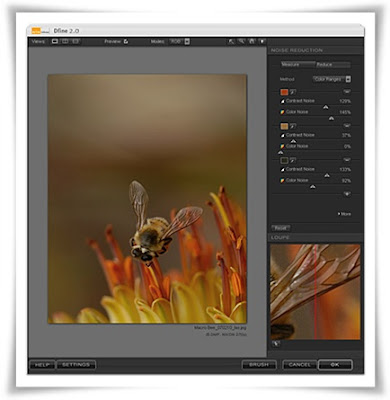
Dfine 2.0 gives you unprecedented control over exactly how much and where to apply noise reduction. This makes it ultra-easy to eliminate noise in your images while maintaining detail and sharpness, thus improving the quality of every digital photo you take. Dfine 2.0 is designed to prevent the loss of detail other noise reduction tools often introduce.


Virtually, all digital cameras inherently create unwanted imperfections known as noise. The amount or type of noise in an image typically depends on the quality and type of imaging sensor with which it was created.

Contrast (Luminance) Noise and Color (Chrominance) Noise can be individually present in an image or might be seen in the same image. Fast or high ISO speeds and low light levels can add noise to images, while some images might exhibit high levels of JPEG artifacts.

U Point® Technology
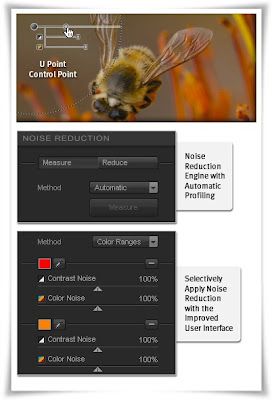
One of the hottest technologies in digital photography today, U Point technology powered Control Points have been added to Dfine 2.0 making it easy to reduce noise only where it is needed, maintaining details everywhere else.


Selectively Apply Noise Reduction
The Control Point and Color Range methods, along with the Selective Tool offer you the most advanced ways for selectively applying noise reduction to your images.

New and Improved Noise Reduction Engine with Automatic Profiling
Dfine 2.0 contains a brand new reduction engine that provides best-in-class noise reduction while retaining an incredible amount of detail.

Automatic camera profiling replaces the need to purchase camera profiles and fine-tunes Dfine’s revamped noise reduction engine to produce the best results for your camera. You can also create and save your own profiles for batch processing images.


Dfine 2.0 for Photoshop and Photoshop Elements
Download From Rapidshare:

PC (Windows Version) - Mac OS Version

or
Download From Easy-Share:
(Only Windows Version)

Dfine 2.0 User Guide:

Download From Rapidshare
or
Download From Easy-Share


Click Here to Read More

Tuesday, April 8, 2008

Color Efex Pro v3.0 (Win & Mac Version) for Photoshop and Photoshop Elements


Color Efex Pro v3.0 + User Guide
For Photoshop and Photoshop Elements
(Win & Mac Version)


Completely Original. Completely Indispensable.
Nik Software Color Efex Pro™ 3.0 filters are the leading photographic filters for digital photography. The award-winning Color Efex Pro 3.0 filters are widely used by many of today's professional photographers around the world to save time and get professional level results. Whether you choose the Complete Edition, Select, or Standard Edition, you’ll get traditional and stylizing filters that offer virtually endless possibilities to enhance and transform images quickly and easily.


Patented U Point technology provides the ultimate control to selectively apply enhancements without the need for any complicated masks, layers or selections. Control color, light and tonality in your images and create unique enhancements with professional results. With 52 filters and over 250 effects found in Color Efex Pro 3.0 you can perform high quality retouching, color correction and endless creative enhancements to your photographs.

Updates to old favorites such as Classical Soft Focus, Darken/Lighten Center, and Vignette filters are joined by exciting new filters Film Effects, Glamour Glow, High Key, Selective Contrast, Bleach Bypass, and more.


Color Efex Pro 3.0
Nik Color Efex Pro 3.0 has been significantly updated to provide photo enthusiasts and professional photographers alike with the most powerful yet easy to use set of photographic filters ever created. DSLR owners will revel in the wide range of quick and easy fixes to dramatically improve their photos with just a few clicks of the mouse. Professional wedding, nature, commercial, and portrait photographers will appreciate the speed of workflow and advanced features designed to support uniquely creative styles and deliver class-leading power.


U Point® Technology
U Point powered Control Points make it easy to selectively add, modify and remove a Filter effect using convenient sliders. Award-winning U Point technology gives you ultimate control to selectively apply enhancements without the need for any complicated masks, layers or selections.


New Filters
The new filters in Color Efex Pro 3.0 range from creative enhancements and special effects to re-touching tools and over 30 conventional film emulation filter effects. New filters include Film Grain, Film Effect, Glamour Glow, Selective Contrast, High Key, Low Key, Polaroid Transfer, Cross Balance filters, and more. Previously available filters have also been updated to provide even more options.

Nik Software product filters are developed to integrate seamlessly into many popular image editing applications that support the Adobe plug-in architecture and there are numerous software applications that accept Adobe plug-in compatible filters. Please consult your image editing application’s documentation for compatibility and installation instructions for 3rd-party plug-ins.


System Requirements

Windows
Windows 2000 Professional, Windows XP Home Edition, Windows XP Professional, Windows Vista
Pentium III 1GHz or better
256 MB RAM
Adobe Photoshop 7 through CS3, Adobe Photoshop Elements 2.0 through 6.0, or other Adobe Photoshop plug-in compatible Application

Macintosh
Macintosh OS 10.4 or later
G4, G5, Intel® Core™ Solo, Intel Core Duo, Intel Core 2 Duo, Intel Xeon
256 MB RAM
Adobe Photoshop CS2 through CS3, Adobe Photoshop Elements 4.0, or AdobePhotoshop plug-in compatible application


Color Efex Pro v3.0
Download From Rapidshare:

PC (Windows Version) - Mac OS Version

or
Download From Easy-Share:
(Only Windows Version)

Color Efex Pro v3.0 User Guide:

Download From Rapidshare
or
Download From Easy-Share


Click Here to Read More

Sunday, April 6, 2008

Macworld US May 2008


Macworld Magazine
May 2008 - 110 Pages - PDF - 18.82 MB


Macworld is a web site and monthly computer magazine dedicated to Apple Macintosh products.


Click Here to Read More

Tuesday, April 1, 2008

AppZapper 1.8.0 (Mac OS X)


AppZapper 1.8.0 (Mac OS X)
Size: 1.59 MB

Everybody loves the drag and drop nature of OS X. Drag an app into your applications folder, and it's installed. You'd think it would be that easy to delete an app — just a matter of dragging it to the trash. But it's not. Applications install preferences, caches, and other support files throughout your computer that take up space and generate clutter. Deleting these by hand every time you delete an app is a pain.


AppZapper is for people who want to confidently try new apps while knowing they can uninstall them easily. Drag one or more unwanted apps onto AppZapper and watch as it finds all the extra files and lets you delete them with a single click. A slick safety system remembers which apps you want to keep safe, and the log tracks all the files you've zapped. In one Zap you'll understand it. In two you'll fall in love. Within the five free Zaps, you'll know you need to add AppZapper to your arsenal. Go ahead — try five free zaps and see AppZapper, the Mac uninstaller for the rest of us, in action.


Click Here to Read More

CPU Speed Accelerator 3.1 (Mac OS X)


CPU Speed Accelerator 3.1 (Mac OS X)
Size: 5.20 MB


CPU Speed Accelerator allows you to drastically increase the CPU allocated to your foreground applications to make the most of the power of your Macintosh.
You want to increase the power of your Macintosh? At very low cost? You want to increase by 20% to 30% the speed of your applications without spending money in new hardware? You want to automatically always make the most of the power of your CPU to the foreground application you are using? Then CPU Speed Accelerator is what you need!

Features:
- It can increase by up to 30% the power of your Macintosh.
- It automatically detects the foreground application you are using.
- It redirects unused power of your CPU to the foreground application.
- You can set the percentage of acceleration between 0% and 100%.
- It tells the Process Manager of the UNIX layer of Mac OS X to always assign the maximum priority to the foreground application.
- It appears in the right side of the menu bar.
- It doesn't need any installation which makes it very easy to use.


Click Here to Read More

Monday, March 31, 2008

EasyWMV v1.3.3 FULL (Mac OS X)


EasyWMV v1.3.3 FULL (Mac OS X)
Size: 4.32 MB


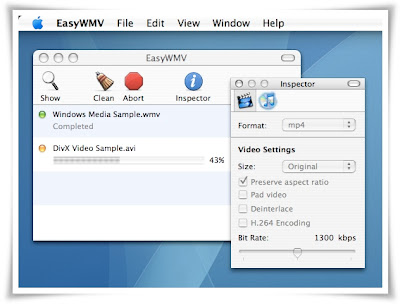
EasyWMV can be used to convert or resize wmv, asf, avi, mp4, mpg, mpeg, mov, m4v, flv, nsv, swf and vob video files so that they can be used with QuickTime Player, Apple TV, iPod and iPhone.

EasyWMV has a very simple user interface, supports drag and drop as well as batch processing. EasyWMV can export video to mpeg and mpeg4 formats and can optimize videos for playback on iPod.

Main features
:: Input formats: asf, avi, flv, m4v, mp4, mpg, mpeg, mov, nsv, swf (uncompressed), vob, wmv
:: Output formats: mp4, mpg
:: Manual or automatic audio bit rate selection from source (32-320kbps)
:: Video encoding up to 2.5mbit/s
:: Support H.264 encoding for mpeg4 video
:: Creates video for QuickTime, Apple TV, iPod and iPhone
:: Batch processing
:: Optimized for multi-core and multi-processor systems
:: Drag & drop of files and folders
:: iTunes integration

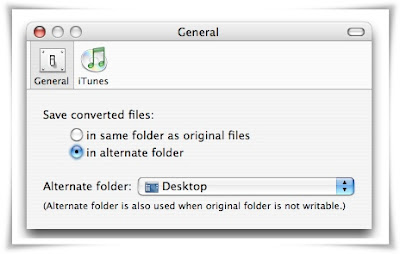
EasyWMV will create a new file with a ".mpg" or ".mp4" extension in the same folder as the original file (or on the Desktop if the folder is not writable). You can also choose to save converted file in the folder of your choice in EasyWMV's preferences:


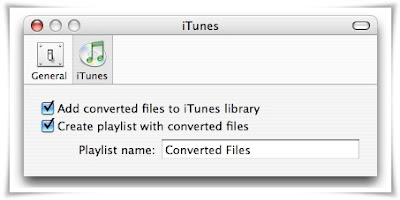
EasyWMV provides iTunes integration: you can automatically add converted files to a playlist in iTunes. To do so, enable the option in the preferences window:


Click Here to Read More
Tuesday, March 25, 2008

Toon Boom Studio 3.5.1 (Mac OS X)


Toon Boom Studio 3.5.1 (Mac OS X)
Size: 60.77 MB


Toon Boom Studio is ideal for individuals looking for an all-in-one animation software. From drawing digitally, scanning hand-drawn animations or seamlessly importing existing artwork, Studio 4 enables you to lip-sync your animation, setup the action in a 3D space and publish your animation projects for TV, HDTV, the Web and iPod!

All-In-One Animation Software
Covering the entire animation workflow from sketching to final publishing, you will find Toon Boom Studio to be a great tool to create or learn animation.

Create any style of animation
Toon Boom Studio offers true animation features designed to facilitate the creation of any styles of animation, including traditional frame-by-frame animation, key-frame animation, cut-out and photo animation.

Easy to learn and use
No matter how much you know about computers or animation, everyone can use Toon Boom Studio. Learn how to use Toon Boom Studio quickly with our free video tutorials, online articles and sample projects or discuss with experts in our user forum.


Download From Rapidshare
Part 1 - Part 2
or
Download From Easy-Share
Part 1 - Part 2

You must download all parts before decompressing.


Click Here to Read More
Monday, March 24, 2008

Screenium (Mac OS X)


Screenium (Mac OS X)
Size: 1.35 MB


Animate Your Screenshots
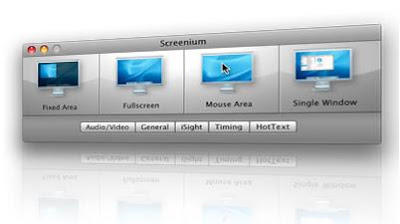
Make live movies of your Mac's screen… capture everything that's happening there, including mouse pointer, selections and movements — in real-time!


With on-the-fly voice recordings, you can easily describe what you are doing on-screen. Simply use the built-in microphone or any external audio source or input device connected to your Mac.


You can actually capture «movie-in-movie»: Screenium records your screen just like it is — including ongoing video playback in multiple windows.


Click Here to Read More
Sunday, March 23, 2008

Morph Age 3.1 (Mac OS X)


Morph Age 3.1 (Mac OS X)
Size: 13.06 MB


The application for morphing/warping images and movies on Mac OS X, such as faces, and save the result to a QuickTime movie. Morph Age is the perfect companion to iLife (iMovie, iPhoto, iDVD) for creating stunning video of your friends and family and even to Final Cut Pro for creating broadcast quality special effects.
Morph Age works by allowing you to define curves on one or more images. Any change made on the curves is reflected on the resulting image through the corresponding distorsion and morphing effect.

Morph Age can animate warp curves independently, so that different parts of the image moves at different times (the eyes, then the ears, then the mouth…). Also, animation effects are available, such as springy motion. Morph Age shows the result in real time, so that you can quickly and easily prototype the transformation.

Morph Age has an extremely fast, novel rendering engine that combines CPU operations (faster on G5) and graphic card power. It enables real-time rendering on mega pixel images still being accurate to sub-pixel.

What’s New in this Version
:: First Round of Leopard compatibility
:: Quicklook implementation for Morph Age documents
:: Communicate max texture size more accurately
:: Resurrected software mode, for GPU-independent quality rendering
:: New rendering pipeline with 256 Mega Pixels limit (was 4 Mega Pixel before)
:: Fixed GUI issues (image list, left)
:: Fixed rendering memory leak

System Requirements
:: Mac OS X 10.4 or later
:: 32MB video RAM


Click Here to Read More

iPod Access 4.1.3 (Mac OS X)


iPod Access 4.1.3 (Mac OS X)
Size: 2.40 MB


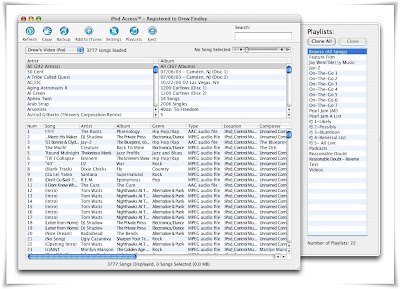
iPod Access is the leading iPod/iPhone music and video transfer application for the Mac. With iPod Access you have instant access to all the songs on your iPod or iPhone.

Your songs can be be displayed and sorted in almost any fashion so you can find the songs you need right when you need them. With the new instant search feature in v4 you can find songs just as quickly as you would in iTunes. And once you have found the songs, movies and playlists that you want, iPod Access will copy them right back into iTunes or to an external drive for backup.
If you need music from your iPod back on your computer then you need iPod Access.


Click Here to Read More

Flip4Mac WMV Studio Pro HD Version 2.2.0.49 (Mac OS X)


Flip4Mac WMV Studio Pro HD Version 2.2.0.49 (Mac OS X)
Size: 10.91 MB


Play • Edit • Make Windows Media on your mac
Flip4Mac® WMV QuickTime plug-in components allow you to import, export, and play Windows Media video and audio files on your Mac. Flip4Mac WMV can be used with most QuickTime-based applications, including QuickTime Player, iMovie, Final CutPro, and more.
When you install Flip4Mac WMV you can play Windows Media files using QuickTime Player and view Windows Media content on the Internet using your web browser. By upgrading Flip4Mac WMV you can import Windows Media files and create Windows Media files for distribution. These features are optional and available in trial mode until you need them.

Play Windows Media in QuickTime Player – it's free
Flip4Mac WMV Player component allows you to play Windows Media in QuickTime Player and your web browser. In fact, you can play Windows media in almost any application that supports QuickTime. With Flip4Mac, you don't have to pass up high-definition movies or Windows Media files you find on the Web. You have more viewing options and the great playback experience you've come to rely on with QuickTime Player.


Import and Export Windows Media on Your Mac
Upgrade to add Import and Export: You can import and export Windows Media content using applications like Final Cut Pro, Final Cut Express HD, QuickTime Pro and iMovie by purchasing one of these upgrades:
Adds the ability to create high definition, multichannel audio and two-pass encoding profiles for ultimate quality and flexibility.


System Requirements:
Intel or PowerPc
Mac OS X v10.3.9, 10.4, 10.5.1 or later
QuickTime v7.0 or later (7.1.6 or later recommended)


Click Here to Read More

Friday, March 21, 2008

Corporate Identity Creator + Logo Creator 5 (Mac OS X)


Corporate Identity Creator + Logo Creator 5 (Mac OS X)
Size: 94 MB


With this easy to use business card software, you can Create beautiful business cards, letterhead and matching envelopes with ease! Just modify the pre-designed business card templates found in the software!


Create logos and other graphics using a built in version of The Logo Creator! Bring your new logo into the business card software seamlessly! 50 customizable logos to mix match and modify !


Launch The Corporate Identity Creator and choose from over 95 matching business card and letterhead templates to mix & modify! Each business card template can be modified hundreds of ways!


Quickly create and personalize the built in business card templates found in the software (Mac OSX and Windows versions available!) - then upload it to our online printshop! No hassles, no driving - do it all from the comfort of your own office. Let the business card software do it all!


Some of the stationery you can modify with The Business Card Software!
(over 95 matching sets!)


Download From Rapidshare:
Part1 - Part2 - Part3

You must download all parts befroe decompressing.


Click Here to Read More