My Dear Friends:

We moved to

www.SoftStreet.net


Please come to visit us
Thanks for your patient, Best wishes for you

Showing posts with label System Utility. Show all posts

Monday, April 14, 2008

AutoShutdown Pro v5.0


AutoShutdown Pro v5.0
Size: 1.36 MB


AutoShutdown can secure your computer and save on power costs!

AutoShutdown is a system shutdown manager utility program which can secure your computer(s) when you are away. Perform an unassisted shutdown, restart, logoff, standby, hibernate or lock the workstation based on time of day, inactivity or battery power level. The Pro version features a system service module that can work with Windows 2000 and XP when a user is not logged in.


AutoShutdown can also clean up files when it performs an action - wiping any trace from your recycle bin, temporary files, recent documents, cookies or other files. AutoShutdown can perform events at a scheduled date and time, after a period of inactivity or when you have one or more hot keys defined to perform specific events.


Click Here to Read More

Thursday, April 10, 2008

Automize 8.01 Enterprise


Automize 8.01 Enterprise
Size: 24.94 MB


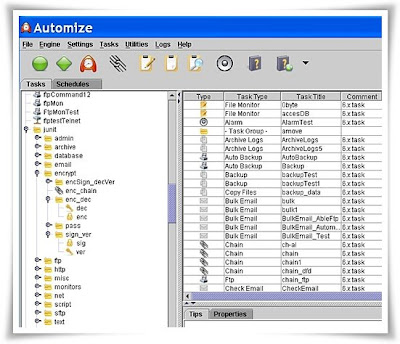
Automize is the leader in cross platform Automation software.Automize is a task scheduler and automation software that can automate a variety of tasks, including ftp transfers, ftp monitoring, web downloads, web site monitoring, email checking and sending, telnet, ping, directory monitoring and more.

You can choose the task from one of the many categories and then customize it to your needs. Automize contains several pre-configured tasks, not commonly found in other applications, this includes automated SQL database queries, support for MS Office tasks, CGI testing and more. All of them offer a simple template that you can customize. In addition, the chaining feature can run tasks in sequence or conditionally depending on exit codes.


Click Here to Read More

Tuesday, April 1, 2008

Locate Laptop v1.0


Locate Laptop v1.0
Locate Laptop - Anti-theft & Laptop Tracker Tool
Size: 5.95 MB


Increase in Laptop sales and users has led to high incidents of theft. What is lost is not just the laptop, but also valuable, sensitive and creative information in it. Locate Laptop™ is an application that locates reportedly stolen laptop from the World Wide Web. It can also silently inform you about the location of your employee's laptop!

A recent survey stated that on an average 60 laptops are stolen or lost every week! What you lose is not only the laptop, but also valuable, sensitive and creative information in it. Do you have a plan to counter this yet? Locate Laptop™ is a system that locates reportedly stolen laptop, from the world wide web. And what more, it silently transfers your critical information on our secure data server. Laptop Locator also encrypts your sensitive information, without the knowledge of the offender!


Click Here to Read More

Ashampoo UnInstaller Platinum Suit 1.1.0.0


Ashampoo UnInstaller Platinum Suit 1.1.0.0
Size: 5.99 MB


Modern Windows® applications are very complicated "beasts". They include large numbers of files that are often saved in many different places, not just in the application's own program directory. In addition to this they also have even larger numbers of settings, sometimes hundreds, which they record in Windows' central database, which is known as the Windows® Registry.


Features :
Ashampoo UnInstaller Platinum Suite works by creating two "snapshots" of your system, one before you install an application and another one directly afterwards.

These snapshots record the entire status of your computer system, including all registry entries, the locations, dates, sizes and versions of all files and the contents of all configuration files.

After creating the second snapshot the program then compares it with the first and records all the differences in a special file called an "installation log file", or "log file" for short.

When you tell Ashampoo UnInstaller Platinum Suite to uninstall the application it loads this log file and uses the information it contains to restore everything on your system to the way it was before you installed the application.


Click Here to Read More

System Commander v9.03


V-COM System Commander v9.03
Size: 60.4 MB


Easily add and remove OSes - great for safe migrations to a new OS, trying out Linux, or any other OS you'd like. System Commander is the ultimate boot manager!

With System Commander, easily select from any OS you have installed
When you install System Commander, it automatically detects and adds each OS found to your OS selection menu by name! Just select the OS you want and go!

Boot manager handles multiple operating systems with ease
System Commander handles every OS available on the PC platform including every Windows, Windows Vista, all Linux, NetWare, Solaris, and many others you probably have never heard of! You can try out beta versions of new OSes, user current stable releases and even older OSes for legacy software and validation.


OS Wizard™ - The easiest way to prepare your system for a new operating system
System Commander's (SC) OS Wizard makes it easier than ever to prepare your computer for your new operating system (OS). Simply choose the OS you plan to install, and the OS Wizard will set up your system, automatically! Or, if you prefer a more hands on approach, you can override the OS Wizard's recommendations. It even includes our exclusive boot-time partitioning.

The safest way to install your new operating system
Without any other tools, System Commander safely and automatically prepares your hard drive to accept your new OS while protecting everything already on your computer - data and other OSes. No drivers or resident memory are used, so there are no conflicts with any OS and no performance degradation. When you first install SC, it automatically detects your existing OSes and includes them in the OS selection menu by name!

Exclusive BackStep™ technology
BackStep Wizard is the safest and easiest way to return your system to its original configuration. Let's say that a month after you've installed that beta OS in its own area, you wish to remove it. Using the BackStep Wizard, you can see all of the actions that the OS Wizard previously performed and any manual partitioning work you have performed using SC. Simply select the operations that you wish to reverse and the BackStep Wizard will undo those steps. Nothing could be easier!

Windows, NTFS and Linux partitioning - Automatically!
SC includes Partition Commander for full NTFS, Linux, and all other Windows type partition resizing. So creating and resizing partitions are a breeze. And, our NTFS resizing works perfectly with the latest Windows XP/2003/Vista as well as 2000/NT. This also includes our NTFS to FAT32 converter. Our NTFS converter safely handles all NTFS versions. SC's advanced conversion technology even handles compressed NTFS volumes, another SC exclusive! So, if you need to convert between FAT and FAT32 or from NTFS to FAT32, there's no easier or safer way than with System Commander!

User Selectable Graphics
SC runs in full graphics, up to 1600x1200 resolution depending on the video card and monitor. Our unique driverless design gives you graphics and mouse support, yet only takes a second to start up. New for version 9 is a slick Vista style.

Exclusive TrueDOS™
Now you can have easy access to a true DOS prompt at boot time when you have Windows Me, 95 or 98. As most users are surprised to discover, Windows Me no longer has any way to get to a true DOS prompt. Without a true DOS prompt, many of your legacy programs and games cannot work with Windows Me.

When installing System Commander from Windows 95/98 or Me, a TrueDOS prompt choice is automatically created, giving you easy access to both Windows and a true DOS prompt. Unlike MS or PC-DOS, TrueDOS still retains the features of Windows, such as the ability to understand large FAT32 partitions.

What's New:
System Commander 9 adds a host of new features beyond prior
versions. A few of these new features include:
:: Automatic detection and identification for Windows Vista
:: OS Wizard improvements, including support for Windows Vista
:: New Vista style GUI
:: Selection for booting both CDs and DVDs (requires BIOS support)
:: Improved Check MBR feature to automatically recover from
damaged MBR
:: Ability to disable Windows boot management and undo the
damage to other Windows OSes caused by Vista's installation.
:: Includes an enhanced version of Partition Commander 9, which
is integrated with System Commander
:: Includes integrated Copy Commander 9
:: Partitioning operations now support USB drives, USB mouse
and keyboards.

Download From Rapidshare
Part1 - Part2

or
Download From Easy-Share
Part1 - Part2


You must download all parts before decompressing.


Click Here to Read More

Monday, March 31, 2008

RegClean 2007 Edition v2.6


RegClean 2007 Edition v2.6
Size: 1.66 MB


RegClean is the award-winning registry cleaner! Regclean Utilizes today's most advanced Technologies to provide you with instantaneous Registry analysis and Repair.

:: Repairs and tuneups your PC
:: Allows you to remove errors automatically or manually
:: Offers comprehensive registry backup utilities
:: Provides scan progress indicators
:: Implements a convenient automated scheduler
:: Performs registry compression, defrag, management and cleanup
:: Performs duplicate file deletion
:: Provides program shortcuts
:: Offers empty key deletion


Click Here to Read More

Tuesday, March 25, 2008

MacDrive 7.0.10


MacDrive 7.0.10
Size: 5.98 MB


Once you've tried MacDrive, you'll kick yourself for not installing it sooner. With MacDrive on a Windows PC no longer are Mac disks ignored and unable to be used. MacDrive helps Mac disks act and appear like normal Windows disks. You can drag-and-drop to copy files in either direction, or double-click to open documents directly from Mac disks.

MacDrive works with just about anything you can throw at it, including hard drives, CD-R/RW, DVD-R/RW, floppies, iPods, flash drives, Zip, Jaz, MO, DMG virtual disk files and more.


Click Here to Read More

Your Uninstaller! PRO 2008 v6.1.1246


Your Uninstaller! PRO 2008 v6.1.1246
Size: 3.63 MB


Your Uninstaller! uninstaller software is the industry's leading uninstaller software. It's the world's 1st smart Drag&Uninstall™ uninstaller software under the Windows platform, works on all Windows versions including Windows Vista/XP/2000/ME/98/95/2003. It's as easy as using the recycle bin. Imagine! Just a drag-drop and the program you don't want will disappear from your computer - as well as everything the unwanted program brings! Your Uninstaller! is a user-friendly way of removing unneeded applications on your computer. It can even remove some annoying spywares!

Your Uninstaller! software is a specially designed uninstaller program for both beginning and advanced users. Your Uninstaller! 2008 is extremely very fast and easy to use. It has a unique ability to uninstall items by simply dragging programs' icons into the Your Uninstaller! icon. You may also find the application you want to uninstall through a unique search function.

Your Uninstaller! completely removes applications so quickly. Your Uninstaller! starts up 500%-1000% times faster than other Add/Remove programs. As you know, there are many installers in the world, such as InstallShield, Wise Installer, Microsoft Installer and many others. Most applications are built using these installers. Each installer has a unique install database, which makes it difficult to find all the changes programs' make to your computer. That's why other uninstallers can only uninstall part of an application-leaving some files and registry keys.

To solve this problem, Your Uninstaller! uses it's unique technique: SmartUninstall™. SmartUninstall™ has a database containing information about all installers on the market; so when it uninstalls a program, it automatically detects which installer the application used, then it simply uninstalls the application properly. That's the reason Your Uninstaller! can detect and completely remove all the programs and icons on your computer.

Key features:
:: Completely remove any application installed.
:: Deep scan of registry and entire disk for unused registry entries and files.
:: Remove programs that could not be removed by Add/Remove Program.
:: Uninstall screen savers. [PRO]
:: Remove internet surfing traces.
:: Backup and restore registry.
:: Registration key management.
:: Built-in Disk Cleaner helps you find and remove unnecessary files on your disk to save space and make computer faster! [PRO]
:: Built-in IE Context Menu Cleaner, cleans the context menu of Internet Explorer. [PRO]
:: Built-in Startup Manager, take full control of Window startups. [PRO]
:: Fix invalid desktop shortcuts and start menu shortcuts.
:: Get the applications detail info even if it hide itself in deep directory, especially useful for finding out "Spy" applications. [PRO]
:: Backup/restore installed-applications information.
:: Uninstall with SINGLE drag-drop! Just drop a file on Your Uninstaller! icon on the desktop to see what happens! [PRO]
:: List installed applications with appropriate icons(same as you see in the Start Menu), you can easily find the application you want to uninstall.
:: Powerful search feature allows you quickly find the program you are about to uninstall.
:: Automatic detection of invalid installations and removing them with one click.
:: Force removal of uninstall related entries in the registry(care to use!). [PRO]
:: Lighting speed at startup, 5-10 times faster than Add/Remove Program of Windows XP!
:: Export programs list to file or printer.
:: More ...

Your Uninstaller! 2008 is a completly new release from previous version with redesigned scanning and processing method.

Here's a brief new features list:
1. New Uninstall technology, removes program completely system wide.
2. New Internet Traces Eraser, clear all your surfing traces, surf anonymously!
3. New Rescue Center, restore your PC to any date, even a specified point.
4. Windows Vista optimized for Microsoft's new system.
5. Improved Advanced Uninstall to fix more problems.
6. Improved UninstallWizard for both advanced users and common users.
7. Improved Startup Manager, find more hidden programs.
8. Improved Disk Cleaner, one click to clean. Scheduled clean.
9. Improved user experience.
10. Improved loading speed.
11. Unicode support for all modules.
12. Multiple language support. Now supports 12 languages.
13. Cache support for fast access to all programs.
14. Know more about each program installed on your computer.
15. Improved deep system scan after uninstallation to find hidden registry entries.
16. Load undocumented startup programs in Startup Manager, it's easy to find some spywares.
17. Improved Disk Cleaner provides more options and faster speed.
18. Improved Drag&Uninstall.
19. More options added for advanced users.
20. Other many minor improvements and changes.


Click Here to Read More

Friday, March 21, 2008

USB Safely Remove 3.31


USB Safely Remove 3.31
Size: 3.76 MB


USB Safely Remove is a neat and handy replacement for the standard 'Safely Remove Hardware' tool. It will make life easier and save time for those who have several hotplug (USB, SATA, Firewire) devices and those who use them extensively.

Features :
:: Keyboard shortcuts for easy device stopping
:: Real device names
:: Hiding any device from stop menu
:: Forced device stop


Why do I need USB Safely Remove?
1 . Your data will never be lost when using it.
2 . A device will never be stopped accidentally, because USB Safely Remove assigns the correct device names. It can also hide any device that will never need to be stopped.
3 . It saves time, because a device can be stopped in one click. This avoids the uncertainty of guessing the reason why a device cannot be stopped.

USB Safely Remove is comfortable and safe replacement for the standard "Safely Remove Hardware" tool. The program has a lot of features designed for comfortable and pleasant work with hotplug devices (USB, SATA, FireWire).


Safely remove in one click
It is an original and comfortable method to safely remove a device, find out what devices are connected and view the contents of their drives. Just move the mouse pointer over the tray icon of the program and you will see a multi-featured quick stop menu with the device list...

Get rid of unnecessary devices!
Are you afraid to accidentally stop the card reader built into your laptop or a dongle? Annoyed by a SATA hard drive or an ADSL modem in the device list? Now you can hide any device from the stop menu in one step.

Global keyboard shortcuts
Like to do everything using the keyboard? Now you can stop and view devices with only ONE hotkey! No need to remember keyboard shortcuts for each device. Being in any application, press the key combination (Win+S by default) and you will see the stop menu. Use the UpDown Arrow keys to select the device you need and either press Enter to stop it or Ctrl+B to view the contents of the device disks.

Correct and clear device names
With USB Safely Remove, you will easily find the device you need to stop because the program detects the actual names of devices. The names the manufacturer gave them. Besides, you can think of your own name for a device and also assign an image for it.

The device cannot be stopped right now. Why?
Ever encountered the situation when Windows does not allow you to remove a device? Now this problem is solved once and for all. USB Safely Remove will show you what programs do not allow you to stop the device and you will stop disable them in one step.


Unique technology: "Guaranteed device stop"
Sometimes Windows does not allow you to remove a device even if you close all suspicious programs. It is a problem in the Windows kernel. It especially often occurs in Windows XP. In most cases, USB Safely Remove allows you to absolutely safely stop the device without losing any data. And it means that now you can rest absolutely assured about the safety of your data.

Notifications about connected and removed devices
Many people feel uncomfortable when they get no respond to their actions. USB Safely Remove is completely devoid of this problem: the program show a notification not only after the device is disconnected, but also after it is connected. Thus, you will always know whether Windows has successfully recognized the device and it can be used. Besides, the program notifies you about the disk letter assigned to the device.

Starting programs after connecting and before removing a device
Another USB Safely Remove feature that distinguishes it from similar software is starting any applications not only after connecting a device, but also before removing it. This feature allows you to back up data before disconnecting a removable hard drive, to run Total Commander with the contents of the drive on the connected flash disk, automatically unmount an encrypted TrueCrypt drive before disconnecting the USB media, etc.

Automating work with devices
USB Safely Remove has a powerful and convenient command line: usr.exe. It allows you to automate work with any devices. For example, you can automatically stop devices according to schedule or in case of any other event.

Working with any hotplug devices - USB, SATA, FireWire
Another important difference between the program and the standard Safely Remove Hardware icon is the possibility to see and disable all hotplug devices. If USB Safely Remove does not show the device you need, select the "Display all storage devices" checkbox in the USB Safely Remove settings.

Displaying volume labels instead of device names
If you have several devices of the same type (like flash disks and removable hard drives), it will be much more convenient to see volume labels instead of device names. To do it, just select the "Show volume names instead of device names" checkbox.

Customizable icon in the system tray
Many people complain that the standard Safely Remove Hardware icon sometimes disappears at the most inappropriate moment. USB Safely Remove completely replaces the standard Safely Remove Hardware icon with its own icon. By default, the USB Safely Remove icon is always displayed in the tray, which gives you quick access to the features of the program and makes using USB more clear and predictable. However, you can change this behavior and the icon will disappear when there are no devices connected to the computer. To do it, select the "Hide icon when there are no devices to be stopped" checkbox in the "Look And Feel" section of the settings.

Download From Rapidshare
or
Download From Easy-Share

Ps: Some antivirus (like Avast , AVG ..) detect most keygen with trojan/virus. All my uploads are scanned by nod32/trojan remover with latest update. Found nothing !.


Click Here to Read More

Wopti Utilities Special Edition v7.80.8.319


Wopti Utilities Special Edition v7.80.8.319
Size: 5.01 MB


Optimize, clean up, maintain and speed up PC. Detect software and hardware information. Wopti Utilities is an all-in-one system utility to optimize,clean up,maintain and speed up your PC. It also gathers detailed and accurate software and hardware information for you to know your PC better.

Wopti Utilities includes 30+ utilities grouped in four general modules (System Information, System Optimization, System Cleaning and System Maintanance), all designed to boost your PC's performance.


Here are some key features of "Wopti Utilities":
:: Overall system optimization options
Optimization of Disk Cache, Desktop Menu, File System, Network, Boot Speed, Security, Backstage Service, etc.
Simple and convenient auto-optimization wizard and optimizes automatically according to detected information of software and hardware
"Restore" function to each optimized item, press one key to restore
if users are not satisfied with the optimization

:: Detailed and accurate system detection
Analyze system deeply and provide detailed and accurate information of hardware and software
Provide suggestions for enhancing system performance according to the detection
Provide system performance test to help users understand CPU/memory speed, graphic card speed, etc.
Detection result can be saved as file for future comparison and reference

:: Powerful cleaning function
Registry Cleaner: Cleans registry rapidly and safely
Junk File Cleaner: Cleans redundant files in hard disk or specific directory
Redundant DLL Cleaner: Analyzes redundant DLL in hard disk and remove after backup
ActiveX Cleaner: Analyzes redundant ActiveX/COM components and remove after backup
Software Intelligent Uninstaller: Automatically analyzes the related files in hard disk and information in registry of the selected files and remove after backup
Backup and Recovery Manager: All removed items can be recovered from "Backup and Recovery Manager" of Wopti Utilities


:: Effective system maintenance
Driver Intelligent Backup: Intelligent backup of drivers for future system re-installation
System Disk Doctor: Tests and repairs disk problems such as abnormal shutdown, disk bad sectors etc.
Memory Defrag: Releases memory easily. Occupies only small space when releasing , users can stop the process anytime to get more memory for applications
Process Management: Application process management tool
File Wiper: Deletes files un-recoverably
Drive intelligent backup,system disk doctor


Click Here to Read More

Thursday, March 20, 2008

PC Washer 1.0.0


PC Washer 1.0.0
Size: 1.53 MB


PC Washer is a powerful system cleaning software that allows you to clean your hard disk and registry, it can locate and remove garbage files in your hard disk to release the wasted disk space, clean and repair all the errors in the registry to speed up your PC, clean the history of your activities to protect your privacy. Is your PC slowing down? This is probably happening because there are too many garbage files that are blocking your computer and slowing down the system, but PC Washer will sweep your PC and keep it running smoothly. The Registry is the most important database of the Windows, PC Washer uses high performance technology to scan more than 10 important parts of the registry, and it can clean and fix the errors and improve the performance of your PC.

Here are some key features of "PC Washer":
:: Garbage cleaning: clean useless junk , temp and obsolete files from your hard disk.
:: Registry cleaning: scan more than 10 important parts of the registry, find and remove invalid registry entries.
:: Privacy protecting: erase internet traces and the history of your activities, make your PC running like new.
:: Shortcuts cleaning: find and remove the start menu and desktop shortcuts that due to removed programs.
:: Favorites menu cleaning: find and remove websites from your Favorites list that are no longer working.
:: Clean degree: automatically detect and report the clean degree of your computer.
:: Easy to use: one-click solution for PC cleaning, user friendly, stable and safe.


Click Here to Read More

Wednesday, March 19, 2008

Portable Spotmau Power Suite 2008 Professional Wincare 2.0.4283


Portable Power Suite 2008 Professional 2.0.4283
Size: 20.90 MB


Spotmau PowerSuite 2008 includes many useful tools for your PC:

Windows Recovery provides a complete solution to recover your corrupt Windows such as partition table recovery, lost/missing files recovery and so on.

Windows Doctor (Windows Speedup, Smart Uninstall, IE Manager, Startup Manager) provides Step by Step Guide to speedup your PC. Remove your unwanted applications; restore default settings of your Internet Explorer; enable you to choose which programs to run automatically at Windows startup; change your desktop icon and right click menu.

Password & Key Finder finds your lost passwords for Email, MSN, IE and asterisks; finds you Windows, Office and IE product or CD keys.


Windows Admin/User Password Recovery can easily reset Windows Vista/2003/XP/2000/NT administrator/user password to blank or change the password.

BIOS/CMOS Password Recovery helps you instantly find or clear your computer’s BIOS/CMOS Password.

Clean up History clears up all your activity records on your computer to protect your privacy.

Data Transfer can be used to backup your personal data before Windows reinstallation. It can transfer files to the removable media/devices, or to a second, undamaged internal hard disk when your Windows has crashed or the hard disk has been damaged.

File Shredder deletes files and folders permanently from your hard disk.

Disk Clone & Backup package provides all kinds of clone options under Windows: Disk to Disk, Disk to Image, Disk from Image, Partition to Partition, Partition to Image, Partition from Image.

You can easily backup disks/partitions or transfer all data from one disk to another, or even burn to CD/DVD, with several mouse clicks. This utility is for cloning Windows 98, ME, NT, 2000, XP, 2003 and Vista. It supports IDE, SATA, SCSI, and USB interfaces.

Desktop Secretary easily manages your daily duties and business schedules.


Click Here to Read More

Auslogics Disk Defrag v1.4.13.295


Auslogics Disk Defrag v1.4.13.295
Size: 1.28 MB


Hard disks are by far the slowest component in your computer. CPU and memory work much faster than hard disks because they do not have moving parts. Therefore fragmented disks often become a bottleneck of the system performance.

Besides causing slowdowns, fragmentation makes the hard drive disk heads move frequently when reading files which leads to freeze-ups and system crashes. It is important to keep your disks defragmented and optimized as much as possible.

FEATURES:
:: Improve computer performance and stability
:: Increase your productivity - no more waiting for files to open
:: Defragment disks in only a few minutes
:: Useful disk fragmentation map and detailed fragmentation report
:: Windows XP Home and Professional, 2000/2003 and Vista supported


Click Here to Read More

UltraEdit-32 v14.00a


UltraEdit-32 v14.00a
Size: 12.01 MB


Replacing Notepad or looking for a powerful text editor? UltraEdit is what you're looking for. UltraEdit is the ideal Text, HEX, HTML, PHP, Java, Javascript, Perl, and Programmer's editor. It's versatile and easy to use.

With nearly 2,000,000 users worldwide, UltraEdit is the #1 selling, most powerful, value priced text editor available!

Key Features:
:: Code Folding
:: Supports 64-bit file handling (standard) on all 32-bit Windows platforms
:: UNICODE support
:: Disk based text editing - supports files in excess of 4GB, minimum RAM used even for multi-megabyte files
:: 100,000 word spell checker, with foreign languages support (American English, British English, Dutch, Finnish, French, German, Hungarian, Italian, Spanish and Swedish)
:: Syntax highlighting - configurable, pre-configured for C/C++, VB, HTML, Java, and Perl, with special options for FORTRAN and LaTex. Multiple wordfiles available for download
:: FTP client built in to give access to FTP servers with multiple account settings and automatic logon and save. (32-Bit Only) Includes support for SFTP (SSH2).
:: SSH/Telnet Window
:: Project/Workspace support
:: Integrated scripting language to automate tasks
:: Configurable keyboard mapping
:: Column/block mode editing
:: Hexadecimal Editor - allows editing of any binary file, shows binary and ASCII view
:: Named Templates
:: HTML Toolbar preconfigured for popular functions
:: Integration with UltraSentry to securely delete UltraEdit temporary files
:: Multi-byte Support with Integrated IME Support


Click Here to Read More

Tuesday, March 18, 2008

Ashampoo PowerUp v3.10


Ashampoo PowerUp 3 (v3.10, 01/11/2008)
More protection, more control, faster and easier
Size: 4.09 MB


Windows® is so complicated that normally only experts can keep their systems properly configured and tweaked for the best performance and user experience. This hasn’t gotten any better with Windows Vista™ – many settings have been moved or renamed and are now even harder to find.
Ashampoo PowerUp 3 is the solution if you don’t want to waste endless hours learning how to configure and maintain Windows®, including Windows® Vista. It’s a single control center for all your Windows® settings and explains everything in simple language. And the new version adds more protection against incorrect settings, more control, more configuration options and makes the whole process easier than ever before. And it comes with a beautiful new graphical design for Windows® Vista!


Configure fast with professional profiles and new tools:
Ashampoo PowerUp 3 comes with a package of professionally-tuned “profiles” for a variety of purposes. Just select the profile and PowerUp automatically configures your entire system in seconds for office work, games, video and photo editing or just maximum all-round performance.

The new Profile Assistant and Profile Manager help you to tweak the standard profiles for your own needs and manage the profiles you create and store. And the new QuickStart Bar gives you instant access to your favorite tweaks and adjustments.


Configure with confidence with the new safety tools and assistants:
The new Risk Level Monitor warns you reliably about potentially dangerous settings. The new Rescue Center automatically records all the changes you make and can return you your original settings at any time. And the Automatic System Scan and System Diagnostics make it easier than ever to find and choose the relevant settings.


Work easier with powerful additional modules:
In addition to hundreds of Windows® configuration options Ashampoo PowerUp 3 also comes with a whole package of additional tools and modules that make your life with Windows® easier.

You can generate detailed reports containing everything support staff need to know about your system when you have problems. You can manage programs that start automatically and switch off the ones you don’t need. And so much more…


New Features:
:: Fully compatible with Windows Vista™
:: Profile Assistant: Helps you to customize your system by modifying existing profiles
:: Profile Manager: Create, delete, modify and export your own configuration profiles that you can use to change all your system settings in seconds
:: Ready-to-use profiles: A set of professionally tuned profiles for super-fast optimization of your system
:: Profile export: Save profiles on external media and apply them independently
:: QuickStart Bar: Direct access to tweaks and settings for fast customization of your system
:: Automatic System Scan: Adjusts the presentation of all options to match your individual system requirements
:: Risk Level Monitor: Warns you about potentially risky settings
:: Rescue Center: Records all configuration changes you make and enables you to return to your original settings at any time
:: Processes: A management console provides detailed information on active processes and enables you to kill them if necessary
:: Services: Recommendations and configuration options for many Windows® services – improve performance by disabling unnecessary services
:: Benchmarking: Check your system performance with a detailed analysis and report
:: Profile Manager: Helps you to optimize system performance and behavior
:: System Diagnostics: Generates a detailed report on your computer’s components
:: Icon Manager: Saves the layout of the icons on your desktop so that you can restore it if it gets “messed up”
:: Skins: Three new skins to change the appearance and style of the program
:: Improved setting help: Context-sensitive pop-up descriptions of all settings provide all the information you need on every option
:: Improved Windows® optimization: For all system areas in Windows® 2000, XP and Windows Vista™
:: Many new settings: A wealth of new options for customizing and the Windows® user interface and enhancing performance
:: Online Update: Add new tuning options and solve issues and problems quickly

Existing Features and Improvements:
:: System Information: Analyses your hardware and software and displays a detailed report
:: Autostart: Configuration options for how Windows® starts
:: Windows® tuning: Direct access to hundreds of Windows® settings and configuration options with detailed information – many new options
:: Configuration profiles: Save your own Windows® configurations as “profiles” that you can load to reconfigure your entire system in seconds
:: Hidden Windows® options: Access many “secret” Windows® settings that are normally difficult or impossible to change
:: MS Office®: Configure hard-to-find Office settings quickly and easily (incl. support for the latest Office versions)
:: MS Outlook®: Configure permitted mail attachments for Microsoft Outlook® (incl. support for the latest Outlook versions)
:: Privacy: View, understand and configure Windows® functions and settings that can be critical for protecting your privacy
:: Hard disk acceleration: Display and adjust settings that control the performance of your hard disks
:: Registry clean-up: Quickly identify and eliminate old or invalid entries that are clogging up your Windows® Registry database
:: Wipe files: Delete sensitive files permanently so that even data recovery labs can never access their contents
:: IP spam blocker: Disable the Windows® messaging service that spammers often use to display annoying advertising on your desktop
:: Tuning Assistant: Comprehensive and safe system tune-up with just a few clicks, with automatic backups as a safety net
:: AntiSpy Assistant: Prevents unauthorized access to your personal data in Windows® and Windows Vista™
:: Uninstall Windows® components: Get rid of faulty Windows® components which cannot be uninstalled through the usual way anymore
:: Language Editor: Edit or translate all texts and menus displayed in the program


Click Here to Read More

Super Utilities Pro 2008 v8.0.1978


Super Utilities Pro 2008 v8.0.1978
Size: 4.75 MB


Super Utilities - Make your computer run faster, safer, with greater privacy and security. With only a few minutes of tweaking, Super Utilities will optimize the performance of your computer, corrects problems and helps you to customize your system to suit your needs.

Super Utilities (for Windows9x/ME/NT/XP/2000/2003) is a collection of tools to fix, speed up, and maintain your PC! These utilities include Disk Cleaner, Registry Cleaner, Uninstall Plus, StartUp Manager, Folder Guard, Tracks Washer, Driver Backup, Auto Shutdown, Windows Manager and Process Manager. With a cool and user-friendly interface makes it easy for anyone to use Super Utilities.

Full service for your windows PC
:: Super Utilities offers 27 tools for cleaning,fixing, speeding up, maintaining, and protecting your PC.
:: System Cleaner: Make your PC faster, more stable, and more efficient by cleaning and optimizing your hard drive, memory, software, and Windows Registry.
:: Security Doctor: Protect your PC from thousands of potential spyware, adware, trojans, keyloggers and tracking threats.
:: Privacy Protector: Keep your sensitive information safe from prying eyes.
:: System Maintenance: Easily perform complicated system maintenance tasks, and keep your computer running quickly and smoothly.
:: Special Tools: More easy-to-use tools that make your computing safer and more efficient.
:: More windows utilities will be added.

Changes in Version 2008 8.0.1975 (24 Feb 2008):
:: Added "Super Mounter "
:: Optimized source code of "Super Shell


Click Here to Read More

Thursday, March 13, 2008

MetaProducts TrayIcon Pro 2.1.254


MetaProducts TrayIcon Pro 2.1.254
Size: 1.02 MB


TrayIcon Pro is a Windows 95/98/NT/2000/ME/XP/2003 application that was developed to let you quickly run your favorite applications and folders directly from the system tray. TrayIcon Pro lets you add icons for these applications and folders to the tray itself or into menus that sit behind icons in the tray. Finally, the functionality of our whole TrayIcon range is brought together in one easy-to-use application.

The new version adds support for Netscape Bookmarks and Opera Hotlists as well as a history of recently browsed URLs. So, you can easily browse Web sites directly from your tray!

Another great feature is the ability to minimize any of your application to the system tray. TrayIcon Pro adds its button next to the standard Minimize/Maximize/Close buttons to all windows. You can choose to minimize the application to a separate tray icon or to a menu in the tray.

There are other window enhancement features - rollup window to show only its caption, make window transparent and stay on top. They all are accessible in all of your windows - near the Minimize/Maximize/Close buttons.

The new version allows you to protect icons from being started with a password - to limit access to some programs if the computer is shared between several users.


Click Here to Read More

HyperSnap v6.21.04


HyperSnap v6.21.04
Size: 4.09 MB

HyperSnap is the fastest and easiest way to take screen captures from Windows screen, and text capture (TextSnap™) from places where normal text copy is not possible. HyperSnap combines the power of a first-class screen capture application with an advanced image editing utility - wrapped into one easy-to-use tool!

It's perfect for capturing images that you want to include in your Help system, online tutorials, manuals, training handouts, presentations, marketing materials, Web pages, emails and more. Use HyperSnap to quickly share a picture-perfect representation of anything on your screen.

HyperSnap is versatile and extremely easy-to-use. You can quickly customize menus and toolbars to fit your needs. Assign your own keyboard shortcuts, create instant toolbars, and even control HyperSnap with voice commands!


HyperSnap v.6 is compatible with Windows Vista (32 and 64 bit releases, XP, 2000, NT4, ME and Windows 98.

Top Features
:: New in ver. 6 TextSnap™ feature to capture editable text from almost anywhere on the screen, when running under Windows 2000, XP, Vista or newer. Starting from ver. 6.10 can also capture tab-delimited data for easy paste into MS Excel.
:: New & powerful image capture, editing, annotation and manipulation tools.
:: Snags also those difficult-to-grab screens from DirectX™ and Glide™ games.
:: Image stamps, frames, drop shadow, free-hand capture, FTP server uploads, more!
:: Automatic color substitution!
:: Non-rectangular window capture!
:: Button Capture - perfect for professional technical writers who need to snap and document dozens of buttons!
:: Auto-scrolls and concurrently captures long web pages and other. documents, enabling it to grab more than is visible on the screen.
:: Tightly integrates with the MS Windows clipboard to automate repetitive tasks - will even automatically PASTE capture images where needed!
:: Automatically saves your captures to graphics files.
:: Doubles as effective image viewer, format converter (over 20 image formats supported).
:: Fully customizable user interface. Rearrange menus and toolbars any way you want, assign any keyboard shortcuts you like, tear off menus to create instant toolbars, even control HyperSnap with voice commands!
:: Extended Window Capture function when running on Windows XP® . Resizes a window to be much bigger than the screen before the capture - in one quick step, no auto-scrolling!


Click Here to Read More

Wednesday, March 12, 2008

PowerStrip v3.77


PowerStrip v3.77
Size: 1.42 MB


PowerStrip is created to be bundled with the new Plug and Play monitors, PowerStrip combines extensive WinAPI-compliant control over display settings with direct hardware support for DDC monitors and color calibration.

Below you see some of the features PowerStrip provides:
:: PowerStrip is designed to permit easy OEM customization
:: Custom cursor and flexible DTP font controls
:: Resolution, color depth and refresh rate controls
:: Comprehensive RGB color calibration controls
:: On-the-fly color depth switching under all versions of Windows
:: Multi-monitor support for up to 9 display devices under Windows 98
:: Extensive DDC monitor support plus a database of over 1000 pre-PnP monitors
:: Comprehensive graphics system diagnostics
:: Autodetect support for auxiliary Direct3D devices
:: Direct DPMS power management control
:: Special screen saver, PowerStrip has DirectX and OpenGL support
:: User-defined hot keys, preset display schemes, and program associations


Click Here to Read More