My Dear Friends:

We moved to

www.SoftStreet.net


Please come to visit us
Thanks for your patient, Best wishes for you

Showing posts with label Multimedia. Show all posts

Saturday, April 12, 2008

AV Voice Changer Diamond v6.0.10


AV Voice Changer Diamond v6.0.10
Size: 11.22 MB


The highest edition of AV VOICE CHANGER SOFTWARE series, Voice Changer Software Diamond can, among other features, alter and create different voices to make voice-over and voice dubbing for audio/video clips, presentations, narrations, voice messages, voice mails, E-greeting cards, etc. This Diamond edition also presents a faster voice morphing algorithm, pro-looking interface, and numerous nickvoices. NEW BACKGROUND EFFECTS in version 6.0 as well as packages of parody voices that help users talk in the voices of many Hollywood stars and other famous people.


It works well with many common VoIP programs as Net2Phone, SkypeOut, Vonage, etc, as well as many Instant Messenger software as Yahoo Messenger with Voice, Skype, MSN Messenger, AOL, etc.


Click Here to Read More

Thursday, April 10, 2008

DivX for Windows 6.8.2.8


DivX for Windows 6.8.2.8
Size: 16.85 MB


Free your media and enjoy advanced interactive features with DivX for Windows. DivX for Windows includes the DivX Codec, the DivX Player, the DivX Web Player and the Stage6 Content Uploader Utility as well as the DivX Converter and the DivX Pro Codec. All components are free and no adware is included in the package.


The latest DivX Codec, available as part of the DivX for Windows download, offers new improvements so your media can reach its full potential. The DivX Codec has been updated to provide even better performance and quality when shrinking large video files down into lean, mean DivX videos. The DivX Codec can compress digital video 5 to 10 times more than the MPEG-2/DVD format and hundreds of times over raw digital video.

The DivX Codec also gives you the ability to encode high definition (HD) videos at resolutions of 720i, 720p, 1080i, and 1080p. Combining high performance and strong compression, you can enjoy better picture quality and a silky smooth video experience with DivX for Windows.


Click Here to Read More

Tuesday, April 8, 2008

DemoCreator v2.0.0.8


DemoCreator v2.0.0.8
Size: 7.02 MB


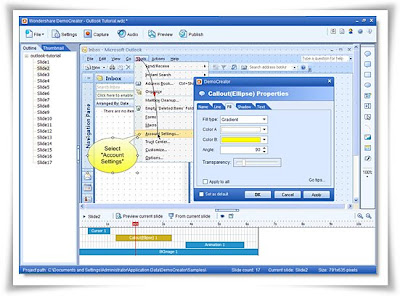
Wondershare DemoCreator - straightforward screen recording software to create flash-based screen movies used for software trainings, presentations, demonstrations, and screen activity logs instead of boring reading material. It not only records mouse movements, keystrokes along with the screenshots, but also provides sound recording and comprehensive editing capability to enhance the final output.


Feature List:
Recording:
• Record actions take on an application, custom region or full screen.
• Record mouse movements and clicks, keystrokes. (New!)
• Auto-annotations and highlights while recording. (New!)

Edit and Enhance:
• Enrich with Interactivities:
• Add callout, shape, text, button and edit entry to make notes and instructions
• Add images (BMP, JPG, PNG, ICO, EMF, WMF, GIF)
• Add a master image as logo or signature (New!)
• Provide 16 kinds of animations(New!)


Enrich with Media:
• Record narration from microphone View the tutorial>>
• Add sound clips (WAV, MP3)
• Preview your edits and transitions in real-time

Powerful Editor:
• Fill elements in different ways (solid fill, gradient fill, fill with picture)
• Add text to elements (font, color, style, size, alignments editable)
• Set actions when click button and clickable areas (do nothing, continue, go to slide, go to URL, close movie, E-mail)
• Organize audio clips’ time sequence with audio timeline editor

Settings:
• Resize the dimension of movie by setting width and height in pixels, and also keep the aspect ratio (4:3, 16:9, 16:10 or custom) automatically
• Set author info (name, email, website, description)
• Set frame rate, quality of output movie
• Set action (stop, loop, close, go to URL) at the end of demo

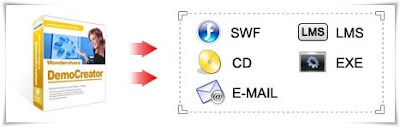
Flexible Publishing Options:
• Publish as Flash movie for sharing on web
• Publish as LMS (AICC/SCORM) compatible courses
• Export as Standalone EXE file or Autorun CD
• Export as email attachment
• Export a certain frame as an image (New!)

OS: Windows 2000/XP/2003/Vista with Microsoft DirectX 9 or later version


Click Here to Read More

Saturday, April 5, 2008

Apple QuickTime Pro v7.4.5 Multilanguage


Apple QuickTime Pro v7.4.5 Multilanguage
Size: 22.72 MB


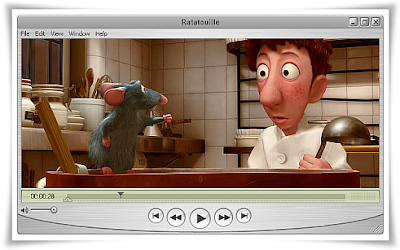
The QuickTime family of digital media creation, delivery and playback software lets you deliver live or pre-recorded video and audio to an audience of any size. When combined with QuickTime Player and QuickTime Pro, these applications work together to provide the industry’s first end-to-end, standards-based digital media delivery system.

QuickTime 7 is Apple's cutting-edge digital media software for both Mac and Windows-based computers delivers unparalleled quality for creating, playing and streaming audio and video content over the Internet. Besides playing MPEG-4 and MP3 content, it supports timecode tracks as well as MIDI standards such as the Roland Sound Canvas and GS format extensions. It also supports key standards for web streaming, including HTTP, RTP and RTSP. Plus, it supports every major file format for images, including JPEG, BMP, PICT, PNG and GIF. QuickTime 7 features an ultra efficient new H.264 video codec delivering stunning quality at remarkably low data rates from 3G to iChat AV to HD.


1. Play movies in Full Screen.
Turn your display into a theatre and enjoy the full cinematic experience, with newly enhanced performance.

2. Save movies from the web.
Build a library of movies by saving them to your computer for playback any time.

3. Do it yourself editing.
Edit movies with the simplicity of cut, copy and paste.

4. Create MPEG-4 content.
Now you can author content in the new worldwide standard format for the Internet — MPEG-4. Learn more.

5. Create 3GPP and 3GPP2 content.
Author high-quality audio, video, and text media in the 3GPP and 3GPP2 file formats, new standards for high-speed wireless networks. Learn More.

6. Create slide shows.
QuickTime Pro enables you to create slide shows from your digital images with a few simple clicks — and even add your own soundtrack.

7. Create designer media skins.
Make your own fashion statement with media skins that create a unique look and feel for your movie. Learn How.

8. Import/Export media.
Import and export video, audio and images from more than a dozen file formats, including the high-quality DV camcorder format and transcode from one format to another.

9. Prepare movies for streaming.
Now you can prepare and compress streaming audio and video for Web delivery. Learn How.

10. Automate your workflow.
Use AppleScript — a Mac-exclusive technology — to automate your production workflow.


Click Here to Read More

Tuesday, April 1, 2008

Winamp Pro v5.53.1924 Multilingual


Winamp Pro v5.53.1924 Multilingual
Size: 12.75 MB


Winamp is a free multimedia player made by Nullsoft. It supports numerous audio and video formats. It also plays streamed video and audio content, both live and recorded, authored worldwide. It has an extremely customizable media library, and allows you to rip and burn your favorite music CDs. Winamp has thousands of skins and plug-ins that allow you to change the look-and-feel of the player, as well as add new features. The player also has access to thousands of free songs, videos and online radio stations from SHOUTcast Radio and AOL Radio with XM.


Product features:

:: A Completely Redesigned Interface, including Album Art
:: Multiple device support, including iPods
:: Access and Share Your Music and Videos with Winamp Remote
:: Play and Playlist the Best Music on the Web with Media Monitor
:: Get Artist & Concert News, Videos & more with Smart Search
:: Enjoy Dynamic Song Recommendations
:: Experience MP3 Surround Sound Support
:: Access to Thousands of Internet Radio Stations, Videos and More!
:: 50 FREE MP3 Music Downloads compliments of eMusic’s 2-week Trial
:: Auto-Tagger provides automatic updates to file information
:: Control Winamp From Your Browser with the Winamp Toolbar


Click Here to Read More

Sunday, March 30, 2008

DivX Creative Bundle v6.8


DivX Creative Bundle v6.8
Size: 16.97 MB


DivX for Windows gives you everything you need to create and play high-quality DivX videos on your PC and beyond.


Click Here to Read More

Friday, March 28, 2008

Nero Micro 8.3.2.1


Nero Micro 8.3.2.1
Nero Burning Rom & Nero Express
Size: 25.69 MB


Nero 8 is a software solution that brings the digital world to your PC with features that make it fun and easy to create multimedia projects with high-quality, professional results. create MP3 mixes and edit vacation videos in High Definition format. Share content around the world with simple Internet upload functions. Burn a disc with just one click, and then enjoy it in any room in your house with versatile streaming features. Rest easy knowing your data is safe in the event of a system crash or a damaged disc. Nero 8 lets you live the digital life with cutting-edge technology and world-class features.

Nero 8, the newest version of the world’s best-selling multimedia suite, brings the digital world to your PC. Now it’s easy to organize and manage all your multimedia files, as well as create and edit new digital content. Nero’s sleek design and user-friendly tools make completing projects fun and enjoyable.

Nero StartSmart 8 is the entry point for all functionality in Nero 8. With Nero StartSmart 8, all the powerful features of Nero8 are at your fingertips, making it easier than ever to complete your digital tasks.

Nero 8 comes loaded with a number of features that enhance Windows VistaTM. With the Nero DiscCopy Gadget, you can copy a disc of any format with just one click. With Rich Preview, you can view the contents of your files without having to open a separate application. With Nero MCE Plug-ins, you can burn and stream your content on a Windows Vista™ MCE powered machine.

New and Improved Features in Nero 8 :
:: Direct access to all features from the project launcher
:: High Definition format support
:: Xbox 360™ and PlayStation® 3 streaming features
:: Blu-ray Disc and HD DVD burning support
:: SecurDisc data protection support
:: Copy a disc with just one click
:: Graphics optimized for Windows Vista™
:: Continual free updates

Supported Platforms: Windows XP / 2000 / Vista


Click Here to Read More

Monday, March 24, 2008

ADG Aspect 5.4.0.78


ADG Aspect 5.4.0.78
Size: 4.20 MB


ADG Aspect 3D is a program, which lets you from a series of photos quickly and easily generate, edit & publish 3D photo compositions on the Web. ADG 3D can be viewed through ADG Java Viewer that eliminates any plug-in installation and gives a platform independent use on the Internet. It can be integrated with ADG Web Panorama, so you can insert 3D object into 360 degrees panorama.


Features :

BASIC FEATURES

:: Creates web 3D compositions (Aspect 3D Model from a series of aspect photos)
:: Interactive zoom and rotation
:: Background image inserting
:: Background panorama inserting
:: Aspect images color keying
:: Automatically aligns images
:: Automatically corrects brightness
:: Automatically corrects contrast
:: Automatically calculation of optimal output file size
:: Automated embedding into the web page
:: Adjustment of output image resolution
:: Adjustment of output image compresson
:: Adjustment of images order and rotation
:: Customized designer user interface
:: ADG Output Format (require Java)
:: MOV Output Format (require QTVR)
:: JPEG JScript Output Format (no plugin required)
:: Output image bilinear filtration
:: Mouse, wheel and keyboard control
:: Javascript control
:: 3D hardware support

Embedding ADG Aspect into Your WEB Site.
When you save your Aspect with HTML option ADG Aspect Tools creates HTML page and all necessary files automatically. You don't need any special HTML or Java programming knowledge, just upload all output files to your web site and rename HTML page to index.html if necessary.

Installation
ADG Aspect Tools requires DirectX Version 6.0 or better installed. ADG Aspect Tools is distributed within a single executable file ADGaspect50.exe, just download and launch it to start your installation. It does not affect any Windows system files, so there is no need to restart your computer after the installation. Use Start/Programs menu or corresponded icon on the desktop to launch ADG Aspect.

Minimum System Requirements
Intel Pentium (R) - class PC
Microsoft Windows (R) 95/98/2000/XP
Microsoft Internet Explorer 4.01 SP1, Netscape Communicator 4.0 or higher
Microsoft DirectX 6.0 or higher
32 MB of RAM
10 MB of available hard drive space
3D accelerator recommended for the best performance


Click Here to Read More

Saturday, March 22, 2008

Advanced Vista Codec Package 4.6.2 Final


Advanced Vista Codec Package 4.6.2 Final
Size: 11.65 MB


Codecs have always been a pain in the butt. This package takes from the best, all the big name creators, several small guys too, and compiles all this into a single pack. All possible conflicts are already dealt with, many user suggested default settings are implemented.


This package does not contain a media player. This package does not associates filetypes. With this package installed, you will be able to use any media player to play DVD's, movies and video clips such as quicktime, realmedia, avi, mpeg, Flv, swf, wmv, etc. Streaming video can be played within web browsers. By default, you shouldn´t need to make any adjustments to enjoy playback immediately.


Click Here to Read More

Friday, March 21, 2008

Bestel DVD Ripper 1.2.1


Bestel DVD Ripper 1.2.1
Size: 4.84 MB


Bestel DVD Ripper is an powerful and easy DVD ripper application for converting DVDs to all most video format (avi,divx,xvid,wmv,asf,...) with excellent output quality. You can enjoy your favorite DVD in anywhere. With integrated advanced video encoder, it is faster than other DVD Ripper software, and just a few clicks is enough.

Key Features
:: Support dvd to avi, divx, xivd
:: Support dvd to asf, wmv
:: Support dvd to other video format
:: Great video audio quality to smaller file and without losing quality
:: Automatically shutdown computer after long time conversion
:: Allows you to select target subtitle and audio track
:: Output profile is adjustable, you can compress movies to any size and quality you need
:: Easy-to-use interface .


Why Choose it?
:: High-speed encoder ensures smooth conversion of video and audio data.
:: So easy to use that only a few clicks are enough.
:: Output settings are all adjustable. It's suitable for veterans as well.
:: Direct DVD movies to all most video formats without losing quality.


Click Here to Read More

Infallsoft DVD Slideshow 2.03


Infallsoft DVD Slideshow 2.03
Size: 12.01 MB


With just three steps. infallsoft DVD Slideshow allows you to create entertaining photo slideshow DVD you can watch on TV.
DVD Photo Slideshow strengthens all its original merits such as multiple transition effects, background music, adjustable slide duration and editable text showed on pictures. All you have to do is add your image files and enhance them with text captions, ken burn effects, music, transitions, etc.

Here are some key features of "infallsoft DVD Slideshow":
:: Customize transition effects, Pan & Zoom for individual slide.
:: Support amazing SWF Flash album themes
:: titles and credits for slideshow.
:: Support trimming background music and recording your own voice.
:: Supported audio formats for background music: MP3, WMA, OGG, WAV.
:: Awesome pan and zoom effects
:: DVD output on DVD-R/RW and DVD+R/RW media (Single or Double Layer)
:: Basic picture editing (rotation, black and white or color, etc.)
:: Supports both PAL and NTSC formats
:: Fast and highgrade MPEG2 encoder
:: Universal DVD burning engine included
:: Optimized for Windows XP and Windows Vista
:: High quality DVD output: photo or picture looks great on TV.
:: Supports more slideshow output options: MPEG video, DVD Folder, ISO File.
:: Decorate your photos with your own voice, text, art clips.
:: Support designing your own Hollywood-style video and motion menus.
:: All-in-One: Basic picture editing, Creating slide show with music, Burning DVD disc.
:: Supports both PAL and NTSC formats. Fullscreen (4:3) output.
:: Support picture formats: JPG, GIF, BMP, ANI, PCX, EMF, WMF, and more...


Click Here to Read More

Apollo Audio DVD Creator 1.2.44


Apollo Audio DVD Creator 1.2.44
Size: 4.14 MB


Apollo Audio DVD Creator is an innovative tool to make your own music DVD. With Apollo Audio DVD Creator you can easily import over 1000 songs(MP3, WAV, WMA, OGG, MPG, AVI etc) or grab tracks directly from Audio CDs and burn into DVDR/RW disc.With powerful DVD navigation menu,you could browse and enjoy your favorite albums conveniently on car or home DVD player.

Features:
:: Put more than 1000 songs on one DVD with top audio quality.
:: Support importing various media formats,include MP3, WAV, WMA, OGG, MPG, AVI, WMV, ASF, AC3, RM anything playable on your PC.
:: Put 5-6 Audio CDs on one DVD disc with CD audio quality.
:: Direct CDs to DVD Copy without losing quality.
:: Burn DVD-Video compliant Disc that playable on any car or home DVD player.
:: Support LPCM, AC3, MP2 audio on DVD.
:: Super fast speed, only need about 30 minutes to create a LPCM format Audio DVD.
:: Create DVD navigation menu automatically with built-in background images.
:: Support various image formats as DVD menu background,include bmp,jpg,gif.
:: Save/load your project, and edit it anytime.
:: Create audio DVD to hard disk for later burning.
:: Support NTSC and PAL TV system.
:: Support a broad range of DVD-R/RW and DVD+R/RW burners.
:: Neat User Interface, 3 steps to burn your music DVD without any complicated parameter settings.


Click Here to Read More

Thursday, March 20, 2008

WebcamXP Pro 2008 v4.10.075


WebcamXP Pro 2008 v4.10.075
Size: 7.29 MB


WebcamXP is one of the most popular webcam software for private and professional use. It offers unique features and unequaled ease of use to let you broadcast / manage your video sources or secure your company with up to 10 video sources per computer. WebcamXP supports all video for windows / WDM sources and most file-based or ip based sources.

It also allows you to do much more like home monitoring with alerts, online gallery and the design of the internal website is customizable. It's the first webcam software that enables the clients connecting to your WebcamXP server to watch your webcam using a flash based technology with a great smoothing effect between pictures (java is still available if you prefer). don't wait any longer and just try the next generation webcam software.


Click Here to Read More

Keyboard Sounder 1.6


Keyboard Sounder 1.6
Size: 12.37 MB


Because long time striking on your keyboard is so tiresome and boring, it is not only a dull job, but also a physical and spiritual affliction, so it reduces your work efficiency and makes you unhappy. It is a problem nobody can avoid, no matter you are a typist, or a software developer, or other. You may have lost the sense of this problem, why don't you try to find a way to solve it?Experience Keyboard Sounder right now! You will enjoy the totally new feeling from your fingers.

When you press the keys, you will hear a fancy sound which is made by the software. The key layout is very exquisite, more than extremely cool 140 sounds effect associated with 18 kinds of keys.

Everything is under your control!

More wonderfully: Keyboard Sounder can play an animation synchronously to respond
to your every action when you press keys.

What' new in v1.6

Bugs fixed
:: fixed bug with shift key can't be hook
:: fixed bug with keyhook.dll was detected as trojan.win32 virus by F-Secure Anti-Virus

Added
:: added auto change scheme by two method in options panel
:: added "football" and "speech" scheme
:: added more sound to abe scheme
:: all wave file was enhanced by DFX and provided two selection during running
installation.


Click Here to Read More

DVD 2 AVI Ripper 2.11.0.45


DVD 2 AVI Ripper 2.11.0.45
Size: 3.19 MB


DVD2AVI Ripper is a powerful and easy-to-use tool that lets you make backups of your home DVD movies. DVD2AVI Ripper produces high-quality AVI (DivX, XviD, MPEG-4, etc.) video files. With DVD2AVI Ripper, you can select the subtitle language, audio track, output file resolution and frame rate, and zoom (Letterbox, PanScan, etc.). DVD2AVI Ripper also lets you preview your work.

Main features:
:: Rip DVD to AVI (DivX, XviD, MPEG-4, etc.)
:: User-defined file resolution, frame rate, bitrate, zoom, subtitle language and audio track
:: Fast conversion with MMX, SSE, SSE2, 3DNOW optimization and automatic processor detection (Pentium 3, Pentium 4, Athlon).


Click Here to Read More

Tuesday, March 18, 2008

VidMorph Pro v1.1.0.32


VidMorph Pro v1.1.0.32
Size: 16.88 MB


Morphing is a special effect used in the television and film industry to create a smooth transition from one image or video to another by transforming the objects in one into the objects of the other.

VidMorph PRO uses standard film-industry techniques to create smooth, professional morphs on your own computer within minutes, without the need for technical skills or complex animation software.

Create your own exciting music videos and movies. Have fun adding morphing to your personal home movies. Morph pictures of yourself or others at different ages to see how you've aged. Morph your dog into your cat. Animate a series of still images. With VidMorph PRO, the possibilities are endless!


Save your morphs in a variety of popular video formats, including 3GP mobile video, Flash SWF, MP4 video, WMV, MPEG, AVI and more. Take your videos with you on your portable digital video player, ipod or phone, post them on the Internet, or send them to friends.

Release your inner artist and director and you will have endless hours of fun and entertainment with VidMorph PRO.


VidMorph PRO Features:

:: Morph video-to-video. morphing technology for professional .video studio
:: Morph Video-to-Image and Image-to-Video. professional morphing technology
:: Morph Image-to-Image, standard morphing feature with powerful quality
:: Multy-morphing, Set series morphs in one morphing project
:: Preview the morph before the final project rendering.
:: Supported input image formats include BMP/DIB/RLE, EMF, GIF, ICO, JPG/JPEG/JPE/JFIF, TIF/TIFF, WMF and others
:: supported input video formats include ASF, AVI, MOV, MPG/MPEG, MP4, WMV and others
:: Crop morphing area, image and video
:: Zoom in on parts of a video, and define a video clip's starting and ending frame.
:: Specify the duration of each morph as well as the duration of the entire output video.
:: Add a sound track for morphing result


Click Here to Read More

Monday, March 17, 2008

Real Player v.11.0.9.372 Gold Premium


Real Player v.11.0.9.372 Gold Premium
Size: 12.62 MB

Download From Rapidshare

or
Download From Easy-Share


Click Here to Read More

Springboard v0.85.2


Springboard v0.85.2
Size: 1.84 MB


Springboard is a fast, light, easy-to-use Windows application for easily and quickly sketching and annotating storyboards for film, video, animation, or other dynamic media.

What does it do?
Springboard helps you organize and plan your story visually.

If you've never made a storyboard before: Storyboarding helps you see what your movie will look like before you shoot. This saves you time and lets you explore more options before you commit your choices to film.

If you've made storyboards on paper: Springboard preserves the simplicity of pencil and paper, plus all the flexibility and power of digital media: perfect erasing, copy-and-paste, easy backups, overlays, exporting directly to video and the Web, and much more.

If you've used other storyboard software: Springboard has a fluid, direct, professionally-designed interface that keeps you focused on what you're doing.

Springboard has been used for:
:: Homegrown video projects
:: Animated shorts
:: Feature films
:: Multimedia presentations
:: Theatre set design
:: Comics
:: and more.

System Requirements
:: Tested with Windows 98, Windows 2000, Windows XP, and Windows Vista.
:: WinTab-compatible pens are supported (and recommended), including pressure-sensitivity and eraser mode. Tested with Wacom ArtPad II, Graphire 2, Intuos 2, and Intuos 3.
:: Minimum display resolution: 800 x 600; recommended 1024 x 768 or higher.
:: Minimum system memory: 128 MB.


Click Here to Read More

FLV Recorder v2.0.1.315


FLV Recorder v2.0.1.315
Size: 1.52 MB


FLVRecorder is the only flash video stream recorder that can record Flash .FLV streaming video broadcasted through HTTP and RTMP protocol automatically.
FlvRecorder have a excellent build-in Flv Player and help you view the flv files, and it is pretty and easy to use.


Click Here to Read More

Thursday, March 13, 2008

Easy MP3 Sound Recorder v3.11


KYDSOFT Easy MP3 Sound Recorder v3.11
Size: 1.05 MB


Easy MP3 Sound Recorder can record any sound from sound card with MP3 format. It records the sound from Windows Media Player, Winamp, RealPlayer, QuickTime, Flash, games, and other Windows applications with high quality, Easy MP3 Sound Recorder can grab streaming audio from the Internet, record Internet radio, music from CD, dialogs from movies, presentation from PowerPoint, MIDI (MID) file from player, and split any section of an audio file. Easy MP3 Sound Recorder also supports to record sound from microphones, line-in, Cassette Tape, Video Tape and more input devices.


Click Here to Read More