My Dear Friends:

We moved to

www.SoftStreet.net


Please come to visit us
Thanks for your patient, Best wishes for you

Showing posts with label Photoshop. Show all posts

Tuesday, April 15, 2008

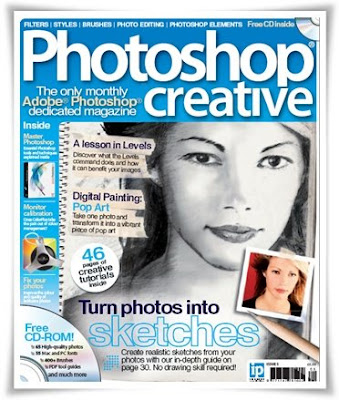
Photoshop Creative Magazine - Issue 11


Photoshop Creative Magazine
Issue 11 - 89 Pages - PDF - 17.77 MB


Download From Rapidshare
or
Download From Easy-Share


Click Here to Read More

Adobe Camera Raw v4.41


Adobe Camera Raw v4.41
Compatible with CS3 & Element 5
Size: 2.50 MB


The camera raw functionality in Adobe® Photoshop® software provides fast and easy access within Photoshop to the "raw" image formats produced by many leading professional and midrange digital cameras. By working with these "digital negatives," you can achieve the results you want with greater artistic control and flexibility while still maintaining the original "raw" files.

The Photoshop Camera Raw plug-in became the latest must-have tool for professional photographers when it was released in February 2003. Camera Raw has been updated to support more cameras and include more features and is available as part of Photoshop CS2.

With Photoshop CS2 you get not only the latest camera raw plug-in, but also the full range of exciting new features that are part of this release.

The Photoshop Camera Raw plug-in now also supports raw files in the DNG format.

It is only compatible with CS3 & element 5
If anyone install it with CS2, the existing version will also not work.
so please backup old .8bi file some where on your hard drive


Download From Rapidshare
or
Download From Easy-Share


Click Here to Read More

Sunday, April 13, 2008

Proxel Lens Corrector v1.2 for Adobe Photoshop


Proxel Lens Corrector v1.2 for Adobe Photoshop
Size: 5.37 MB


The Photoshop plugin Proxel Lens Corrector corrects your lens aberrations; barrel, pin cushion, fish eye, translation or a combination of all.

The main advantages of the tool compared to the competition are:
:: You can correct any lens you own, including e.g. third party wide angle converters.
:: You can easily make high-quality measurements yourself, i.e. the result is not based on manual tweaking.
:: The canvas size is increased for full quality of your pictures, i.e. no down-scaling of the picture. Canvas resizing is very rare for Photoshop plugins. (Because of this the plugin has to be started from the File→Automate menu.)
:: You can measure and correct all parameters – e.g. correct a non-centered and distorted fish eye.
:: You get both 8 and 16 bit color depth support.

More features:
:: State of the art lens calibration tool; easy and fast to use.
:: Calibration result stored in calibration files.
:: Easy to use and understand GUI (Graphical User Interface).
:: Fast and high quality correction of the images.


Click Here to Read More

Portable Adobe Photoshop CS3 Extended


Portable Adobe Photoshop CS3 Extended
Size: 57.52 MB


Download From Rapidshare
or
Download From Easy-Share


Click Here to Read More

Photoshop Creative Magazine - Issue 10


Photoshop Creative Magazine
Issue 10 - 89 Pages - PDF - 22.57 MB


Download From Rapidshare
or
Download From Easy-Share


Click Here to Read More

Saturday, April 12, 2008

SmartMask v.1.2


SmartMask v.1.2
Save time on complex selections
Size: 12.51 MB


AKVIS SmartMask is an efficient selection tool that saves you time and is fun to use. Never before has selection been so simple!

There are many occasions when you have to make a selection. When processing an image, you will often need to mark up an area to which an effect or a correction should be applied. Photo collage and photo montage creation requires thorough selection of objects.


However, making selection can be a painstaking job because many objects don't have clearly defined edges and fade into the background. Just try selecting yourself on a group photo.

AKVIS SmartMask makes even a difficult selection as easy as pie. Now, you can spend less of your time on selection of objects and more of it on creativity.

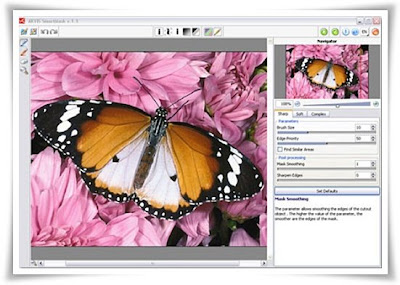
The idea is so simple that you will feel like a child in drawing classes: there are two pencils (red and blue); you draw a line with the blue pencil inside the object you want to select (for example, yourself on a group photo), and with the red pencil - some lines outside the object, to define the areas that should be cut out (other guys in the photo).

The program miraculously reads your thoughts and makes the selection you want - understanding where the borders of the object end.

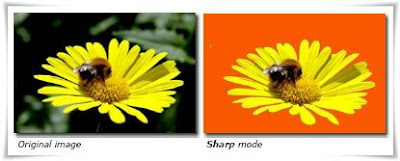
There are three modes tailored to different selection types: Sharp, Soft and Complex.
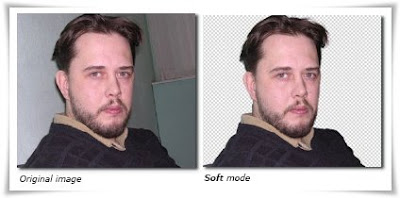
For example, in the Soft mode a green pencil is added, that helps you to define difficult parts - fluff, hair, fur. In cases where the selected object stands against a background of a similar color range, or the object's edges are uneven, you can use the touch-up brush in the Complex mode.


The program even allows you to get rid of the color tint left on the cutout object by the environment. In most cases objects on a photo are not evenly lighted, the cutout object can have shades and colors reflected from the nearby objects. Such color shades can be absolutely inappropriate on a new background: for example, hair having a blue cast from the sky or a green shade from the trees, shadows of objects on the clothes. This mask tool helps to get rid of the unwanted color shades.


Business Use: Making selections takes up much time of the designer's working day. Use of SmartMask considerably increases his/her productivity. Your designer will be released from the boring work and will have more room for creativity and realization of his ideas.


In the tradition of our other products, SmartMask is yet another tool that is not only straightforward, but also fun to use. It makes the dull process of selection, which used to involve a lot of manual work with a lasso or the magic wand tool, an amusing job.

AKVIS SmartMask plugin integrates into the image processing programs installed on your computer. The plug-in is compatible with Adobe Photoshop, Photoshop Elements, Corel (Jasc) Paint Shop Pro, etc.


Click Here to Read More

Fisheye-Hemi v1.12 for Photoshop


Fisheye-Hemi v1.12 for Photoshop
Size: 1.98 MB


The Fisheye-Hemi Plug-In is an Adobe® Photoshop® compatible set of plug-ins that deliver aesthetically pleasing images from fisheye lens.


Click Here to Read More

PearlyWhites v1.01 for Photoshop


PearlyWhites v1.01 for Photoshop
Size: 1.58 MB


PearlyWhites is an Adobe® Photoshop® compatible Plug-In filter that automatically whitens and brightens teeth in digital images.


Click Here to Read More

Friday, April 11, 2008

Photoshop Creative Magazine - Issue 9


Photoshop Creative Magazine
Issue 9 - 87 Pages - PDF - 16.16 MB


Download From Rapidshare
or
Download From Easy-Share


Click Here to Read More

Digital Anarchy Backdrop Designer v1.2.2


Digital Anarchy Backdrop Designer v1.2.2
Photoshop Plugin
Size: 19.22 MB


Backdrop Designer provides a great new way of creating digital backgrounds for photography and other design mediums. Pick from hundreds of premade backdrops, or customize your own presets.


This Photoshop plugin creates beautiful resolution-independent backdrops, very similar to those expensive muslin drapes you may currently have in your photography studio.


Click Here to Read More

The Iconfactory IconBuilder XP v2.0 Photoshop Plugin


The Iconfactory IconBuilder XP v2.0 Photoshop Plugin
Size: 4.67 MB


IconBuilder for Windows is a filter for use with Adobe Photoshop that makes creating icons a snap. By harnessing the professional power of Photoshop and Photoshop layers, IconBuilder provides icon artists with the most complete tool set possible for modern icon design and creation.

IconBuilder for Windows has the ability to construct and save icons for all the traditional Windows OS platforms (95, 98, 2000, NT & XP), including the latest version, Windows Vista.


Compatible with Adobe CS3
IconBuilder is compatible for use with Adobe's new Creative Suite 3, specifically Adobe Photoshop CS3 and Fireworks CS3. Photoshop CS3 gives artists the power and flexibility needed to create modern, 256x256 pixel icons quickly and easily.

Build Icons for Windows Vista
IconBuilder for Windows supports the creation of Vista-ready ICO files with 256x256 resources. Set preferences to use PNG compression or not, build in large format icon resources, save and you are done!

New Verification Tools
Thanks to the Verify panel, IconBuilder for Windows lets you view resource information and warnings for each file format prior to saving, so you can catch problems early, avoiding potential issues later on in the project.

Feature List
:: Creation of 256x256 .ICO files for Windows Vista
:: Supports creation of all classic Windows .ico formats (WIN 95, 98, NT, 2000 and XP)
:: View icon information and correct errors prior to saving via Resource Verification
:: Supports transparent / translucent masking of icons
:: QuickBuild creates all resources in a single click
:: Extract any PC icon into Photoshop for editing
:: View icons against a variety of desktop colors
:: ToolTips for novice and advanced users


Click Here to Read More

Panopticum Digitalizer v1.24 for Photoshop


Panopticum Digitalizer v1.24 for Photoshop
Size: 1.11 MB


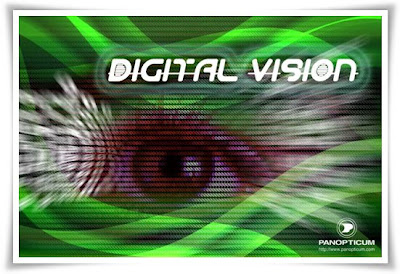
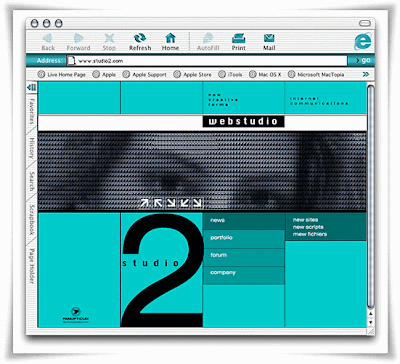
Panopticum Digitalizer - it is the additional module for the Adobe Photoshop. Digitalizer allows to receive very interesting effect. The image is represented by a matrix, the elements of which will form a figure of the initial image. Elements of the image can be figures, letters and any other symbols. A set of used symbols you can edit in the special editor.


Also you can use ready character sets, by loading them from a file. Setting up parameters of plugin, you can change quality of display picture and its expressiveness. If picture driven, the symbols of a matrix will change in dynamics. In a combination to other filters and using the multy-layers compositions can be received the perfect products of computer art products.


Click Here to Read More

Thursday, April 10, 2008

Photoshop Creative Magazine - Issue 8


Photoshop Creative Magazine
Issue 8 - 85 Pages - PDF - 16.13 MB


Download From Rapidshare
or
Download From Easy-Share


Click Here to Read More

Photoshop Creative Magazine - Issue 7


Photoshop Creative Magazine
Issue 7 - 87 Pages - PDF - 16.82 MB


Download From Rapidshare
or
Download From Easy-Share


Click Here to Read More

Wednesday, April 9, 2008

Dfine 2.0 for Photoshop and Photoshop Elements


Dfine 2.0 for Photoshop and Photoshop Elements
With User Guide

(Windows & Mac OS Version)


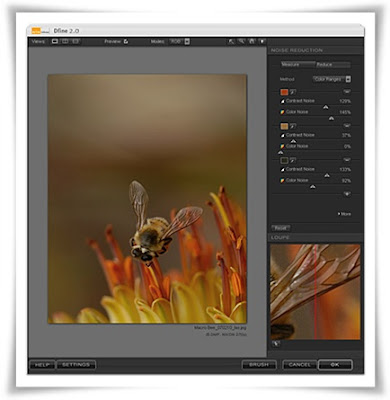
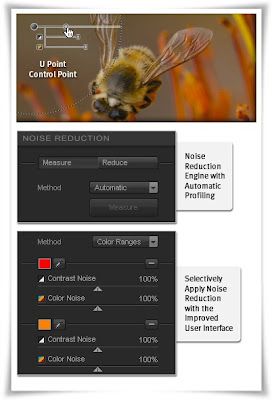
Dfine 2.0 gives you unprecedented control over exactly how much and where to apply noise reduction. This makes it ultra-easy to eliminate noise in your images while maintaining detail and sharpness, thus improving the quality of every digital photo you take. Dfine 2.0 is designed to prevent the loss of detail other noise reduction tools often introduce.


Virtually, all digital cameras inherently create unwanted imperfections known as noise. The amount or type of noise in an image typically depends on the quality and type of imaging sensor with which it was created.

Contrast (Luminance) Noise and Color (Chrominance) Noise can be individually present in an image or might be seen in the same image. Fast or high ISO speeds and low light levels can add noise to images, while some images might exhibit high levels of JPEG artifacts.

U Point® Technology
One of the hottest technologies in digital photography today, U Point technology powered Control Points have been added to Dfine 2.0 making it easy to reduce noise only where it is needed, maintaining details everywhere else.


Selectively Apply Noise Reduction
The Control Point and Color Range methods, along with the Selective Tool offer you the most advanced ways for selectively applying noise reduction to your images.

New and Improved Noise Reduction Engine with Automatic Profiling
Dfine 2.0 contains a brand new reduction engine that provides best-in-class noise reduction while retaining an incredible amount of detail.

Automatic camera profiling replaces the need to purchase camera profiles and fine-tunes Dfine’s revamped noise reduction engine to produce the best results for your camera. You can also create and save your own profiles for batch processing images.


Dfine 2.0 for Photoshop and Photoshop Elements
Download From Rapidshare:

PC (Windows Version) - Mac OS Version

or
Download From Easy-Share:
(Only Windows Version)

Dfine 2.0 User Guide:

Download From Rapidshare
or
Download From Easy-Share


Click Here to Read More

Photoshop Actions Set - Photographers Toolkit Vol 1, 2, 3


Photographers Toolkit Vol 1, 2, 3
(Photoshop Actions Set)
Size: 1.06 MB


Download From Rapidshare
or
Download From Easy-Share


Click Here to Read More

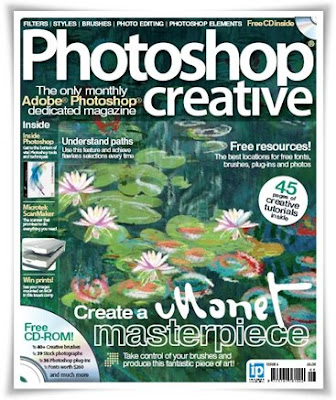
Photoshop Creative Magazine - Issue 6


Photoshop Creative Magazine
Issue 6 - 87 Pages - PDF - 19.11 MB


Techniques
The latest and greatest techniques;
- How to use Paths in your work
- Remove red-eye from photos
- Improve portraits with Lighting Effects

Creative Tutorials
Easy-to-follow creative tutorials;
- Learn how to paint like Monet
- Transform day photos into night
- Create digital frames

Also featured;
- The best locations for free resources
- Common Photoshop queries answered


Click Here to Read More

Photoshop Creative Magazine - Issue 5


Photoshop Creative Magazine
Issue 5 - 86 Pages - PDF - 19.95 MB


Techniques
The latest and greatest techniques;
:: Get to grips with Levels
:: Improve colour in portraits
:: See what the Noise filters can do

Creative Tutorials
Easy-to-follow creative tutorials;
:: Turn photos into vibrant Pop Art images
:: Create your own outer space scene
:: Make realistic sketches from photos

Also featured;
:: Create the impossible in Photoshop
:: The best creative resources reviewed


Click Here to Read More

Tuesday, April 8, 2008

Color Efex Pro v3.0 (Win & Mac Version) for Photoshop and Photoshop Elements


Color Efex Pro v3.0 + User Guide
For Photoshop and Photoshop Elements
(Win & Mac Version)


Completely Original. Completely Indispensable.
Nik Software Color Efex Pro™ 3.0 filters are the leading photographic filters for digital photography. The award-winning Color Efex Pro 3.0 filters are widely used by many of today's professional photographers around the world to save time and get professional level results. Whether you choose the Complete Edition, Select, or Standard Edition, you’ll get traditional and stylizing filters that offer virtually endless possibilities to enhance and transform images quickly and easily.
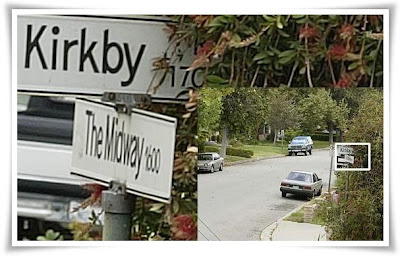
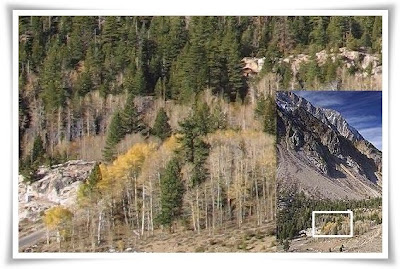

Patented U Point technology provides the ultimate control to selectively apply enhancements without the need for any complicated masks, layers or selections. Control color, light and tonality in your images and create unique enhancements with professional results. With 52 filters and over 250 effects found in Color Efex Pro 3.0 you can perform high quality retouching, color correction and endless creative enhancements to your photographs.

Updates to old favorites such as Classical Soft Focus, Darken/Lighten Center, and Vignette filters are joined by exciting new filters Film Effects, Glamour Glow, High Key, Selective Contrast, Bleach Bypass, and more.


Color Efex Pro 3.0
Nik Color Efex Pro 3.0 has been significantly updated to provide photo enthusiasts and professional photographers alike with the most powerful yet easy to use set of photographic filters ever created. DSLR owners will revel in the wide range of quick and easy fixes to dramatically improve their photos with just a few clicks of the mouse. Professional wedding, nature, commercial, and portrait photographers will appreciate the speed of workflow and advanced features designed to support uniquely creative styles and deliver class-leading power.


U Point® Technology
U Point powered Control Points make it easy to selectively add, modify and remove a Filter effect using convenient sliders. Award-winning U Point technology gives you ultimate control to selectively apply enhancements without the need for any complicated masks, layers or selections.


New Filters
The new filters in Color Efex Pro 3.0 range from creative enhancements and special effects to re-touching tools and over 30 conventional film emulation filter effects. New filters include Film Grain, Film Effect, Glamour Glow, Selective Contrast, High Key, Low Key, Polaroid Transfer, Cross Balance filters, and more. Previously available filters have also been updated to provide even more options.

Nik Software product filters are developed to integrate seamlessly into many popular image editing applications that support the Adobe plug-in architecture and there are numerous software applications that accept Adobe plug-in compatible filters. Please consult your image editing application’s documentation for compatibility and installation instructions for 3rd-party plug-ins.


System Requirements

Windows
Windows 2000 Professional, Windows XP Home Edition, Windows XP Professional, Windows Vista
Pentium III 1GHz or better
256 MB RAM
Adobe Photoshop 7 through CS3, Adobe Photoshop Elements 2.0 through 6.0, or other Adobe Photoshop plug-in compatible Application

Macintosh
Macintosh OS 10.4 or later
G4, G5, Intel® Core™ Solo, Intel Core Duo, Intel Core 2 Duo, Intel Xeon
256 MB RAM
Adobe Photoshop CS2 through CS3, Adobe Photoshop Elements 4.0, or AdobePhotoshop plug-in compatible application


Color Efex Pro v3.0
Download From Rapidshare:

PC (Windows Version) - Mac OS Version

or
Download From Easy-Share:
(Only Windows Version)

Color Efex Pro v3.0 User Guide:

Download From Rapidshare
or
Download From Easy-Share


Click Here to Read More

Stair Interpolation Pro 2.5 (Photoshop Plugin)


Stair Interpolation Pro 2.5 (Photoshop Plugin)
Size: 1.13 MB


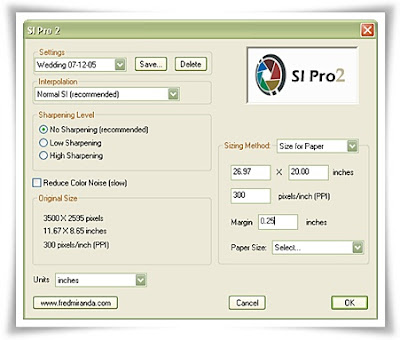
The new SI Pro 2.5 plugin, now compatible with Windows Vista and CS3, gives photographers access to powerful and flexible options for customizing their own image interpolation outputs. It is the result of many months of development and based on the feedback we received from many professional photographers looking for the highest quality print output.


The SI Pro 2.5 plugin is the next generation interpolation tool and replaces the popular SI Pro plugin. This new essential digital darkroom tool features improved algorithms, added options to choose from pre-set and custom paper sizes, pixel dimension, margins, printer resolution and even interpolates your images by scale. A powerful downsampling option was also added to SI Pro 2.5 making this plugin ideal for your interpolation and downsampling workflow.


The main concept of this professional plugin is to offer one solution for all digital files, including scanned film. It works with both English and Metric unit systems, therefore encompassing any printing media available.
Fine, Normal and Coarse SI Interpolation intensities as well as optional smart sharpening can also be added to your desired interpolation method. For your high ISO files, the new SI Pro 2.5 offers the option of removing color noise while preserving pixel information intact.


Click Here to Read More