My Dear Friends:

We moved to

www.SoftStreet.net


Please come to visit us
Thanks for your patient, Best wishes for you

Showing posts with label Office. Show all posts

Tuesday, April 8, 2008

Nitro PDF Professional v5.3.3.6


Nitro PDF Professional v5.3.3.6
Size: 23.31 MB


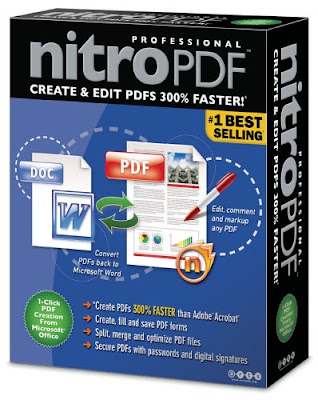
Nitro PDF Professional is a high-quality, affordable PDF creation and editing application that puts the full power of PDF within everyone's reach. In addition to providing the basics — powerful, robust PDF creation at an extremely affordable price — Nitro PDF Professional includes the full range of top-shelf PDF functionality, opening up new vistas for current and new users of PDF.
Nitro PDF Professional is built from the ground up as the perfect PDF product for business and enterprise, combining an extremely competitive price with a no-compromises feature set that gives users the power to organize, edit, secure and create PDF.
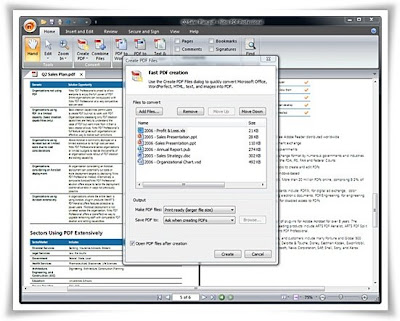

Create, view & edit all of your PDF documents and gain full control over your PDFs with just the one application. Create PDF from Microsoft Office with one click and easily convert more than 200 file types to PDF. Copy, edit, and insert text, graphics and whole pages. Add automatic page numbering, date- and time-stamps. Add navigational aids like bookmarks and hyperlinks. For business users, Nitro lets you: markup and review documents using sticky notes, highlighting, and comments. Configure security settings, and control others' ability to print, edit, and/or copy your work.

Create and share
PDF is all about sharing information. You can send someone a PDF file and know they'll be able to view it correctly, no matter what kind of computer they have or what software they use. Nitro PDF Professional gives you the tools to create PDF from scratch, by converting existing files or from within any application that can print.

• Easy PDF Creation. Create PDF files with a single click from within Microsoft® Office applications, by converting from any of over 200 different file types, or by using the bundled Print-to-PDF printer driver.
• Create and edit compilation PDFs. Combine different files and file types into a single PDF file for convenient distribution. Add, remove and shuffle pages, or insert pages from other PDFs.
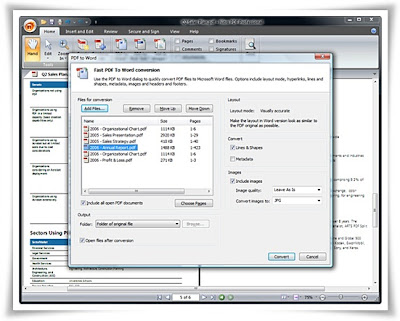
• Convert to Word. Convert PDF files back to Microsoft® Word format for easier editing and copying.

Edit PDF files
Nitro PDF Professional also gives you the ability to edit existing PDF files — so you don't have to go back to the original files if you want to make changes or corrections. You can also enhance your PDFs with an extensive range of interactive features.

• Directly edit text and images. Use intuitive editing tools to directly insert or edit text and images in PDF files.
• Stamps and watermarks. Apply stamps and watermarks to single or multiple pages - mark documents as approved, add letterheads, company logos, footers, and more.
• Intelligent stamps. Add page numbers, date stamps and Bates numbers to PDF files, with control over font, positioning, and more.
• Add enhancements and interactive features. Insert and modify the full range of PDF navigational and interactive features — links, bookmarks, buttons, hyperlinks, and JavaScript.

Intuitive commenting and review
The built-in review and collaboration features of PDF offer an alternative to ad-hoc email or paper-based processes that is light years ahead. With PDF the entire collaboration process is electronic, so nothing gets lost and all feedback stays organized.

• Intuitive tools. Add feedback in familiar and intuitive ways with sticky notes, highlighters, underlines, and more.
• Nothing gets lost. Comments and feedback are attached directly to the material being commented on, so nothing gets lost. And commenting is non-destructive — the original material remains intact for later reference.
• Organize feedback. Nitro PDF Professional's Comments Panel automatically keeps feedback organized, allowing you to see all commentary at a glance and to sort it by contributor, comment type, page, date submitted, and color.

Secure your work
The built-in security features of PDF give you exceptional control over the PDF files you create: encrypt files to prevent unauthorized access, restrict sensitive operations, and more.

• Encryption. Password-based PDF security encrypts the entire contents of your PDF files using the DES or AES algorithms, guarding against disclosure of sensitive information in the case of loss or theft.
• Set permissions. You choose what others can and can't do with your PDF files — document viewing, printing, editing, and copying can all individually be turned on or off, or secured with a password.

New in version 5.3.1:
* Create and apply digital signatures to your PDF files.
* Advanced image editing, including inserting, cropping, rotating, downsampling, replacing, extracting, and more.
* Export files for re-use in Microsoft Word, Corel WordPerfect, Open Office, and more.
* Extract all text and images.
* Batch processing for all exporting and Bates numbering features.
* Full support for Chinese, Korean, Japanese (CJK) and Central European (CE) fonts.
* Text Box and Call Out commenting tools for text-based feedback.
* 'Getting Started' help for new Nitro PDF Professional users.
* Email documents and forms from Nitro Pro.


Click Here to Read More

Monday, April 7, 2008

Check In Out Organizer Pro 1.9


Check In Out Organizer Pro 1.9
Size: 8.22 MB


Check In/Out Organizer Pro is a flexible check-in and check-out transaction management software that you can easily customize to your specifications.

Our Check In/Out inventory system gives you an easy way to build the following software solutions:
:: Document Library System
:: Tool/Equipment Tracking System
:: Small Warehouse Tracking System
:: Media Inventory/Tracking System
:: Book Library System
:: and more ....

Check In/Out database software solution includes four databases with a minimum number of fields:
:: Items: manage and catalog all items (books, equipment, tools, CDs, video tapes, DVDs, or any inventory items...)
:: Borrowers: manage borrowers, members, patrons, employees information
:: Loan Database: view, search check-in and check-out transactions
:: Fine Database: manage fine transactions (optional)


Click Here to Read More

Wednesday, April 2, 2008

Windows and Office Genuine Advantage Validation


Windows and Office Genuine Advantage Validation
Size: 1.13 MB


LATEST VERSION!
100% working on Windows Update, Office Update
Microsoft Download Center and
Microsoft Update

Download From Rapidshare
or
Download From Easy-Share


Click Here to Read More

Inn Planner 2008 Designer


Inn Planner 2008 Designer
Hostel Reservation Software
Size: 13.74 MB


Inn Planner takes care of all accounting issues in a small inn establishment of up to 30 rooms. It handles everything from reservations to invoicing to generating financial reports. Being the first truly visual inn management product, Inn Planner visualizes room availability, immediately showing what rooms and rates are available on certain dates. Making a reservation for your guests is as simple as a few mouse clicks...


InnPlanner 2008 - automated guest management for small hotels and B&B. Are you an innkeeper running a small hotel or a bed and breakfast? Straighten up your paperwork, eliminate errors and make your life easier with automated guest management! InnPlanner takes care of all accounting issues in a small inn establishment of up to 30 rooms. It handles everything from reservations to invoicing to generating financial reports.


Major Features
+ Automate work with Calendar, Reservations, Orders, Services, Rooms, Customers, Discounts, Tariffs, Agents, Notes and more;
+ Print and generate invoices;
+ Use more than 30 standart reports and handy query/report designers;
+ Program"s built-in editors - Form Editor, Report Style Editor, HTML/TXT Output Editor, Formula Editor, Script Editor - let you change everything, even the hotkey combinations! Add new fields to your database and remove useless...


Designer Edition
There are plenty of systems available, each with their own compromises. Why settle for something that does only part of what you need?
InnPlanner 2008 Designer allows you to design a perfect system for your hotel! Being a top-of-the line product, it allows full customization of every field and every action. Add extra fields and tables to reflect your hotel’ unique features. Maximize your profit by offering inventive discounts depending on current or expected vacancy rates, make automated announcements, generate custom reports or even track employee salaries with InnPlanner 2008 Designer!


Click Here to Read More

Friday, March 28, 2008

TrueCafe.4.1


TrueCafe.4.1
Size: 8.23 MB


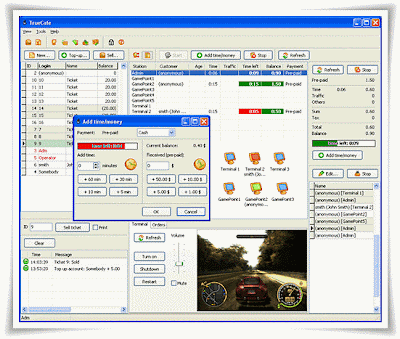
Friendly cyber cafe software (Internet cafe software) with modern user interface, great number of features and outstanding customer support.

Control a cyber cafe with ease
All important information is displayed on one screen: the list of customers that you can create, edit, sell products to; the list/icons of workstaions you can arrange according to the real location of terminals in the club; session summary for a selected terminal; the list of active sessions. While managing a session, you can set/extend a time limit or pre-paid, add any product (printing, scanning, etc.), give a discount, print a receipt when a session is finished.

Utilize pre-paid tickets (time codes)
Create, print, sell, delete or recover pre-paid tickets. Distribute tickets among your employees (agents). Keep track of a ticket status. Delete all unused tickets. Use a ticket to top-up a customer session.

Use license key (CD-key) management
Cut down your game licensing expenses using the CD-key management system. Purchase a quantity of licenses to cover a simultaneous gameplay vs. purchasing a license for every terminal where a game is installed.

Install on NComputing and Terminal Server
Install TrueCafe on a multi-session platform such as NComputing host (www.ncomputing.com: L100, L200, X300, etc.) or Windows Terminal Server. In this case a number of user sessions run on a host computer simultaneously. Each session is considered by TrueCafe as a separate virtual terminal with TrueCafe Client running. TrueCafe Server can be installed on either the same shared computer or a detached one.

Automatically charge customers for printing
TrueCafe Printer Watcher software let you automatically charge your customers for printing on any printer in your cyber cafe, using a very precise method of calculating the exact number of document pages and copies. Use the print confirmation feature which notifies your customers how many pages they print and how much they are charged for the printing. You can also turn on the print control feature which means a customer can only print if he has enough money on his balance.

Setup any complicated pricing
Configure pricing per minute, hour, an item or setup a table of fixed sums that are added to a bill; round amount of a service; setup taxing (included in or excluded of the price). Create a number of time zones with distinct pricing for each one. Setup amount-dependent pricing (e.g. 1 hour = $5, 2 hours = $7, etc.). Create a pricing package for each group of customers or let your customer select pricing they prefer by providing them with "public" packages.

Protect terminals
Lock a terminal unless a customer enters his name/password or a cyber cafe administrator unlocks a terminal remotely. Disable the Task Manager, hide the standard Desktop and Start Menu. Setup a restricted set of applications a user can start. Warn a customer via a message or custom sound file when critical amount of time/money is left. Let your customer top-up his balance using a ticket, change his password, order products (drinks, snacks, etc.) from his/her place. Restart a terminal when a session ends to rollback any changes made by a customer (providing that DeepFreeze software is installed).

Control terminals remotely
Get a terminal screenshot and the list of running processes. Terminate any process, start an application remotely. Control terminal sound volume, mute sound.

Chat with a customer
Use a build-in instant messenger to organize a chat between operator and a customer on any terminal. Send a text message to a terminal in order to notify your customers about an important event or provide them with any other information.

Manage terminals
Setup an application set for each group of terminals (e.g. Internet station, game station, etc.). Shutdown or restart any terminal, start an application on a terminal remotely. Change the TrueCafe Client security level (none, auto-start, disable Task Manager, hide Desktop and Start Menu).

Setup a point-of-sale
Sell products in your cyber cafe. Make a walk-in (anonymous) and member sales, select multiple items into a bill, add/remove items from a bill. Print a receipt on the receipt printer or any other printer. Make your unique receipt design.


Click Here to Read More

Thursday, March 27, 2008

Jade Property Suite v5.6.0 build 1326


Jade Property Suite v5.6.0 build 1326
Size: 5.32 MB


Manage your real estate listings, contacts and enquiries, Publish your property listings to your website, Put a full-featured property search on your website, Create personalized emails with full-color details, Print flyers, brochures, catalogs, reports, letters, labels and business cards, Export to other formats, Customize to fit your business Compact and powerful.


Jade Property Suite has a powerful web publishing system that generates the real estate listings for your website. Your customers will find it easy to locate a property on your website. You will find it easy to maintain. Jade handles everything, from image processing to search scripts and synchronized uploading.

Jade's in-built editors allow you to customize the look, content and categorization of your web listings. A simple default design provides you with a starting point for your own customized listings.

Product Homepage's


Click Here to Read More

OrgBusiness School Calendar 1.3


OrgBusiness School Calendar 1.3
Size: 10.25 MB


School Calendar is a universal calendar for teachers and pupils from high-schools and colleges, letting them track lessons and tasks to do, organize the studies more effectively than before. To plan time and eliminate overlapping of classes, the calendar lets you track a single pupil or teacher, group of pupils, classroom or school teaching staff. The calendar is ideal as a single reference point for information about classes, details, material, notes and comments. The calendar has an automatic search option and auto-completion of information about a class if it has ever been entered into the database. For more convenience, there are different viewing modes: calendar with a vertical or horizontal timeline or a table-like one. Reminders can help users never miss the class or important event again. Introduced specially for teachers is an ability to see the payment details for any particular date.

The calendar data can be synced with Microsoft Outlook, exported to various formats, such as .xls, .txt, .html, .xml for use in other applications. Included is an auto-backup option with an opportunity to remove old archives automatically. The calendar is password protected against unauthorized access. There is a low-priced edition of the product for a workgroup that allows users to work simultaneously over the network.


Click Here to Read More

OrgBusiness OrgCourier 1.2


OrgBusiness OrgCourier 1.2
Size: 9.32 MB


This software is suitable for courier business. It's perfect for couriers to plan working hours so that the orders do not overlap with someone else and keep track of scheduled appointments. It'll store the information about clients, such as their address, telephone, email and comments. This modern and extremely handy program makes management a real pleasure. Included are two viewing modes, an automatic search option and password protection.

The program has a handy interface to calculate and show the "fee charged", helping you to make decisions quickly. It's possible to create reminders to alert couriers about the things they should do. Available is an automatic search and auto-field filling for a customer, who has already been entered to the database. You can view the information about payments, daily income for any day at any moment when you need it. For those people, who work in Microsoft Outlook, it's possible to export data. Export of data is available to different formats: XLS, TXT, HTML, XML for its adaptation for other programs. In case of crashes or virus attacks, there is an auto backup function with a possibility to remove old archives automatically.


Click Here to Read More

Thursday, March 13, 2008

Book Label 2007 v.1.1.0.30


Book Label 2007 v.1.1.0.30
Size: 6.49 MB


Do you have a collection of books that is getting of hand? Are you looking for the most efficient way to catalog it? Look no further... Book Label 2007 is the answer to your problems.Expanding the suite of powerful software for collectors, CodeAero Technologies now presents Book Label 2007. This easy-to-use software enables you to stay on top of your ever growing collection of books.

Quick and Easy Data Entry
All information about your books is downloaded from online databases (including cover art).

One-Click Sort & Search
Sorting your database is as easy as clicking a button.

Loan Management
Make sure you never lose another book by easy-to-use loan management.

Reports & Exports
Printing and exporting your data is only one mouse-click away.

Reliability & Speed
Book Label is built on a solid client/server database which means your collection can grow to virtually any size.

Manage Multiple Collections
You can can create any number of databases and keep them separate. Make sure you never lose another book by easy-to-use loan management.


Click Here to Read More

Advanced Random Password Generator v1.0


Advanced Random Password Generator v1.0
Size: 1.22 MB


Advanced Random Password Generator (pwdGen) is utility that provides generation of qualitative highly random passwords. Random passwords can provide higher security for your accounts. The program uses RSA crypt provider as a robust random number generator. The password generator can use different customizable character sets, user also can select length of the password. The program includes database for managing user passwords. Program uses custom interface components and has user-friendly look.


Click Here to Read More

Easy Currency Converter v3.5


Easy Currency Converter v3.5
Size: 1.06 MB


If you often have to convert money from one currency to another, it would be a good idea to acquire a software that serves this purpose. Easy Currency Converter is a simple currency calculator and bases its cross-currency calculations on the US Dollar. This means that if you, for example, convert Euro to Yen, it will first convert Euro to Dollar and then Dollar to Yen. This process is invisible to the user.

After you install the program you need to update the currency exchange rates. This is done clicking the Update button and is only possible if you have an Internet connection. Next you'll have to wait for the program to download the exchange rates from the publisher's website.


Click Here to Read More

Tuesday, March 11, 2008

Photo Collector Pro v1.2.2


Photo Collector Pro v1.2.2
Size: 9.49 MB

Enjoy an organized photo collection
Create a digital photo album
Edit your photos
Share your photos with friends and family


Key features:
:: Catalog photos automatically
:: Auto-scan your harddisk and CDs
:: Browse your photo album
:: Browse by date, event, subject, etc... view full screen, zoom in...

Edit your photos
:: Rotate, flip, resize, crop, remove red eyes, adjust colors, etc..

Create slideshows
:: Many slide transitions available

Search your photo album
:: Find photos by caption, subject, keywords, etc...

Print photos
:: Print photos, thumbnail sheets or photo property lists

Share photos online
:: Export to HTML and place your pictures on your website (Pro only)

Read/write EXIF & IPTC
:: Read EXIF&IPTC, write back caption and keywords (Pro only)

Photo Collector runs on Windows 98, ME, 2000, XP and Windows Vista


Features
:: Adding digital images to the database
:: Supported image file formats: JPG, GIF, BMP, PNG and TIFF
:: Reads EXIF and IPTC header information
:: Add photos by reading them directly from any WIA-compliant digital camera
:: Add photos by scanning your harddisk, USB stick or CD/DVD-ROMs for images files
:: Unlimited number of photos
:: After adding, you can use the Edit screens to edit the properties of the photos to your own liking
:: Use the Batch Edit Properties function to modify multiple records in one go

Image editing
:: Rotate 90 degrees left/right (lossless)
:: Flip horizontal/vertical (lossless)
:: Red-eye removal
:: Cropping
:: Rotate (correct camera tilt)
:: Grayscale color images
:: Contrast and brightness adjustment
:: Red, Green, and Blue color adjustment
:: Support for advanced editing by external editor program

Image viewing
:: Thumbnail view of your photos on the main screen
:: Resize thumbnails on-the-fly
:: Auto Zoom: automatically enlarge the photo the mouse is pointing at
:: Timeline view: group photos by the year, month or day they were taken
:: Browse mode, where you can also perform lossless rotates and flips

Slideshow viewer:
:: Variable slide and transition duration
:: More than 20 basic transition types, with over 160 variants
:: Set photo as Windows wallpaper with one click

Available data fields
:: Main: Caption, Photo Date/Time, Event, Photographer, Location, Subject, Category, People
:: Notes: Notes, Keywords, User Checklist, User Text, User Number, Personal Rating
:: Pro: Camera, Filter, Lens, Exposure, Flash Used, EXIF fields (Pro edition only).
:: Image File: File Path, File Location, Format, Color Depth, Width, Height, Size
:: All fields can be renamed, e.g. to your own language

Viewing, searching and sorting
:: View your collection as a list with multiple columns, or resizable thumbnail images
:: Sort on any field, or on multiple fields
:: Configurable lists, choose which fields to show as columns
:: Automatically group photos in folders, e.g. by Photo Month or Subject
:: Quick Search, for finding photos that contain the text you type, in any field

Filter feature:
:: Search in specific fields
:: Search in multiple fields in one search
:: Use AND or OR to combine filter conditions
:: Use NOT to show all items EXCEPT the filter results
:: Statistics screen, showing a graphical chart with bars per subject, format, people, etc...

Printing
:: Print individual photos, one per page for best quality
:: Print contact sheets of all photos in the database, you can choose how many thumbnails to print per page
:: Print lists of all photos in the database, you can choose which fields to shows as columns and which field to sort the list on.
:: Print a selection of photos, e.g. the result of a search

Exporting (PRO only)
:: Export to HTML, for creating an online photo album to share with your friends
:: Automatic resizing of large images
:: Optional watermarking to help protect copyrights
:: Export to Folder, for placing a selection of photos in a single folder
:: Export to Text (e.g. CSV), for using your data in other programs like Excel
:: Export to XML


Click Here to Read More

Game Collector Pro v2.3.3


Game Collector Pro v2.3.3
Size: 4.66 MB


Game Collector gets its game data and cover images from our own Collectorz.com Game database. Users of the program help build and maintain the database by submitting data and images to us using Game Collector's Submit feature. Our content managers judge and process the submitted data manually, so that data quality is ensured. At the moment, the database contains data for nearly 18 thousand video games on 70 different platforms.

Game Collector and its online game database support all available game platforms. The online database has data for game on 70 different platforms, of course including the popular current consoles and PC games...

Browse your game collection
Browse your game inventory on screen, ordered the way you want (e.g. by Platform, by Genre, by Purchase Date, etc...). You can view your lists in a columnar List View or in the cool Images View, showing just the cover art. Group your games in folders, e.g. by Platform or by Genre or scroll through them as one big list.

Data entry and maintenance tools
Built-in Auto Capitalization function, e.g. typing "metroid prime 3: corruption" will automatically change into "Metroid Prime 3: Corruption". The AutoCap feature is fully user configurable, including an exceptions list.
Next/Previous buttons in Edit Game screen let you edit multiple movies in a row, without leaving the edit screen.
Use the Edit Multiple feature to modify data for multiple movies or episodes in one go.
Automatic Sort Title generator make sure that titles like "The Sims" are sorted correctly.
Rename data fields to suit your needs, several User Defined fields are available for this purpose.


Sorting and Searching
Order your games lists any way you like using the Sort Order screen.
Use the Quick Search box to search your entire database for the occurrence of a particular text.
Use the Filter screen screen to search on particular fields using AND, OR and NOT combinations.

Printing (PRO edition only)
Print lists of your games. You decide which fields to show as columns and which field(s) to sort the list on.
Print one game per page with all details, including box cover image.
Print a selection of games, e.g. the result of a search.

Export to HTML (PRO edition only)
Export game lists to HTML format, so that you can view and show your collection on your website.
Export game details pages using various layout templates and styles, including all game details and cover images.

Loan Manager (PRO edition only)
Track which Games you loaned and to who
Track Loan Date, Due Date and actual Return Date
Add extra notes for each loan
View all Loaned items, all Overdue items or entire loan history


Compatibility
The Windows edition of Game Collector is compatible with Windows 98, ME, 2000, XP and Vista. It is available in the following languages: English, Dutch, German, Turkish, Polish, Spanish.


Click Here to Read More

Book Collector Pro v5.2.1


Book Collector Pro v5.2.1
Size: 10.67 MB


Browse your home library
Browse your book inventory on screen, ordered the way you want (e.g. by Title, by Author or by Publication Date). You can view your lists in a columnar List View or in the cool Images View, showing just book cover images.
Group your books in folders, e.g. by Genre, Author or Publisher, or scroll through them as one big list.

Data entry and maintenance tools
:: Built-in Auto Capitalization function, e.g. typing "harry potter" will automatically change into "Harry Potter". The AutoCap feature is fully user configurable, including an exceptions list.
:: Next/Previous buttons in Edit Book screen let you edit multiple movies in a row, without leaving the edit screen.
:: Use the Edit Multiple feature to modify data for multiple books in one go.
:: Automatic Sort Title generator make sure that title like "The Glass Inferno" are sorted correctly.
:: Rename data fields to suit your needs, several User Defined fields are available for this purpose.


Sorting and Searching
:: Order your book lists any way you like using the Sort Order screen.
:: Save your sort order definitions and activate them directly using the Sort Order menu on the toolbar.
:: Use the Quick Search box to search your entire database for the occurrence of a particular text.
:: Or build advanced filters with the Filter screen, using brackets, AND, OR, NOT, equal, not equal, greater than, less than, "contains" and wildcards.
:: Save your filters and activate them directly using the Filter menu on the toolbar


Network Support including Read-Only Mode
:: A lock file system automatically prevents concurrent editing
:: When one user is already using a database in Writable mode, subsequent users will automatically open the database in Read-Only mode
:: In Read-Only all editing features are hidden and disabled, allowing viewing and searching only
:: Create Read-Only workstations by running a forced Read-Only installation (start the installer with the /readonly command line parameter)


Loan Manager (PRO edition only)
:: Track which books you loaned and to who
:: Track Loan Date, Due Date and actual Return Date
:: Add extra notes for each loan
:: View all Loaned items, all Overdue items or entire loan history


Click Here to Read More

Movie Collector Pro v5.4.3


Movie Collector Pro v5.4.3
Size: 11.19 MB


Movie Collector gets its movie data and cover images from our own Collectorz.com Movie database. Users of the program help build and maintain the database by submitting data and images to us using Movie Collector's Submit feature. Our content managers judge and process the submitted data manually, so that data quality is ensured.
At the moment, the database contains data for over 90 thousand movies and over 120 thousand DVD editions.

Browse your movie collection
Browse your DVD inventory on screen, ordered the way you want (e.g. by Title or by Release Year). You can view your lists in a columnar List View or in the cool Images View, showing just DVD cover images.

Website Links, movie files and extra images
:: Add links to websites, e.g. to IMDb, to the official movie site, etc...
:: Add links to movie files and start your movie player directly in Movie Collector
:: Add cover images
:: Add related other images, photos, etc...
:: Use the Links Tab page to add movie files by dragging and dropping

Data entry and maintenance tools
:: Built-in Auto Capitalization function, e.g. typing "american gangster" will automatically change into "American Gangster". The AutoCap feature is fully user configurable, including an exceptions list.
:: Next/Previous buttons in Edit Movie screen let you edit multiple movies in a row, without leaving the edit screen.
:: Use the Edit Multiple feature to modify data for multiple movies or episodes in one go.
Automatic Sort Title generator make sure that title like " The Bourne Ultimatum" are sorted correctly.
Rename data fields to suit your needs, several User Defined fields are available for this purpose.


Sorting and Searching
:: Order your movie lists any way you like using the Sort Order screen.
:: Save your sort order definitions and activate them directly using the Sort Order menu on the toolbar.
:: Use the Quick Search box to search your entire database for the occurrence of a particular text.
:: Or build advanced filters with the Filter screen, using brackets, AND, OR, NOT, equal, not equal, greater than, less than, "contains" and wildcards.
:: Save your filters and activate them directly using the Filter menu on the toolbar


Network Support including Read-Only Mode
:: A lock file system automatically prevents concurrent editing
:: When one user is already using a database in Writable mode, subsequent users will automatically open the database in Read-Only mode
:: In Read-Only all editing features are hidden and disabled, allowing viewing and searching only
:: Create Read-Only workstations by running a forced Read-Only installation (start the installer with the /readonly command line parameter)

Export to HTML (PRO edition only)
:: Export movie lists to HTML format, so that you can view and show your collection on your website.
:: Export movie details pages using various layout templates and styles, including cast & crew, DVD details and cover images.

Loan Manager (PRO edition only)
:: Track which DVDs you loaned and to who
:: Track Loan Date, Due Date and actual Return Date
:: Add extra notes for each loan
:: View all Loaned items, all Overdue items or entire loan history


Click Here to Read More

Music Collector Pro v8.1.1


Music Collector Pro v8.1.1
Size: 10.35 MB


Music Collector gets its CD data and cover images from our own online CD database. Users of the program help build and maintain the database by submitting data and images to us using Music Collector's Submit feature. Our content managers judge and process the submitted data manually, so that data quality is ensured.

Browse your CD inventory on screen, ordered the way you want (e.g. by Artist, by Genre, by Purchase Date, etc...). You can view your lists in a columnar List View or in the cool Images View, showing just album cover art.
Group your CDs in folders, e.g. by Artist or by Genre or scroll through them as one big list.

Alternatively, browse your music database in Track View, where tracks can be listed, grouped and sorted, independent of the CD they appear on.


Data entry and maintenance tools
:: Built-in Auto Capitalization function, e.g. typing "goodbye blue sky" will automatically change into "Goodbye Blue Sky". The AutoCap feature is fully user configurable, including an exceptions list.
:: Next/Previous buttons in Edit Album screen let you edit multiple albums in a row, without leaving the edit screen.
:: Use the Edit Multiple feature to modify data for multiple albums or tracks in one go.
:: Automatic Sort Title generator make sure that title like "The Wall" are sorted correctly.
:: Rename data fields to suit your needs, several User Defined fields are available for this purpose.

Sorting and Searching
:: Order your CD lists and track lists any way you like using the Sort Order screen.
:: Save your sort order definitions and activate them directly using the Sort Order menu on the toolbar.
:: Use the Quick Search box to search your entire database for the occurrence of a particular text.
:: Or build advanced filters with the Filter screen, using brackets, AND, OR, NOT, equal, not equal, greater than, less than, "contains" and wildcards.
:: Mix album and track fields in your filters (e.g. album.artist = madonna AND track.title contains "love")
:: Use the same filters in Album and Track View, switch back and forth to see the same filter results in both views
:: Save your filters and activate them directly using the Filter menu on the toolbar

Network Support + Read-Only Mode
:: A lock file system automatically prevents concurrent editing.
:: When one user is already using a database in Writable mode, subsequent users will automatically open the database in Read-Only mode.
:: In Read-Only all editing features are hidden and disabled, allowing viewing and searching only.
:: Create Read-Only workstations by running a forced Read-Only installation (start the installer with the /readonly command line parameter).


Printing
:: Print lists of your CDs or songs. You decide which fields to show as columns and which field(s) to sort the list on.
:: Print one CD per page with all details, including cover images.
:: Print a selection of CDs, e.g. the result of a search.

Export to HTML (PRO edition only)
:: Export CD lists to HTML format, so that you can view and show your collection on your website.
:: Export album details pages using various layout templates and styles, including all CD details, track lists and cover images.

Loan Manager (PRO edition only)
:: Track which CD you loaned and to who.
:: Track Loan Date, Due Date and actual Return Date.
:: Add extra notes for each loan.
:: View all Loaned items, all Overdue items or entire loan history.


Click Here to Read More

Kaizen Software Home Manager 2008 v3.0.3001.0


Kaizen Software Home Manager 2008 v3.0.3001.0
Size: 6.87 MB

Begin your home inventory today
Do you need a way to track all your "stuff"? With Home Manager you can organize and track your home inventory. Easily enter the details about your belongings, and use the built-in search feature to find it again quickly. If you already have a lot of digital pictures, simply drag and drop them into the program to automatically create new inventory items for each one.

Organize your inventory by category and location, and drag and drop items from one category to another. Keep a running maintenance and repair history for your assets. Print a home inventory report (complete with digital pictures) for your insurance agent; backup your data for safekeeping, and get the peace of mind that comes with having a full accounting of your home inventory.

Home Manager helps you get organized
You have better things to do with your time than searching through paperwork or digging through old paint cans looking for that lost color code. Now you can stop the frustrating searching and take control. With Home Manager software you can have all the information you need about your home right at your fingertips.

Be prepared for the unexpected
Sadly, every year natural disasters like earthquakes, fires, floods, tornadoes and hurricanes leave people without a home and with their possessions lost or destroyed. Without a detailed record, making an insurance claim can be a hassle at best. Whether you own your home, or rent an apartment, insurance companies recommend that you keep a current home inventory record to assist in the event of an insurance claim. Home Manager gets you started by building a complete home inventory. You can track warranty and insurance information, and even include digital pictures to assist in the unfortunate event of an insurance claim.


Features
• Home Inventory Tracking for one or multiple residences
• Track costs for home improvement and repair
• Store your book and movie information in a database
• Track warranty and insurance Information
• Import an unlimited number of digital pictures
• Search your inventory to find records fast
• Backup your inventory to disk, floppy, or as an Email Attachment
• Print report for off-site storage.
• Create your own custom categories and locations

Requirements
• Windows 98, ME, XP, NT, 2000, XP, or Vista
• Minimum 166 MHz processor
• Minimum 32 MB RAM
• Minimum 10 MB Hard Disk space


Click Here to Read More

Friday, March 7, 2008

Gadwin Diagram Studio 5.4


Gadwin Diagram Studio 5.4
Size: 16.22 MB


Diagram Studio is a powerful application for creating professional-looking business, technical drawings and illustrations for your documents quickly and easily. Diagram Studio is the ideal program for creating a wide variety of flowcharts, organization charts, and diagrams.

Diagram Studio is a powerful application for creating professional-looking business, technical drawings and illustrations for your documents quickly and easily. Diagram Studio is the ideal program for creating a wide variety of flowcharts, organization charts, and diagrams. Specifically, Diagram Studio can produce:

:: Business diagrams, presentations and illustrations
:: Organization and workflow charts
:: Software and process flowcharts
:: Database structures
:: Engineering schematics and technical drawings
:: Web-site structures and network diagram
:: Research layouts and maps
:: Floor plans, street and directional maps, traffic routings.


Click Here to Read More

Thursday, March 6, 2008

CoffeeCup Web Calendar 4.2


CoffeeCup Web Calendar 4.2
Size: 7.39 MB

Add a Flash Calendar to Your Website !


Now you can add a cool Flash Calendar to your Website and highlight your events, meetings or holidays. Add descriptions of your special days and times and they will appear when someone clicks a date. No HTML experience is required, simply use our wizard to create your Website calendar. Customize the colors to fit your layout and each type of day on your calendar too. You can also use images for dates and have multiple events happening on each day. With Web Calendar you can repeat events weekly, monthly or yearly too. It's never been easier to have your own calendar on your Website!


Some Features of CoffeeCup Web Calendar
:: Select repeating styles for each event
:: Choose between the date formats mm/dd/yyyy and dd/mm/yyyy
:: Add Background Images and Sounds


:: Web Calendar offers 3 different sizes for your Website
:: Choose different color schemes for each type of day on your calendar
:: Support for International Character Sets
:: Creates a flash SWF file so it is compatible with all browsers
:: Convenient FTP tool to upload your files
:: Edit the design to match the look and feel of your site
:: Customizable Templates
:: Live Preview to see your Calendar
:: Free Support & Free Upgrades for Life


Click Here to Read More

Hotel Reservation 1.6


Comfy Hotel Reservation 1.6
Size: 8.75 MB


Comfy Hotel Reservation assists hotels, apartments, BandB accommodations, motels, guest-houses or holiday homes in managing and maintaining reservations. The system is fully scalable and designed to provide extensive flexibility and varied choices. Hotels and travel agents can achieve maximum time efficiency and best costs in processing reservations.

This modern and extremely handy program makes management a real pleasure. The program enables users to switch between profiles to view the reservation of any room, it is also possible to view multiple rooms simultaneously or open the reservations of several rooms at the same time.

Comfy Hotel Reservation can maximize yield and minimize unsold room nights for hotels of any size and market orientation. Managing repeat customers and recording customer preferences helps you to retain your customers. All profiles data is protected with a password preventing unauthorized access. The program has the Auto Backup feature that allows saving the data to the secured archive. The program also has a built-in Print Designer, which offers a variety of original templates and options to make a fine and clear printout of a schedule.

What is important, the data from Comfy Hotel Reservation can be exported to many different formats, like MS Outlook, XML, HTML, XLS and TXT. Supports all versions of Microsoft Windows.


Click Here to Read More